Applicant tracking system (ATS) software is the system you use to run hiring as a structured, auditable process instead of email threads and spreadsheets. It centralizes job postings, applications, communication, interviews, scorecards, and offers in one place, so recruiters move faster and hiring managers decide with better evidence. The right ATS fits your operating model, integrates with your existing HR stack, and gives leadership the analytics it expects. This buyer's guide explains what to look for, which core features matter, and how to compare providers — with a clear focus on DACH compliance.
The provider list further down this page lets you compare tools side by side. Use this guide first to define what "best applicant tracking software" actually means for your team, then evaluate the shortlist against criteria you can defend to finance, IT, and your works council.
What applicant tracking software does for your hiring
Most organizations outgrow manual hiring once requisitions spread across departments and locations. Without an ATS the pipeline turns opaque, time-to-hire drifts, and candidate experience suffers. Applicant tracking software centralizes requisitions, applications, interviews, offers, and communication. It turns hiring into a repeatable process with clear ownership and data you can trust. Recruiters move faster because routine steps are automated. Hiring managers get guided decisions and collaboration tools. Finance and leadership get the visibility to plan headcount and control cost. Compliance improves by design, because the system enforces retention, consent, and equal-opportunity records. Providers such as Jobvite package that same idea as one system, folding recruitment marketing and onboarding around the core applicant-tracking pipeline instead of treating them as separate tools.
You also reduce operational risk. An ATS logs who changed what and when. It standardizes how candidates are scored and keeps interview feedback timely and comparable. By tying job distribution and sourcing performance to outcomes, it lets you rebalance spend based on proof rather than gut feel. In short, the software aligns recruiting with the business: predictability, quality, and speed.
Job postings and multichannel distribution
Hiring starts with getting roles in front of the right people. An ATS publishes jobs to free aggregators, niche boards, and your career site in one step, and adds paid or programmatic distribution where reach needs a boost. Per-channel UTM tracking enables source-to-hire analysis, so you compare boards, referrals, agencies, and campus events on the same scale. Look for one-click posting, automated takedowns when a role closes, and localized postings for multilingual markets. To keep your database clean, the platform should deduplicate candidate profiles by email, phone, or custom rules. For agencies, you want restricted visibility, ownership windows, and fee tracking by placement.
Candidate pipeline, parsing, and screening
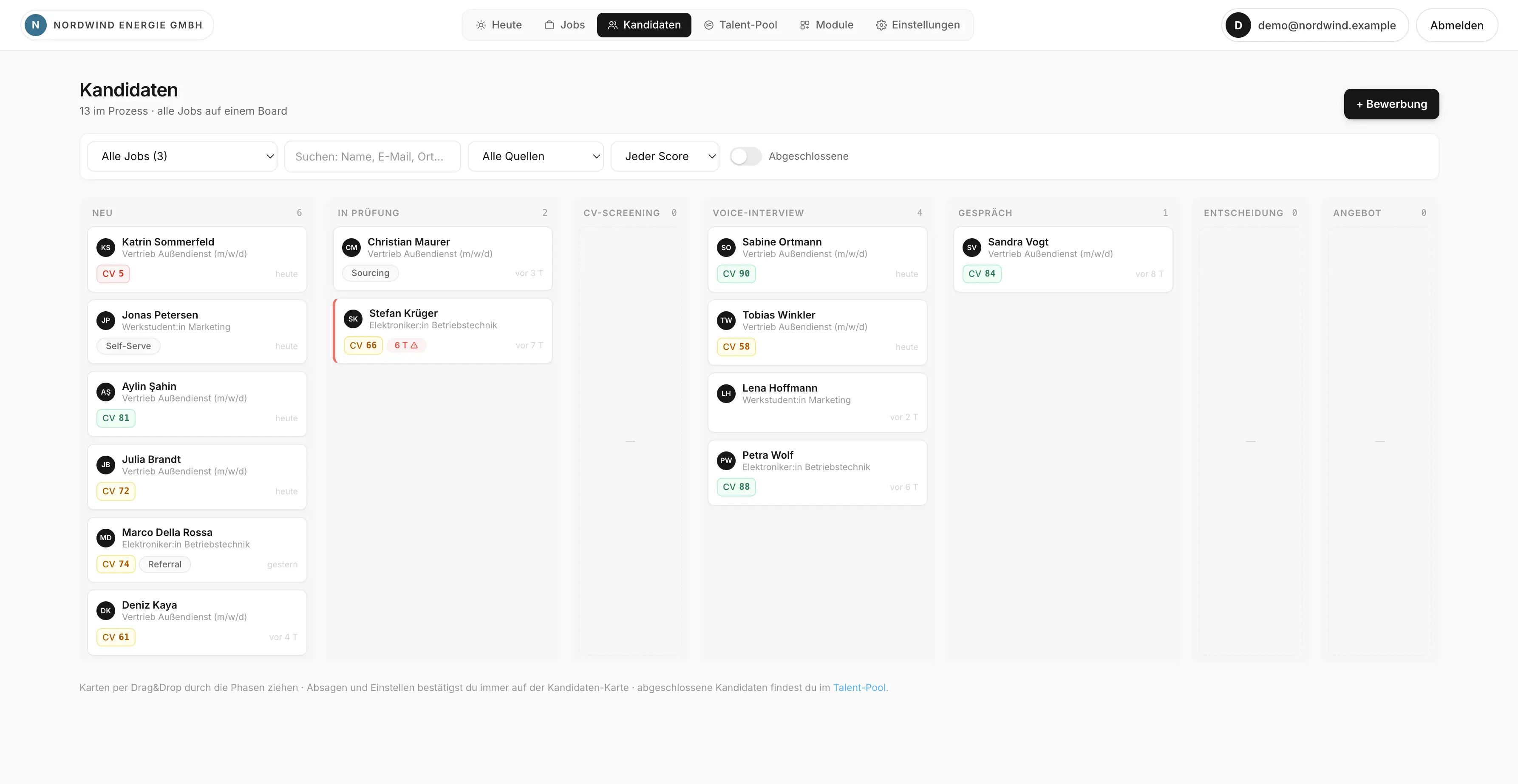
The pipeline is the heart of an ATS. Parsing converts resumes into structured fields — skills, experience, education — and screening rules surface likely matches. You can define knockout criteria such as work authorization, shift availability, or required certifications, which protects recruiter time and adds transparency to why a candidate advanced or did not. When you use AI suggestions, insist on explainability and bias controls: store the rules and weights, keep a manual override, and keep humans accountable for every decision. A strong pipeline view shows stage, owner, age, and next action at a glance, so nothing stalls silently.
Candidate communication and employer brand
Speed and clarity win talent. An ATS centralizes email and messaging with templates for outreach, interview prep, and rejections, plus personalization tokens and guardrails for tone and legal language. Automated replies confirm receipt and status changes so candidates are never left guessing. Every message lands in the candidate record, so your team always has full context. If brand voice matters, lock approved templates and enable localized variants. Branded sender domains and DMARC alignment improve deliverability, which keeps your messages out of spam during high-volume hiring.
Interview scheduling and structured evaluation
Hiring quality improves when feedback is structured and comparable. Applicant tracking software offers interview kits, scorecards, and rubrics tied to job competencies. Scheduling runs through native integrations with Google Workspace or Microsoft 365: recruiters propose times and the system builds panels, rooms, and video links while handling time zones. Feedback is due within a set SLA, and the system nudges late reviewers. To reduce bias, hide earlier scores until a reviewer submits. Interviewers see the resume, agenda, key questions, and evaluation criteria in one place, which keeps conversations focused and repeatable across teams and locations.
Collaboration, offers, and onboarding handoff
Hiring is a team sport. An ATS gives hiring managers, interviewers, and recruiters a shared view with role-based permissions, comments, and @-mentions, so decisions happen in the tool rather than in side channels. Offer management uses templates that pull in compensation ranges, benefits, and policy clauses, enforces approval hierarchies, and exports a clean e-signature package candidates can sign on mobile. Once signed, the platform triggers background checks and creates the pre-hire record. The clean handoff to your onboarding and HRIS systems — via prebuilt connectors, webhooks such as offer.accepted, or APIs — means device orders, access, and orientation can start the moment a candidate accepts, with no re-keying of data. Paycor takes a different route to the same outcome: it keeps applicant tracking, onboarding, payroll, and time tracking inside one platform, so the handoff never leaves the system in the first place.
Integrations and data design
An ATS is only as strong as its connections. Check for modern REST APIs with pagination and filtering, webhook subscriptions for event-driven flows, and iPaaS connectors if your team prefers low-code. Verify calendar and email integrations that use secure OAuth and support both Google Workspace and Microsoft 365. For the HRIS handoff, confirm prebuilt connectors, clear field mapping, and error handling. If you run a data warehouse, ask for a reverse-ETL pattern or read replica so you can build dashboards without burning API quotas. Keep a canonical field mapping between ATS and HRIS, and use standards such as SCIM for identity and SSO for access. For more on stitching tools together, see our guide to recruitment process automation.
DACH compliance: GDPR, BDSG, AGG, and the works council
For HR teams in Germany, Austria, and Switzerland, compliance is a selection criterion, not an afterthought. Applicant data is personal data, and applicants count as employees in the data-protection sense under § 26 BDSG. Two requirements shape how an ATS must behave. Some vendors address the data-residency question directly: MHMeRECRUITING, for instance, offers its applicant-management platform as a cloud or on-premise deployment with German data centers, an option mid-sized companies, public institutions, and social organizations use to simplify that first check.
Retention and deletion. When a candidate is rejected, their data should generally be deleted within about six months after the process ends. That window exists because a rejected applicant can bring a claim under the General Equal Treatment Act (AGG); the two-month deadline to assert a claim plus litigation buffer is the practical basis for the roughly six-month retention. Keeping data longer requires a legal basis — typically the candidate's consent to join a talent pool. A good ATS lets you set region-specific retention rules and automatically deletes or anonymizes profiles on schedule, and documents that it did so.
Works council co-determination. Two provisions of the Works Constitution Act matter. Adding a new hire usually triggers the works council's right to be involved in staffing decisions under § 99 BetrVG. Separately, recruiting software that can monitor employee behavior or performance falls under § 87 Abs. 1 Nr. 6 BetrVG — and per the settled case law of the Federal Labour Court (BAG), any system objectively suitable for monitoring triggers co-determination, regardless of the employer's intent. Practically, this means you negotiate a works agreement before rollout. Favor vendors who can scope features, restrict who sees what, and provide the documentation your works council will ask for.
- Data residency: confirm EU or DACH hosting options and a subprocessor list before signing.
- Consent & purpose: per-channel consent, clear purpose statements at application and talent-pool join.
- Retention automation: region-specific deletion rules with audit logs, defaulting to roughly six months for rejected candidates.
- DSAR tooling: search, export, and deletion to handle data-subject requests within statutory deadlines.
- Access control: SSO, role-based permissions, and audit trails to support a works agreement.
Selection criteria: how to compare ATS providers
ATS providers differ widely in architecture, feature depth, and target customer. You need a fit that matches your hiring scale, regulatory exposure, and integration needs. Use the criteria below to run a rigorous evaluation rather than reacting to a polished demo.
| Criterion |
Why it matters |
What to check |
Red flags |
| Integrations |
Hiring touches email, calendars, HRIS, background checks, and job boards |
REST APIs, webhooks, OAuth, HRIS connector, sandbox, sane API quotas |
CSV-only exports, manual sync, no test environment |
| GDPR / BDSG compliance |
Protects candidate data and reduces legal risk in DACH |
EU hosting, consent, DSAR tooling, ~6-month retention automation |
No data residency, manual deletion, weak audit logs |
| Works-council readiness |
§ 87 / § 99 BetrVG make rollout dependent on co-determination |
Granular permissions, feature scoping, documentation for a works agreement |
All-or-nothing monitoring, opaque data flows |
| Configurability |
Adapts to regions, roles, and growth without code |
Pipeline templates, field management, rule engine, localization |
Vendor tickets for basic changes, no versioning |
| User experience |
Drives adoption and data quality across busy managers |
Clean UI, mobile, interview kits, bulk actions, accessibility |
Cluttered screens, slow pages, no shortcuts |
| Analytics |
Turns recruiting into a managed, measurable process |
Time-to-hire, stage SLAs, source-to-hire, export to BI |
Static reports only, opaque metrics |
| Total cost of ownership |
Prevents surprises and aligns spend to value |
License model, implementation scope, admin effort, add-on costs |
Heavy services dependency, add-on sprawl, unclear pricing |
Matching the ATS to your hiring model
The best tool depends on how you hire, not on a feature checklist alone. Three common models illustrate the point.
High-volume and frontline hiring
For retail, hospitality, or logistics, volume rules. Configure a short mobile application with essential questions, use knockout rules for availability and location radius, and add self-scheduling with automated reminders. Trigger background checks after a conditional offer and track time-to-hire in days. Programmatic ads balance spend across regions, and the ATS keeps the pipeline flowing even when local managers have little time.
Specialist and executive roles
For niche or senior roles, depth beats speed. Build interview loops with fewer, deeper conversations, add work samples, and apply stricter access permissions. Keep agency collaboration structured with clear ownership and feedback timelines, and record the rationale for every decision. Offer templates with custom clauses and approval steps handle sensitive negotiations cleanly.
Scale-up teams and talent pools
Growing companies need structure that does not slow them down. Standardize stages, automate the obvious steps, and build talent pools so silver-medalist candidates are reachable later — with the consent that makes longer retention lawful. As headcount swings, the same configuration scales without a rebuild.
How to run an effective ATS evaluation
A structured selection process keeps you focused and reduces buyer's remorse. Map your current hiring journey, including edge cases like executive hires, interns, and hourly roles. Define must-haves and nice-to-haves, then translate them into demo scripts and ask vendors to show your real scenarios rather than generic tours. Involve recruiters, hiring managers, IT, security, and — in DACH — your works council early. Run a pilot on a subset of roles and measure the impact before you commit.
- Document your data model: fields for candidates, applications, jobs, offers, and the mappings to your HRIS.
- List every integration — calendars, email, HRIS, background checks, assessments, job boards — with owners and SLAs.
- Specify the automation you need on day one: stage changes, reminders, approvals, and retention/deletion jobs.
- Define the reporting leadership expects for the next quarterly review and confirm the data is available.
- Plan change management and, for DACH, the works-agreement timeline before go-live.
Frequently asked questions
What is the difference between an ATS and an HRIS?
An ATS runs talent acquisition — from job posting to signed offer. An HRIS or HCM is the system of record for employees after hire. The ATS hands off a new-hire record to the HRIS at offer acceptance. They should integrate, but they are not the same system, and you generally want both.
How long can we store applicant data under GDPR in Germany?
For rejected candidates, the practical standard is deletion within about six months after the process ends, because that covers the AGG claim window plus a litigation buffer under § 26 BDSG. Storing data longer needs a legal basis, usually the candidate's consent to join a talent pool. Your ATS should automate region-specific retention and log the deletions.
Does our works council have to approve the ATS?
In most cases, yes. Recruiting software that can monitor behavior or performance falls under § 87 Abs. 1 Nr. 6 BetrVG, and adding hires triggers § 99 BetrVG. Plan a works agreement before rollout, and choose a vendor that can scope features and supply the documentation your works council will request.
How much does applicant tracking software cost?
Pricing usually scales with users, active jobs, or company size, and many vendors offer modular tiers. Look beyond the license: factor in implementation, admin time, training, data migration, and add-ons such as assessments or job distribution. The savings from automation and better channel ROI often outweigh license fees within the first year when hiring scales.
Do we need AI features in an ATS?
AI helps with parsing, matching, and drafting messages, but it should be assistive, not autonomous. Demand explainability, bias testing, and a human-in-the-loop design — especially in DACH, where automated decision-making is scrutinized. Avoid black-box scores you cannot justify to candidates or a works council.
Putting it together
Applicant tracking software is the operating system for hiring: it makes the process visible, repeatable, and fair, frees recruiters for high-impact work, and gives hiring managers the clarity to decide fast. For DACH teams, the decisive factors are GDPR/BDSG-compliant retention, works-council readiness, and integrations that fit your stack. Anchor your evaluation on the real workflows you run today and plan to run next year, then compare the providers below against the criteria above to find the platform that matches your scale, your compliance posture, and your appetite for configuration.

























.png)