Free Self-Evaluation Phrase Catalog | 200+ Phrases by Skill, Role & Rating


Free Self-Evaluation Phrase Catalog | 200+ Phrases by Skill, Role & Rating
Yes, you can write a job application with ChatGPT, and most people already do: in a survey of 1,005 karriere.at users (July 2026), half had used AI for application documents, most often for the cover letter. Which model you pick matters less than how you use it: ChatGPT, Claude and Gemini all write usable drafts if you supply your own facts, set language and tone, and check the result for invented details yourself. Without your input they are not reliable authors.
The risk is trust: in a CV Genius survey of 625 UK hiring managers (April 2024), around 80% said they do not trust AI-generated content in CVs or cover letters, and karriere.at's CEO notes that recruiters quickly notice when person and application do not match. This guide shows how to use ChatGPT step by step, which mistakes to avoid and when another tool makes more sense.
Is it okay to use ChatGPT for a job application?
Yes. According to Karrierebibel, no law forbids creating an application with AI; what matters is that your statements are true. Employers rarely object to AI support, but they do object to generic text: karriere.at says a generic cover letter with typos suggests the applicant is not using the technology well. Use ChatGPT like an editor who words your facts better, not like a ghostwriter who invents them.
Step by step: how to write an application with ChatGPT
This is the workflow we recommend for good AI drafts. The first application takes about half an hour; later ones take less because your material is reusable.
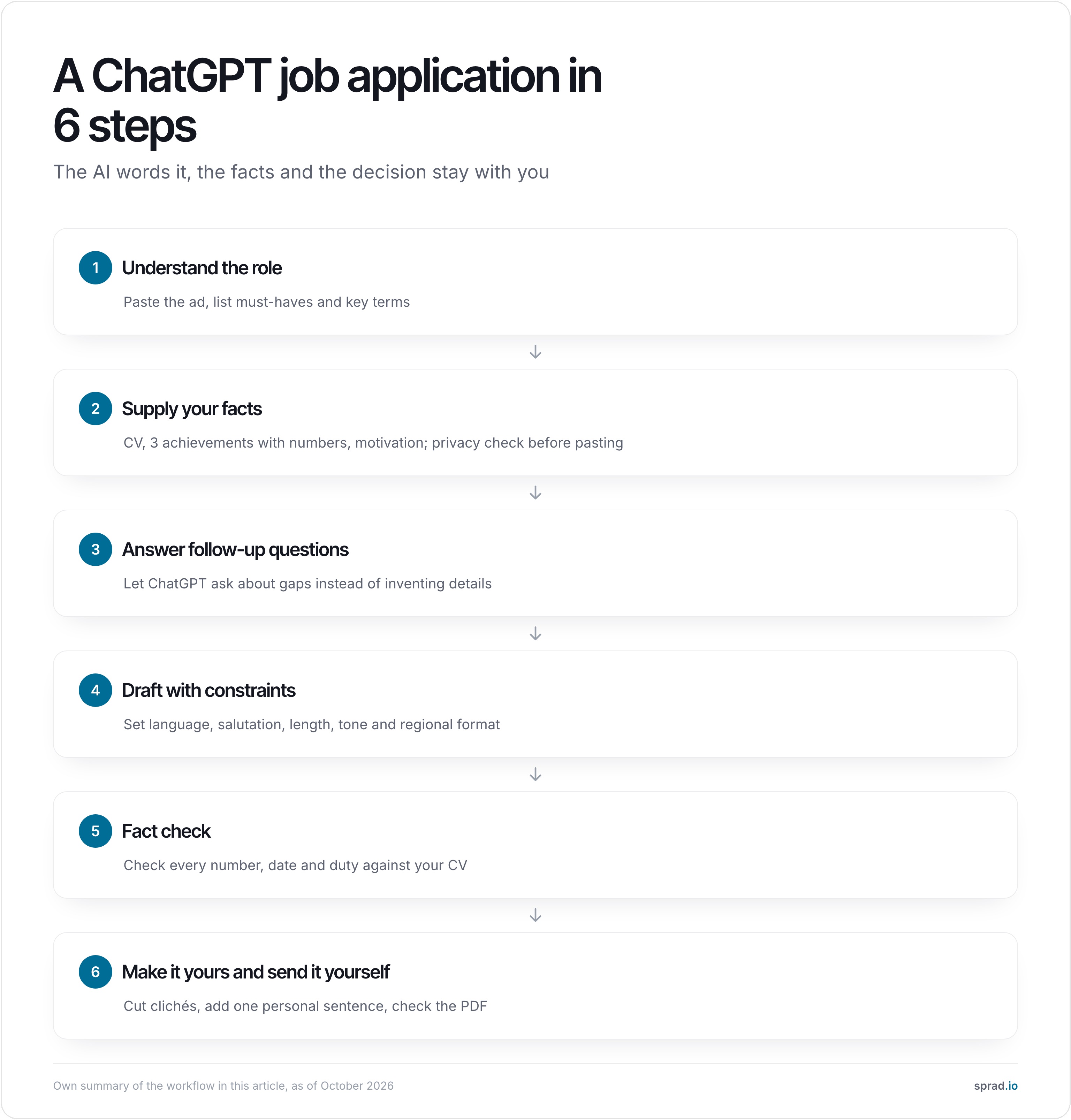
1. Understand the role
Paste the full job ad and ask for the must-haves, key terms and what the company really wants. It does not replace reading the ad, but it helps you miss nothing.
Here is a job ad. List the 5 most important requirements, the key terms and likely interview questions. Do not invent anything that is not in the ad.
2. Supply your facts
Give ChatGPT your material, not just the task: your CV, three achievements with numbers (revenue, time saved, team size, outcome) and a sentence or two on why this role. Remove address, phone number, date of birth and reference names first (see the privacy section).
3. Allow follow-up questions
The most effective one-liner in the whole process prevents invented details:
First ask me up to 5 follow-up questions about my experience that matter for this role. Only then write a draft, using nothing but my answers and my CV.
4. Draft with clear constraints
A prompt without constraints yields generic text. Set language, salutation, length, structure and tone:
Write a cover letter in English, maximum 220 words, 3 paragraphs: an opening with a concrete reference to the company, two relevant achievements with numbers, and a closing asking for a conversation. No clichés such as "I am writing to apply" or "dynamic team".
5. Fact check
Read every sentence against your CV. Numbers, job titles, dates, tools and responsibilities are the most error-prone. You can use the AI as the checker:
Compare the cover letter sentence by sentence with my CV. Flag every statement that is not supported there.
6. Make it yours and send it yourself
Cut phrases you would never say and add one sentence only you can write: a project that shaped you or a specific reason for this company. Then download the documents as PDF, check formatting and file name, and send them yourself.
Typical mistakes with ChatGPT applications
- Starting without your own facts. The model then invents metrics and duties you have to defend in the interview.
- Using one prompt for every role. A letter that fits every company fits none.
- Ignoring the region. A casual English draft for a German mid-sized company looks out of place; in DACH, formal address, a named salutation and often a photo on the CV are common.
- Sending the draft unchanged. Recruiters spot stock phrases like "I am passionate about" quickly.
- Pasting sensitive data. A full CV with address, salary history or references ends up in your chat history.
- Not reading the ad yourself. You will not notice when ChatGPT writes past it.
Privacy: what can go into ChatGPT, what should not
Your application contains personal data covered by the GDPR. In practice: enter only what the purpose needs. For a text draft you do not need name, address, phone number, date of birth or reference names; use placeholders like [Name] and fill them in the final document.
Also check your account's data controls: with OpenAI you can switch off the use of your chats for training (Data Controls FAQ, as of October 2026), and temporary chats keep the conversation out of your history. Claude and Gemini offer comparable switches in their privacy settings.
One piece of background many do not know: when employers use AI to select applicants, the EU AI Act classes this as high-risk (Annex III). That does not change how you may use ChatGPT, but it explains why companies are increasingly wary of automated mass applications.
Which AI model is best for applications: ChatGPT, Claude or Gemini?
None is best for everyone, and rankings between these models shift week to week. We did not invent a benchmark; the table below is our assessment from typical use (as of October 2026), not a measurement.
| Model | Typical strength for applications | What to watch |
|---|---|---|
| ChatGPT | Very widespread, many prompt examples, good for follow-up questions, interview practice and saved instructions | Drafts sound generic without a style brief; check data controls |
| Claude | Often used for calmer, more natural-sounding text and longer documents | Also invents details when information is missing |
| Gemini | Handy if your documents already live in Google Docs or Gmail | Specify tone for German-language letters and proofread |
| Specialist assistant (e.g. Atlas Career) | Job search, match score and documents per ad in one flow | Not a free-form chat for everything; you review and apply yourself |
Our advice: run the same material through two models and keep the draft that needs fewer corrections. Following the steps above matters more than the choice.
Worked example: how much time does ChatGPT really save?
Assumptions (not a measurement, replace with your own numbers): you write 10 tailored applications. By hand each takes 60 minutes for reading the ad, adapting the CV and writing the letter. With the workflow above each takes 25 minutes because material and constraints are reusable; the first run takes 40 minutes.
- By hand: 10 × 60 min = 10 hours.
- With ChatGPT: 40 + 9 × 25 min = 4 h 25 min.
- Saving: about 5.5 hours, which you can spend on choosing roles and interview prep.
The saving disappears if you skip the fact check: an application with an invented number can cost you the job.
Region and role: what changes for DACH
A US-style draft rarely suits a German-language ad. Tell the model country and format:
| Region | Typical cover letter salutation | Photo on CV common? |
|---|---|---|
| Germany, Austria, Switzerland | Sehr geehrte Frau / Sehr geehrter Herr [Name], formal "Sie" | Yes, still widespread, especially outside tech |
| US | Dear Hiring Manager / Dear [Name] | No, usually discouraged |
| UK | Dear Sir or Madam / Dear [Name] | Sometimes, less standard than in DACH |
Your role also changes what ChatGPT should do:
- Tech: explain projects clearly, practise interview questions, word trade-offs.
- Business (marketing, sales, operations): turn vague wins into numbers and summarise cases for the interview.
- Creative roles: brainstorm and structure; portfolio and voice stay yours.
- Trades and care: describe experience clearly and briefly if application language feels unfamiliar.
- Graduates and career changers: turn internships, projects and volunteering into role-relevant stories.
More on European conventions and safe tools: our DACH guide to AI tools for applications and the article on AI cover letters for Europe.
When ChatGPT is not enough: stack comparison and Atlas Career
ChatGPT only knows your CV if you paste it, and it does not search for matching jobs. That is why most applicants combine tools. Four typical routes compared:
| Route | Quality | Speed | Risk of sounding mass-produced |
|---|---|---|---|
| ChatGPT, Claude or Gemini + manual tracking | Medium to high if you edit well | Low to medium | Low |
| Career platform with AI (CV builder, tracker) | Medium, template-based | Medium to high | Medium, templates look alike |
| Auto-apply bots | Low to medium | Very high | High, recruiters filter mass applications |
| Atlas Career | High, tailored per ad and reviewed by you | Medium | Low |
Atlas Career: free, no limits, you apply yourself
Atlas Career is an AI career agent from Sprad in Vienna. You describe what you are looking for once in a short voice conversation. Atlas then searches over 1.5 million active jobs straight from employers, more than 100,000 of them in DACH, and gives every role a match score from 0 to 100 with reasons. For each application it creates a tailored CV and, on request, a cover letter in the language of the ad.
Atlas is free with no limits and sends nothing by itself: you review everything, download it as PDF and apply directly to the employer. Data is hosted in the EU, never sold, not used to train third-party AI models, and you can delete it any time. You can try Atlas at atlas.now.

To be fair: for free-form tasks such as interview practice, salary negotiation rehearsal or an unusual text, ChatGPT is more flexible. Atlas is strong when you want to find and rank jobs and have fitting documents per ad. Many combine both: Atlas for search and documents, ChatGPT as a sparring partner for the interview.
Conclusion: process before model
- Use ChatGPT as a co-pilot, not an autopilot. Facts, decision and sending stay with you.
- Bring material and constraints. Allow follow-up questions, set region and tone, never skip the fact check.
- Protect your data. Placeholders instead of real names, training use switched off.
- Add a tool with job search when you need many matching roles. For example Atlas Career, free with no limits.
FAQ: ChatGPT for job applications
Can I let ChatGPT write my whole application?
Technically yes, but it is not wise. A draft without your facts quickly contains invented details and sounds interchangeable. Better: provide your CV, achievements and the job ad, let it ask follow-ups, check every statement and add a personal sentence.
Can recruiters tell if ChatGPT wrote an application?
Often, if the text is generic. karriere.at points to documents where person and application do not match. Clichés, uniform structure and missing company references give AI text away fastest. A draft with your concrete examples that you reworded in your own voice stands out less.
Is it allowed to use AI for a job application?
Yes, per Karrierebibel no law forbids it. Your statements must be true, though. We are not aware of any labelling duty for applicants; if in doubt, check the ad or ask.
Which prompt works for a cover letter?
One that includes material and constraints: job ad, your CV, language and salutation, length, structure and a list of banned clichés, plus the instruction to ask follow-up questions first. See steps 3 and 4 above for templates.
Is ChatGPT or Claude better for applications?
Both work. Claude is often used for more natural-sounding text, ChatGPT for versatility and many prompt examples. Test your material with both and keep the draft that needs fewer corrections.
How do I protect my data in ChatGPT?
Remove address, phone number, date of birth and reference names, use placeholders, switch off training use in data controls and use temporary chats if needed. Keep sensitive documents such as references out of the chat. More in our guide to organising your search.
How long should a cover letter be?
As a rule of thumb one page, roughly 180 to 250 words in three paragraphs. State the length in the prompt, otherwise AI drafts run long.
Is there a free alternative that searches jobs and tailors documents?
Yes: Atlas Career is free with no limits, searches over 1.5 million jobs, scores each with reasons and creates a tailored CV per application. You review everything and apply yourself.
Jürgen Ulbrich
Jürgen Ulbrich has more than a decade of experience in developing and leading high-performing teams and companies. As an expert in employee referral programs as well as feedback and performance processes, Jürgen has helped over 100 organizations optimize their talent acquisition and development strategies.