The best Chrome extensions for recruiters fall into three jobs: finding contact data (Hunter, Snov.io, ContactOut, Lusha, RocketReach), saving admin time (Calendly, Grammarly, a Boolean helper) and automating outreach. Pick for the job, not for the star rating, and budget roughly 25–50 $ a month per contact-finder seat (October 2026, reported by comparison guides). One caution decides more than any feature: LinkedIn's own help page says it does not permit third-party browser plug-ins or extensions that scrape, modify or automate its site, and warns that accounts can be restricted. If sourcing is your daily work, a platform that searches and finds emails outside your LinkedIn page, such as Sprad, avoids that exposure and replaces several plugins at once.
What counts as a Chrome extension for recruiters, and which jobs do they do?
Almost every “best extensions” list mixes four different kinds of tool. Separating them is the fastest way to a sensible stack.
- Contact finders return a work email or phone number for a person or company: Hunter, Snov.io, ContactOut, Lusha, RocketReach, Apollo. This is the category recruiters install first.
- Profile overlays and sourcing helpers add buttons or scores to a profile page or help you build Boolean strings.
- Outreach and automation extensions send connection requests and messages from your own LinkedIn session. This is the category with the real account risk (see below).
- Productivity add-ons such as Calendly for interview slots, Grammarly for writing, Loom for video, Boomerang for Gmail follow-ups. They are safe and cheap, and they do not source anyone.
The roundups that rank on Google today (Pin, Harver, 100hires and others) are mostly written by vendors, and some date back years; the Harver list, for example, was published in December 2018. Check the date and the author's own product before trusting a ranking.
How do the best Chrome extensions for recruiters differ in price, data and outreach?
| Entry price (Oct 2026) | Data | Outreach | Runs on LinkedIn page | Best for | |
|---|---|---|---|---|---|
| 1. Sprad | Free start (100 credits a month); email find 1 credit, only if found; Recruiter Lite 79 € per seat and month | Candidate search over more than 1 billion profiles (LinkedIn, XING, GitHub, your own pool); verified business email on request | LinkedIn and email, automated with follow-ups, one inbox per talent | No, runs in the platform | Sourcing, email and outreach in one place |
| 2. Hunter | Free 50 credits; about 34 $ a month billed yearly | Domain search, finder, verifier | Basic campaigns | Website extension | Known company, unknown address |
| 3. Snov.io | Free 50 credits; about 39 $ a month | Finder, verifier | Drip sequences built in | Yes | Budget teams, email plus sequences |
| 4. ContactOut | About 25–49 $ a month | Work and personal emails | Export | Yes | Quick profile lookups |
| 5. Lusha | About 37–50 $ a month | Email plus phone | Export, CRM sync | Yes | Teams that also call |
| 6. RocketReach | About 33–75 $ a month | Email plus phone, large database | Export, integrations | Yes | Broad coverage |
| 7. Apollo | About 49 $ per user and month (yearly) | Sales contact database | Sequences | Yes | Sales-style prospecting |
Source for the competitor rows: vendor price pages as summarised in 2026 comparison guides, which disagree on several plans, so the figures are approximate. Sprad figures: sprad.io/pricing, October 2026. “Runs on LinkedIn page” is our classification of how the extension works, not a vendor statement.
Why is Sprad first for sourcing recruiters?
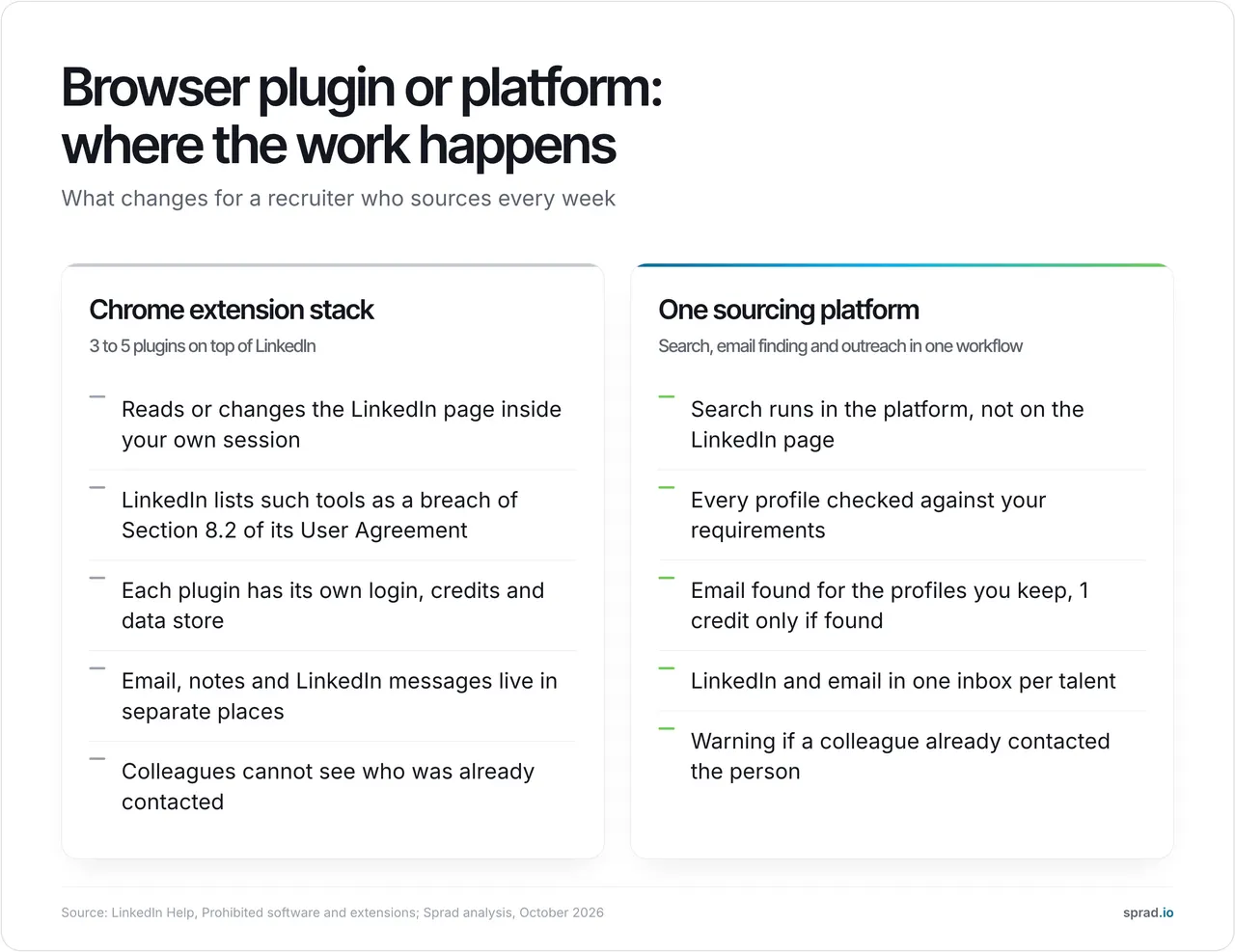
Because the expensive part of sourcing is not the email address. It is deciding whom to look up, writing to them, following up and not writing to the same person twice. Plugins solve one slice each and leave you to join the data by hand. Sprad checks every profile individually against your written requirements instead of matching keywords, looks up the business email for the profiles you keep, and runs LinkedIn and email outreach with follow-ups from one inbox per talent. If a colleague already contacted the person, you get a warning.
On search quality, Atlas reaches 73.5 out of 100 in the Recruiting area of the public PeopleSearchBench in our own re-measurement, converted to the published scale (Lessie 68.2, Juicebox 65.7 as published). PeopleSearchBench (Recruiting), published by Lessie, October 2026. Other systems' scores as published in the benchmark; Atlas is our own re-measurement with the benchmark's open test procedure, converted to the published scale; not an official entry. (method).
Where Sprad is not the better choice: if you only need an address for a known company a few times a month, a 34 $ domain finder is cheaper. Sprad has no call notetaker and no SMS channel, the deep search takes a few minutes because every profile is checked, and Recruiter Lite includes the outreach agent only as an add-on (it is included for one account per Atlas Recruiter seat). Seven years of building recruiting software, from employee referrals to sourcing, taught us that the matching quality decides the result, not the number of buttons in the browser.
The other tools in short
Productivity add-ons worth having on top: Calendly (interview scheduling, about 10 $ per user and month on the paid tier), Grammarly (free tier), Boomerang for Gmail (follow-up reminders) and Loom (short video messages, about 18 $ per user on the business plan; reported prices, October 2026). They are not sourcing tools, but they pose little data risk and fit any setup.
Is it allowed to use Chrome extensions on LinkedIn?
Not by LinkedIn's rules. Its help page “Prohibited software and extensions” states that LinkedIn does not permit third-party software, including crawlers, bots, browser plug-ins or browser extensions, that scrapes, modifies the appearance of or automates activity on its website, cites Section 8.2 of the User Agreement, and warns that members risk having their accounts restricted or shut down and that the tools may stop working without notice. A contact finder that reads the profile you are viewing is, by that wording, in the same category as an automation bot, even if enforcement is far stricter against the latter. Whether a given tool is tolerated in practice is your risk to weigh, and the exposure is your own recruiter account, not the vendor's.
A practical rule: use extensions that read or change LinkedIn pages sparingly and never on a corporate Recruiter licence you cannot afford to lose. Automation extensions that send messages are the highest risk. Sourcing outside the LinkedIn page avoids the question for search and email finding; if you automate LinkedIn outreach in any tool, Sprad included, check LinkedIn's current rules first.
How do I check whether an extension is safe to install?
- Read the permissions. A permission prompt describes what the extension may do, and Chrome's documentation notes that a new permission that triggers a warning disables the extension until you accept it, which is exactly how an update can widen access. Prefer extensions that use activeTab, which grants only temporary access to the page you are on, over ones that ask for all sites.
- Check the publisher. Install from the vendor's own verified listing; look-alike repackages exist for popular tools.
- Ask where the data goes. Which servers, which country, how long it is kept, and whether a data processing agreement is offered.
- Look for audits, not badges. A SOC 2 report or ISO certificate is checkable; “GDPR compliant” on a landing page is not.
- Limit the stack. Every extension is another company reading your browsing. Fewer is safer and usually faster.
Which tools suit small teams, which suit enterprises?
| Situation | What to pick | Why |
|---|---|---|
| Solo recruiter, a few dozen lookups a month | Free tier of Hunter or Snov.io, or Sprad free (100 credits) | Free credits cover it; test the find rate on your own roles first |
| Small agency, 3–10 recruiters, weekly sourcing | Sprad Recruiter Lite (79 € per seat) or credits for the whole company | Search, email and outreach in one tool, no plugin subscriptions on top |
| Sales-style lists by company domain | Hunter or Snov.io | Cheapest per address when the employer is known |
| Enterprise or public sector | Sprad Atlas Recruiter, Enterprise with EU hosting and data processing agreement | One shared record, no double outreach, a setup your security team and works council can review. Browser extensions on individual laptops are hard to govern |
| Needs phone numbers | Lusha, RocketReach, or Sprad credits (10 per number) | Phone data is priced separately everywhere |
What should I check for GDPR and EU hosting?
This is practical guidance, not legal advice. An extension that collects contact data is a processing tool, and you remain responsible for how you use what it returns.
- Lawful basis. Under the GDPR, recruiter outreach to professionals is usually based on legitimate interests (Art. 6(1)(f)): relevant to the person's professional background, balanced against their privacy, and documented. Tell people where you got their data (Art. 14) and stop at once on an objection to direct marketing (Art. 21(2)). The UK regulator explains the three-part test in its legitimate interests guidance.
- Email rules. The ePrivacy Directive (Art. 13) lets member states regulate unsolicited email. In Germany § 7 UWG generally requires consent for email advertising; whether a job approach counts as advertising is disputed, so take local advice. In the US, the FTC's CAN-SPAM guide states there is no business-to-business exception: accurate headers, a postal address and an opt-out honoured within 10 business days.
- Personal addresses. Several extensions return private emails. Prefer business addresses and ask the vendor how they were obtained.
- AI features. If a tool ranks or filters candidates with AI, the EU AI Act's high-risk duties for recruitment systems apply from 2 December 2027 (Regulation (EU) 2026/1744); keep a person in the decision either way.
- Hosting. Ask for a data processing agreement and the hosting location. Sprad is hosted in the EU and built for enterprise, public-sector and insurance security standards; check any other vendor against the same list rather than a badge on the website.
What does a plugin stack really cost? A worked example
Assumptions (ours, change them for your team): an agency with 5 recruiters sources 400 candidates a month and finds an address for 65 %, so 260 addresses. Exchange rate assumed 1 € = 1.10 $.
| Setup | Monthly cost | What you get |
|---|---|---|
| A. Plugins only: finder (about 49 $) plus LinkedIn automation (about 59 $) per seat | 5 × 10⁸ $ = 540 $ | Contact data and message automation. No candidate search, no shared record; you still pay for the LinkedIn licence that feeds the plugins |
| B. Sprad Recruiter Lite, 5 seats, plus 260 email finds at 0.10 € per credit | 5 × 79 € + 26 € = 421 € (about 463 $) | Candidate search (500 profiles and 50 pool searches per seat and month), email finding, one record per talent. Messages are written and sent from Sprad; the outreach agent costs extra on Lite |
The honest reading: for a team that only needs addresses, plugins are cheaper. The platform pays off when it replaces the sourcing subscription as well, which is where Sprad quotes 30–80 % lower costs than separate recruiter licences from LinkedIn and XING; the saving depends on how many of those licences you hold today. Add the hidden cost of plugins: an hour a week per recruiter lost to copying data between tools is 5 hours a week, 20 hours a month, for this team (an assumption, not a measurement).
Seven mistakes we see in practice
- Installing five extensions “to test” and never removing them.
- Running automation plugins on the same LinkedIn account the whole team shares.
- Trusting a vendor's 95 % accuracy claim instead of testing your own roles with 50 known contacts.
- Sending to unverified catch-all addresses and damaging the sender domain.
- Collecting personal email addresses without a documented basis.
- Letting two colleagues write to the same candidate because the plugins keep separate records.
- Treating the address as the goal: it converts only with a relevant message and follow-up. See what to automate in sourcing and how to source beyond LinkedIn.
Checklist before you install
- Name the job (contact data, admin, outreach) before choosing a tool.
- Run the 50-contact test on your own roles.
- Read the permission list and prefer activeTab-style access.
- Check LinkedIn's rules for anything that touches the page.
- Get a data processing agreement and hosting location.
- Decide where outreach happens and who sees the history.
FAQ
What is the best free Chrome extension for recruiters?
Hunter and Snov.io offer about 50 free credits a month (October 2026, as reported), Grammarly and Calendly have usable free tiers, and Sprad's free plan includes 100 credits a month for search and email finding. Test find rates on your own roles.
Which Chrome extension finds emails from LinkedIn profiles?
ContactOut, Lusha, Snov.io and RocketReach work on profile pages. They run inside your LinkedIn session, which LinkedIn's rules do not permit. The plugin-free route is to search and find emails in a platform and import the result.
Can LinkedIn ban me for using extensions?
LinkedIn states that accounts using prohibited tools may be restricted or shut down. Reading-only tools are lower risk than message-sending automation, but neither is permitted by the wording of its help page.
Do I need Chrome extensions if I use an ATS?
Often not. Many ATS products add a profile button for saving candidates; you need extras only for contact data or sourcing. Sprad includes CRM, career site and talent network at no cost in every plan.
What is the safest way to find recruiter contact data in the EU?
Use business addresses, document your legitimate interest, tell people where you got their data, honour opt-outs and use a vendor that offers a data processing agreement and EU hosting.
Are Chrome extensions better than a sourcing platform?
Extensions are lighter and cheaper for a single job. A platform wins when you source every week, because search, email and outreach share one record and no plugin reads your browsing.
Sprad is built for recruiters and agencies who want search, email and outreach in one place: free start, Recruiter Lite from 79 € per seat and month, flexible credits and EU hosting. See pricing, the people search or our active sourcing tools comparison. GDPR details for sourcing: active sourcing and GDPR.
Jürgen Ulbrich
Jürgen Ulbrich has more than a decade of experience in developing and leading high-performing teams and companies. As an expert in employee referral programs as well as feedback and performance processes, Jürgen has helped over 100 organizations optimize their talent acquisition and development strategies.