A LinkedIn Recruiter InMail lets you message someone outside your network without a connection. On Recruiter Lite, LinkedIn's Help Center lists 30 InMail credits per month, with a maximum balance of 120; Recruiter Corporate allotments are set by contract and not published. A credit is credited back if the recipient accepts, declines or replies within 90 days, so only unanswered InMails cost you a full credit.
How many InMails do you get with LinkedIn Recruiter?
The allotment sits on the individual seat, not on the team: it cannot be pooled with colleagues and does not move with you when a licence changes. Per LinkedIn's Help Center (checked October 2026), Recruiter Lite gets 30 credits per month and unused credits accumulate up to 120. For comparison, the same page lists Premium Career at 5 per month (cap 15), Premium Business at 15 (cap 45) and Sales Navigator Core at 50 (cap 150).
| Plan | InMail credits per month | Maximum balance | Source and caveat |
|---|---|---|---|
| Recruiter Lite | 30 | 120 | LinkedIn Help Center, Oct 2026 |
| Recruiter Corporate | Set by contract | Set by contract | Not listed by LinkedIn; third-party guides often cite about 150 per month, treat as unconfirmed |
| Premium Business | 15 | 45 | LinkedIn Help Center, Oct 2026 |
| Sales Navigator Core | 50 | 150 | LinkedIn Help Center, Oct 2026 |
Recruiter Lite costs, according to third-party pricing research checked in August 2026, roughly 1,680 US dollars per seat per year; LinkedIn does not publish this price. Recruiter Corporate has no list price, and renewals of roughly 835 to 1,080 US dollars per licence per month have been reported. A side by side of both tiers is in Recruiter Lite versus Recruiter Corporate.
How the credit-back rule works
LinkedIn's Help Center states that every InMail that is accepted, declined or responded to directly within 90 days of sending is credited back. A pending message counts as neither accepted nor declined, and Quick Replies count as a response. An InMail that draws any answer, even a polite no, is therefore free; one that stays silent for 90 days uses a full credit.
Two practical consequences. First, you cannot send a second InMail to the same member until the first one has been answered, so a follow-up has to go through another channel. Second, the refund arrives with a delay of up to 90 days, which makes the effective balance harder to read in the first months.
What does an InMail really cost? A worked example
The number that matters is cost per reply, not cost per message. The calculation below uses the Lite seat price (about 1,680 US dollars per year, or 140 per month) and the 30 monthly credits. The reply rates are assumptions, not measured values. Because every reply refunds its credit, net credits spent equal InMails sent times (1 minus the reply rate). If you spend exactly 30 net credits a month, you can send 30 divided by (1 minus the reply rate) InMails.
At a 20 percent reply rate that is 37.5 InMails and 7.5 replies a month, so one reply costs 140 divided by 7.5, about 18.70 US dollars. At 10 percent you send about 33 InMails, get 3.3 replies and each costs about 42 US dollars; at 30 percent you send about 43, get 12.9 replies and each costs about 10.90 US dollars.
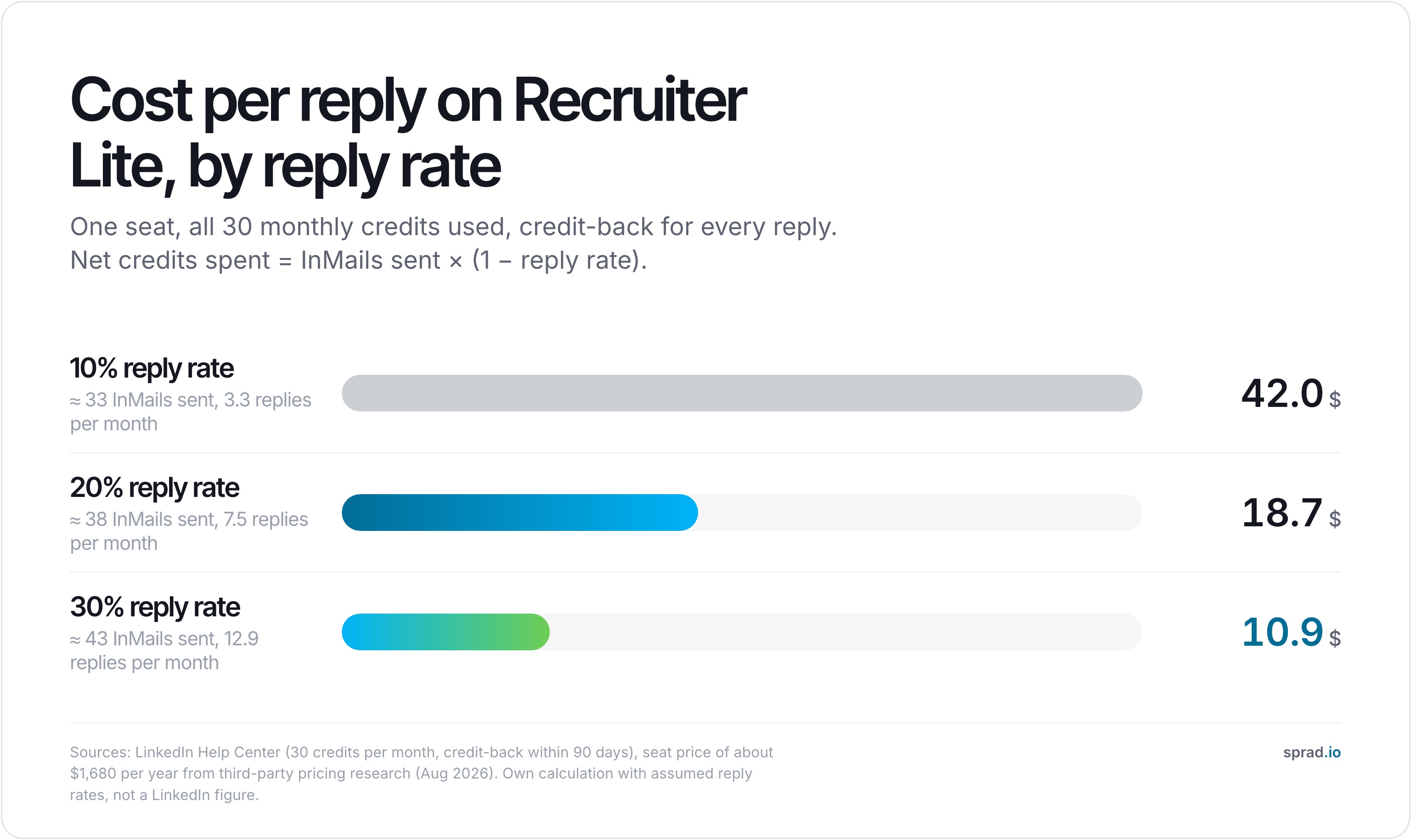
Tripling the reply rate cuts the cost per reply by almost 75 percent. No negotiation over a bigger allotment achieves that, which is why message quality and target selection are the real levers. How seat and credit costs fit into a wider ROI picture is covered in pricing, seats and credits in AI sourcing tools.
Step by step: get more replies from the same credits
- Check your balance first. Look up your current credits and cap in the Recruiter account; the credit-back shows up there, not in this article.
- Spend InMails only on strong matches. A weak match costs a full credit and rarely answers. Rank your list and send the top of it.
- Lead with the reason for this person. One concrete sentence about their work, then the role, then one easy next step.
- Keep it short. A few lines that can be read on a phone outperform a full job description.
- Follow up outside InMail. Because a second InMail is blocked until the first is answered, use a connection note or email for the nudge, where it is permitted.
- Review monthly. Count sent, replied and net credits spent, then recalculate your cost per reply.
Typical mistakes that burn credits
- Sending to the same scarce profiles that several colleagues already messaged this month.
- Copying one template to every role, so the message reads as bulk even though it is an InMail.
- Letting the balance sit at the 120 cap: credits above the cap are simply not added.
- Counting messages instead of replies when reporting to the hiring manager.
Why the allotment runs out first on hard-to-fill roles
On scarce-skill roles the pool of matching profiles is small, several recruiters message the same people, reply rates fall and more InMails per hire are needed. Teams that hit this ceiling rarely solve it with a bigger allotment in the same channel; they add channels. Options beyond LinkedIn are covered in sourcing across multiple sources instead of one network.
This is where Sprad fits: it combines LinkedIn (connection request, message, InMail) and email in one automated flow with AI templates and follow-ups, and keeps the whole conversation per candidate in one inbox. It warns if someone was already contacted, also for another role or by a colleague, which removes double outreach. Your own InMail allotment can be used directly from Sprad or inside sequences, so Sprad adds to your Recruiter seat rather than replacing the credits.
A rule of thumb for any sourcing tool: if results appear instantly, it is almost always a (semantic) keyword search. Atlas has the AI check each profile against your requirements, so the deep search takes a few minutes while Quick Search returns first results in about 3 seconds. In the Recruiting area of the public PeopleSearchBench, Atlas ranks first with 73.5 out of 100. PeopleSearchBench (Recruiting), published by Lessie, October 2026. Other systems' scores as published in the benchmark; Atlas measured with the benchmark's open test procedure. (Method and details). One search covers LinkedIn, GitHub and your own talent pool. Honest limits: Sprad has no SMS channel and no AI call notetaker, and a deep search takes longer than a keyword search. You can start free with 100 credits per month; see people search and pricing.
A note on email: Article 14 of the GDPR requires you to inform people whose data you did not collect from them, in principle within one month. Unsolicited email advertising is also restricted in Germany under section 7 UWG, so check the legal basis for your first email contact with your data protection officer.
What violates the rules and puts an account at risk
LinkedIn's Help Center states that it does not permit third-party software that scrapes, modifies the site or automates activity, and names bots, crawlers, browser plug-ins and browser extensions. Members using such tools risk having their accounts restricted or shut down, and the tools may stop working without notice. If your allotment feels tight, the answer is not an unofficial extension but a higher reply rate, additional regular channels and, where needed, a conversation with your LinkedIn account team.
Frequently asked questions about LinkedIn InMail credits
How many InMails per month does LinkedIn Recruiter include?
Recruiter Lite includes 30 credits per month according to LinkedIn's Help Center. Recruiter Corporate allotments are set by contract and LinkedIn does not list a figure.
Do unused InMail credits roll over?
Yes, up to a maximum balance. For Recruiter Lite the Help Center gives 120. When you cancel a Premium subscription, its credits expire and do not transfer on upgrade.
How much does one InMail cost?
There is no per-message price inside a seat. Dividing a seat price of about 1,680 US dollars per year by 360 credits gives roughly 4.70 US dollars per credit used. The more useful figure is cost per reply, about 18.70 US dollars at a 20 percent assumed reply rate.
Do I get the credit back if someone declines?
Yes. LinkedIn credits back InMails that are accepted, declined or responded to directly within 90 days.
Can I share my InMail allotment with colleagues?
No. The allotment is tied to the individual seat; there is no shared team pool.
Does an out-of-office reply count?
LinkedIn's Help Center does not say. Check with LinkedIn support or your account team before building a plan on it.
Is there a daily InMail limit?
LinkedIn does not publish a daily cap in the Help Center article on credits. Your practical limit is the credit balance, plus LinkedIn's detection of unusual automated activity.
Is it worth negotiating a bigger allotment or improving outreach instead?
Improving outreach. A bigger allotment only comes through a contract and does nothing for the reply rate, while the worked example shows that tripling the reply rate cuts the cost per reply by about three quarters.
Jürgen Ulbrich
Jürgen Ulbrich has more than a decade of experience in developing and leading high-performing teams and companies. As an expert in employee referral programs as well as feedback and performance processes, Jürgen has helped over 100 organizations optimize their talent acquisition and development strategies.

