Choose Recruiter Lite when one recruiter makes occasional hires and can work within a third-degree LinkedIn network. Choose Recruiter Corporate when restricted reach, advanced filters, ATS integration or team governance blocks delivery. Lite has published pricing; Corporate does not. If your real problem is sourcing throughput rather than LinkedIn access, compare a different operating model before upgrading.
LinkedIn Recruiter vs Recruiter Lite: the short buying answer
This is not a conventional vendor comparison. Both products search the same platform, but they package access differently. Recruiter Lite is a self-service subscription for low-volume hiring. Recruiter Corporate is a sales-led system for TA teams that need unrestricted network access, richer search controls and shared infrastructure.
The decision is therefore not “Which feature list is longer?” It is “At what point does one paid sourcing seat need to become a team system?” Team size matters, but it is not the only trigger. One recruiter working on scarce specialist roles may need Corporate reach. A larger company filling a few familiar roles may remain productive with Lite.
LinkedIn's current Recruiter Lite product page describes the intended split plainly: Lite is for individuals hiring a few people a year, while Recruiter is for teams sourcing competitive roles or hiring more consistently. That is a useful starting point, not a procurement rule. Your search market, outreach volume and hand-off process decide the answer.
| Decision condition | Recruiter Lite | Recruiter Corporate | Buying implication |
|---|---|---|---|
| Search reach | Profiles within your first-, second- and third-degree network | Full LinkedIn network access | Corporate matters when the best candidates sit outside the recruiter's network |
| Search precision | 20+ filters, up to 10 search alerts | 40+ filters, Spotlights, insights and up to 50 alerts | Upgrade when missing filters repeatedly create review work or hide scarce profiles |
| Outreach capacity | 30 InMails per seat and month; no bulk InMail | 150 InMails per seat and month; bulk sends to 25 recipients | Compare required first contacts and follow-ups, not headline credits alone |
| Projects and teamwork | Shared projects for a team of up to five paid licenses | Shared workflows plus 20 free collaborator licenses per Recruiter seat | Corporate becomes relevant when Hiring Managers need governed access without recruiter seats |
| ATS and reporting | No ATS integration; standard InMail and job reports | 28+ supported ATS partners, pipeline analytics and custom reporting | The integration and audit trail can matter more than search volume |
| Price visibility | Published USD self-service pricing | Contact sales; no public list price or public standard term | Corporate cannot be compared responsibly without a written quote |
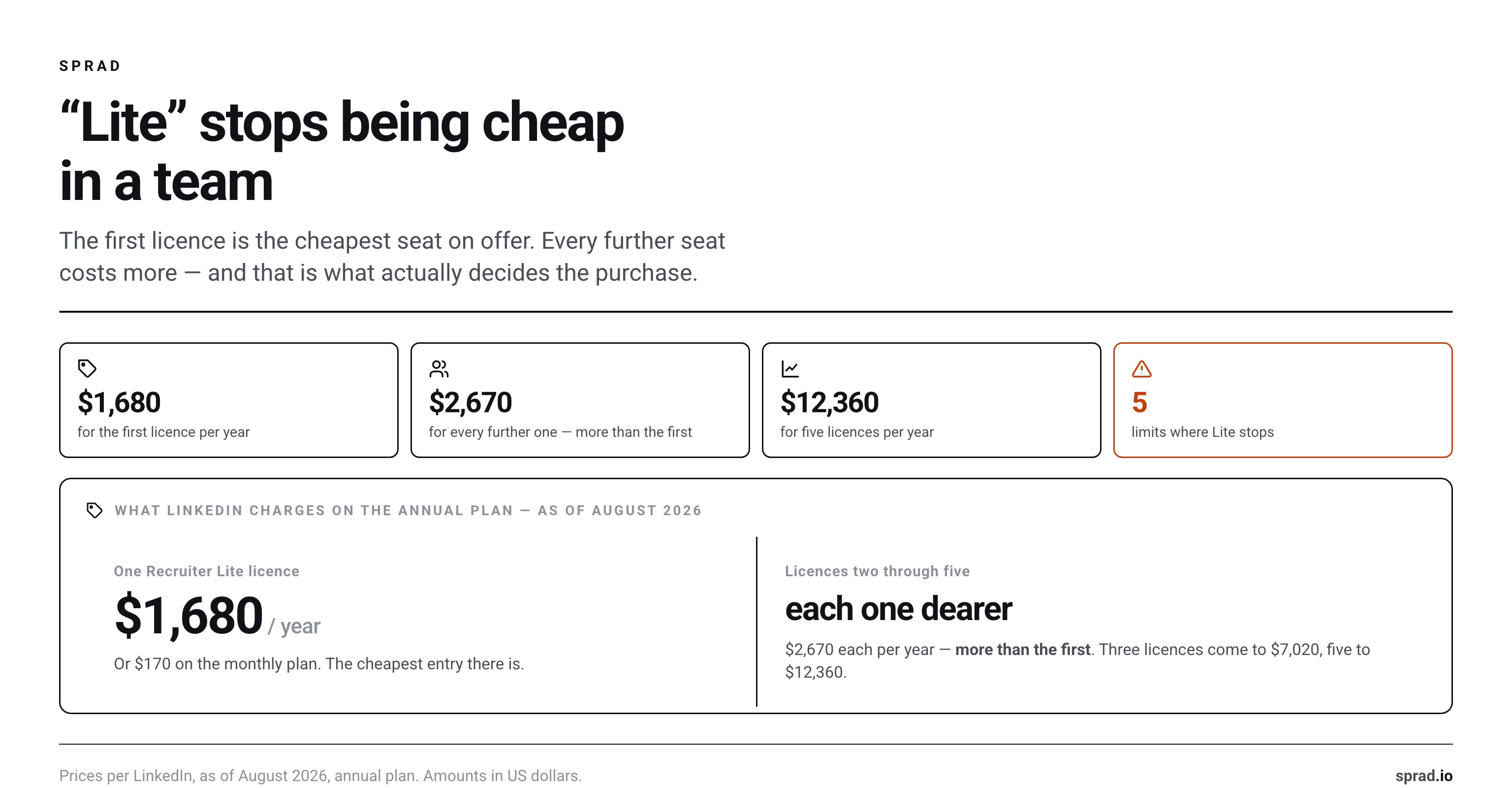
What LinkedIn Recruiter Lite costs in August 2026
Price status: August 2026. LinkedIn's official plan comparison publishes USD prices for Recruiter Lite and states that regional prices and currencies vary. One license costs $170 on a monthly subscription or $1,680 on an annual subscription. Licenses two through five cost $270 each per month or $2,670 each per year. Local pricing appears after registration.
The annual totals reveal why “Lite” does not automatically mean inexpensive for a team:
- One seat: $1,680 per year on the annual subscription.
- Three seats: $7,020 per year: $1,680 for the first seat plus two at $2,670.
- Five seats: $12,360 per year: $1,680 plus four at $2,670.
Those figures are subscription charges, not a complete recruiting budget. Promoted jobs, extra InMail and recruiter time can add cost. LinkedIn says Lite includes 30 InMails per seat each month and permits the purchase of up to 70 additional credits per month. It does not publish the add-on price in the comparison page, so request the checkout amount for your market rather than inserting a third-party estimate.
Recruiter Corporate has no public list price. LinkedIn asks buyers to contact sales. It also does not publish one standard contract term on the product pages reviewed in August 2026. Any article presenting a universal Corporate price is therefore reporting a quote, an estimate or an old contract, not a current list price. Ask for the net seat price, minimum seat count, term, renewal uplift, included InMails, job slots, implementation and optional AI products as separate line items.
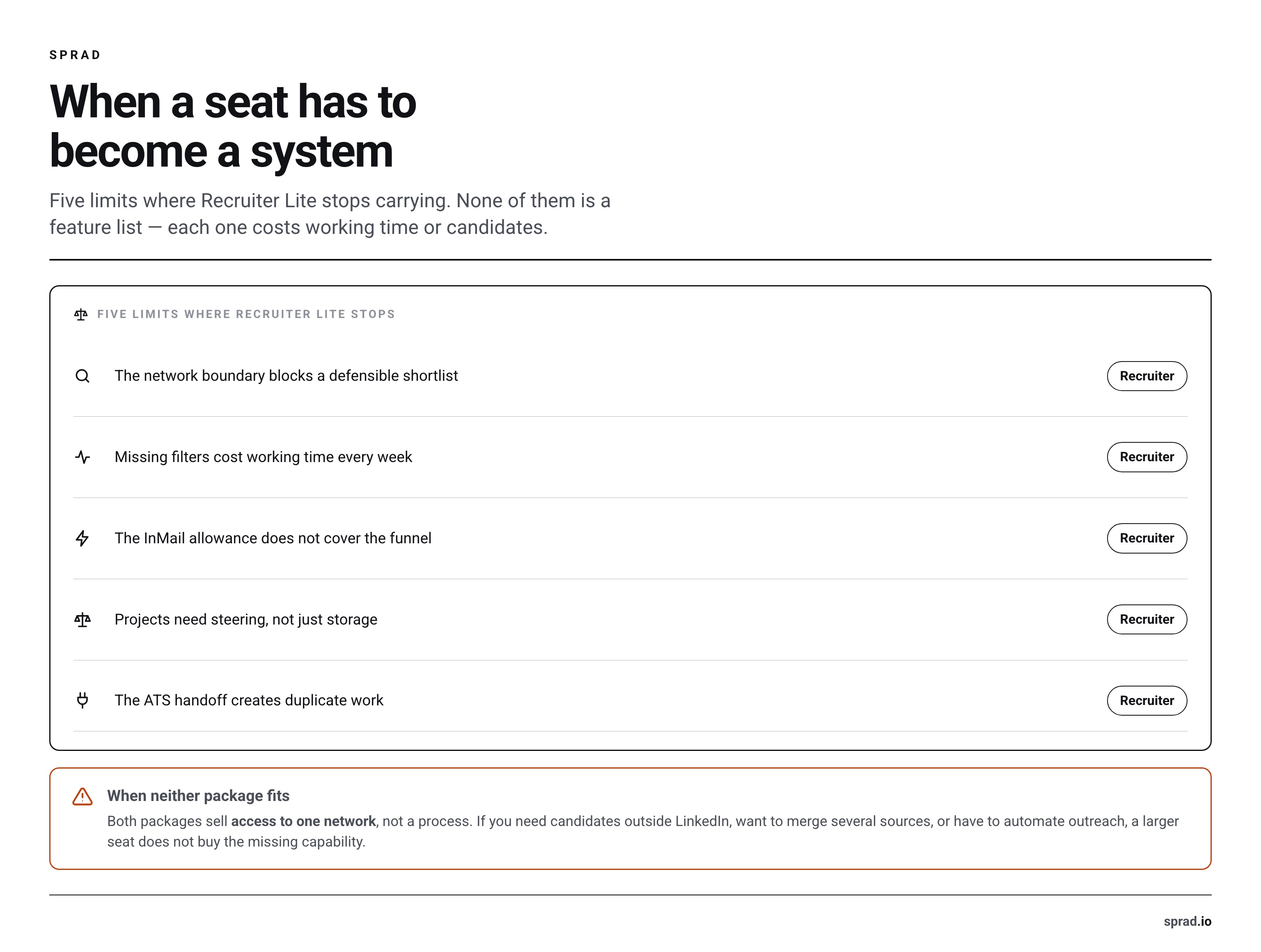
The real upgrade axis: when a seat must become a system
1. Network reach is blocking the shortlist
Lite searches through third-degree connections. Corporate opens the full LinkedIn network. That difference is minor when recruiters have broad networks in the right occupation and geography. It becomes decisive for a new market, a thin specialist pool or a recruiter whose network is concentrated in another industry.
Test this before upgrading. Take five representative vacancies and record how often a promising search ends because profiles are outside reach. Also record whether the missing candidates are genuinely qualified. If reach blocks several live searches, Corporate solves a documented access problem. If the results are large but irrelevant, more access merely creates more profiles to review. For scarce roles, use a small-candidate-market sourcing plan before assuming that a larger database view creates supply.
2. Filter precision is consuming recruiter hours
Lite includes more than 20 filters. Corporate has more than 40, including additional signals and insights. LinkedIn lists Spotlights, candidate and company insights, search insights, tagging and more search alerts among the Corporate differences. Its marketing page also highlights filters such as “Open to Work” and “More likely to respond.”
The value is not the filter count. It is the number of profiles a recruiter avoids reviewing. If a Corporate-only filter removes 300 irrelevant profiles from every search, it can justify a higher seat price. If the team mainly searches by title, skills, location and experience, Lite may already provide the useful controls. Build two or three real searches during a trial or sales demonstration and measure qualified profiles in the first 50 results.
Do not confuse advanced filters with a better search brief. A weak role definition remains weak in either product. Teams struggling to translate a Hiring Manager's request into search logic may benefit more from a clearer workflow for Boolean and natural-language sourcing than from another license tier.
3. Outreach demand exceeds 30 InMails
Lite includes 30 InMails per license per month; Corporate includes 150. Corporate also supports bulk InMail to as many as 25 recipients at once, while Lite does not. These are material differences, but neither number is a hiring outcome.
Start with the funnel. How many qualified first contacts are needed for one reply, one booked conversation and one hire? A team that sends 25 carefully selected messages per month does not need 150 credits. A recruiter who needs 120 first contacts for every niche role will run out of Lite capacity quickly. Map the stages using a search-to-booked-meeting funnel, then price the plan against the required contact volume.
Remember that more InMail does not repair weak targeting or generic copy. Track positive replies and booked meetings by search, not only messages sent. Corporate can raise capacity; it cannot guarantee candidate interest.
4. Projects need governance, not just storage
Both products have projects. Lite is no longer simply a solo folder system: LinkedIn's current Lite overview says customers can build teams of up to five recruiters, assign or reassign licenses and collaborate on hiring projects. Some multi-seat collaboration features are still being rolled out, so availability should be confirmed in the buyer's account.
The dividing line is governance. Corporate includes free collaborator licenses for Hiring Managers, centralized workflows, richer reporting and company-level data ownership. Lite requires paid recruiter licenses for the active team and caps the team at five. If Hiring Managers only receive a shortlist in the ATS, Lite projects may be enough. If several stakeholders review profiles, leave notes, reassign work and need reporting across requisitions, Corporate's operating model is more coherent.
Also test offboarding. Recruiter Lite is accessed through a personal LinkedIn account, even though licenses can be reassigned. Procurement should document who owns projects, messages and exports, and what happens when a recruiter leaves. Do not wait for a resignation to discover the answer.
5. The ATS hand-off is becoming duplicate work
Lite has no ATS integration. Corporate supports integrations with more than 28 ATS partners and adds pipeline analytics and custom reporting. This can be the strongest upgrade case for a multi-recruiter team: fewer duplicate records, clearer candidate status and a shared audit trail.
Measure the hand-off cost. Count the minutes spent copying profiles, checking whether a person already exists, updating stages and producing reports. Multiply that by monthly sourced candidates. If the manual work is negligible, the integration has little economic value. If duplicate outreach or missing status data is common, the integration may justify Corporate even before the team uses all 150 InMails.
Team-size guidance without a false magic number
LinkedIn does not publish a rule such as “Corporate starts at three recruiters.” Avoid inventing one. Use these operating patterns instead:
- One occasional recruiter: Lite is usually the sensible starting point when third-degree reach and 30 InMails cover the work.
- One specialist sourcer: Corporate may be justified despite the small team if full-network access and advanced filters repeatedly unlock scarce profiles.
- Two to five recruiters: Lite can now support shared projects, but obtain both a multi-seat Lite total and a Corporate quote. At three annual Lite seats, the published total is already $7,020.
- A TA function with Hiring Manager participation: Corporate is the stronger fit when free collaborator roles, ATS integration, centralized reporting and data governance are required.
- More than five active recruiters: Lite's team cap rules it out as the common workspace. Corporate or another system architecture is needed.
For small companies, the license decision should follow the hiring motion, not employee count. A 70-person engineering company may have harder searches than a 1,000-person local employer. This Active Sourcing guide for small businesses helps separate occasional hiring from a repeatable sourcing function.
When neither LinkedIn plan fits
Both plans share three structural limits. They are LinkedIn-centered, priced per active seat and still require a human workflow around search, outreach and follow-up. If the problem is insufficient capacity rather than insufficient LinkedIn access, paying for more filters or InMails may treat the wrong constraint.
| Your actual constraint | Better option to test | Why |
|---|---|---|
| Known candidates already exist in the ATS or Talent Pool | Talent Pool reactivation | Use owned relationships before buying more external search access |
| The relevant market is not concentrated on LinkedIn | Multi-source sourcing tool or specialist database | Broader source coverage addresses the reach problem directly |
| Roles attract enough qualified applicants | Job ads, referrals or an ATS workflow | Active Sourcing may add work without improving the shortlist |
| The team lacks time to search and follow up | Managed sourcing or workflow automation | Capacity is delivered as work, not another interface |
| Volume varies sharply between hiring periods | Sprad Atlas People Search with usage-based credits | The commercial model is based on usage rather than one subscription per sourcing seat |
The last case is where Sprad belongs in the comparison. A team considering Lite only because Corporate feels too expensive may have a sourcing-volume problem, not a LinkedIn-license problem. A People Search workflow billed by usage lets the buyer compare output against demand without funding one license for every user. It is not the right choice when recruiters specifically need LinkedIn's full-network view or its native ATS integration.
Similarly, a multi-source product is the better test when LinkedIn coverage is the constraint. A multi-source sourcing strategy can add professional communities, owned databases and other relevant sources. Neither Recruiter tier expands beyond LinkedIn merely because the plan costs more.
What to put into the procurement test
Do not compare plans in a generic demo. Use five real vacancies: one easy recurring role, two normal searches and two bottleneck roles. Run the same brief through Lite and the Corporate demonstration. Ask each recruiter to record:
- Qualified profiles among the first 50 results.
- Qualified profiles blocked by network reach.
- Review time per qualified profile.
- InMails required per positive reply and booked meeting.
- Minutes spent moving data into the ATS.
- Stakeholders who need project access but do not source.
Then request the Corporate quote in a comparable format: same currency, taxes stated, total contract value, term, billing schedule, renewal rule, seat reassignment, included InMails, job products, integrations, implementation and add-ons. Compare it with the annual Lite total for the required seats. A feature is valuable only when the test shows it removes a current bottleneck.
DACH and European data questions
Recruiter Lite is available in Germany, Austria and Switzerland. LinkedIn publishes USD reference prices and tells users to register to see regional pricing, so DACH buyers should not convert $1,680 into euros and present that as a local quote. Record the displayed EUR or CHF price, whether tax is included, and whether billing is monthly or annual.
The plan choice does not make data protection disappear. LinkedIn's Talent Solutions GDPR FAQ says enterprise data can be exported or deleted and that Talent Solutions data processed by LinkedIn is transferred to the United States. It points customers to the DPA and contractual safeguards. Your organization still needs a documented purpose, access rules, retention practice and process for candidate requests, especially when profile data is copied into an ATS or another sourcing system. That is a legal and process review, not a reason to claim that one license tier is automatically compliant and the other is not.
FAQ
How much does LinkedIn Recruiter Lite cost?
As of August 2026, LinkedIn publishes $170 per month for one monthly Lite license or $1,680 per year for one annual license. Seats two to five are listed at $270 per month each or $2,670 per year each. Prices vary by region and currency; use the amount shown in your local checkout.
How much does full LinkedIn Recruiter cost?
LinkedIn does not publish a list price or one standard contract term for Recruiter Corporate. You must request a quote. Treat prices in third-party articles as examples, not a tariff. Compare total contract value, seats, term, InMails, integrations, implementation, job products and add-ons.
Is Recruiter Lite enough for a small recruiting team?
It can be. Lite supports up to five paid licenses and shared projects. It is enough when third-degree network access, 20+ filters, 30 monthly InMails per seat and standard reporting cover the workflow. It becomes restrictive when the team needs full-network search, ATS integration, advanced reporting or free Hiring Manager collaborators.
Does Recruiter Lite include projects and team collaboration?
Yes. Current LinkedIn documentation says a Lite team can include up to five recruiters and collaborate on hiring projects. LinkedIn also says these newer multi-seat features are being rolled out gradually, so confirm availability in the purchasing account. Corporate adds broader governance and free collaborator roles.
Should we upgrade because we need more InMails?
Only after measuring the funnel. Corporate raises the included allowance from 30 to 150 InMails per seat and adds bulk sending. If targeting or response quality is the bottleneck, more capacity will not fix it. Calculate contacts needed per booked meeting, then compare top-ups, Corporate and non-seat-based alternatives.
Jürgen Ulbrich
Jürgen Ulbrich has more than a decade of experience in developing and leading high-performing teams and companies. As an expert in employee referral programs as well as feedback and performance processes, Jürgen has helped over 100 organizations optimize their talent acquisition and development strategies.