A good recruiter outreach email is short, names one concrete reason for writing to this person, says what the role offers (title, location, pay range) and ends with a single easy question. Send one first message and two to three follow-ups over about two weeks, ideally across email and LinkedIn, and use a template only as a frame: the first line must be written for the person. For LinkedIn InMail, keep it to 200 to 400 characters (LinkedIn's own recommendation; the hard limits are 200 for the subject and 1,900 for the body) and use the three InMail templates below. Before you hit send, check the legal basics: tell candidates who you are and where you found them (GDPR Art. 14), and offer an opt-out.
What do "recruiting email templates" mean in practice?
A recruiting email template is a reusable message skeleton with fixed parts (who you are, the offer, the call to action) and variable parts (the personal hook, the role details). It does not replace research on the candidate. It saves you the typing, so the time goes into the one sentence that shows you looked at their work.
The worked example below uses stated assumptions, not market data. You contact 200 candidates for one engineering role. Writing every message from scratch takes about 6 minutes, 200 × 6 = 1,200 minutes, or 20 hours. With a template and a personal first line it takes about 1.5 minutes, 5 hours in total. At €45 labour cost per hour (Destatis, 2025) that is €900 against €225. The saving is real, but only if the personal line survives: a template with no personalization is the fastest way to a spam folder.
Step by step: how to write an outreach email that gets read
- Pick the one hook. A project, a talk, a repository, a career move, a shared contact. If you cannot name one, the candidate is probably not a fit for a personal message yet.
- Write the subject line for the person, not for the role. Short, specific, no capital-letter urgency (see the table below).
- Open with the hook, then the offer. One sentence of hook, two of offer: title, team, location or remote, pay range where you may share it.
- Close with one question. "Would a 15-minute call next week be worth it?" beats "Let me know if you are interested or know someone."
- Add the legal lines. Who you are, where you found the contact, how to say no. Two sentences in the signature or footer.
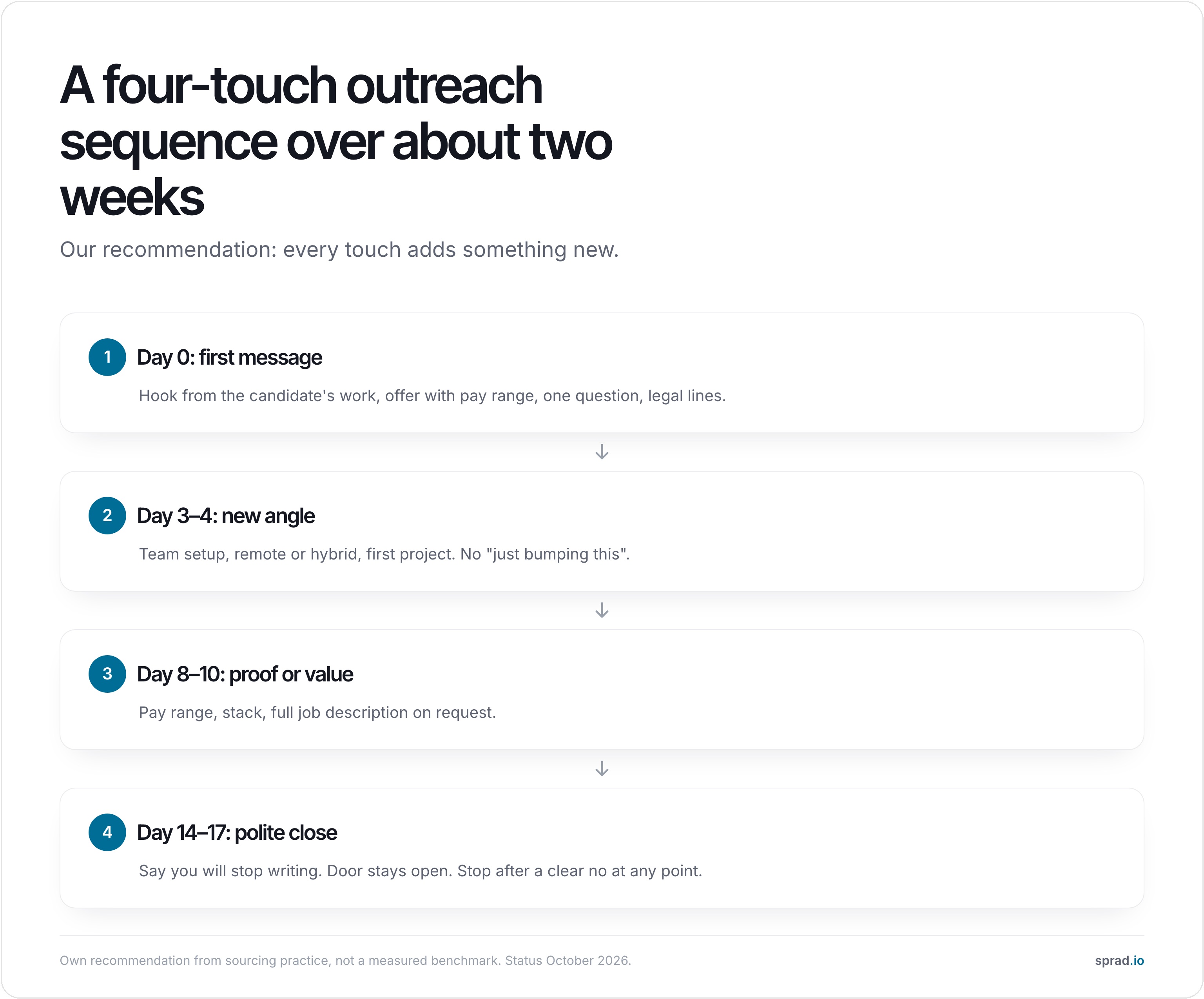
- Plan the follow-ups before you send. Each one adds something new; none repeats the first.
7 recruiter outreach email templates you can copy
Replace everything in [brackets]. Keep each message under about 120 words (our rule of thumb from running sourcing campaigns, not a measured law).
1. First message from a profile or project
Subject: Your [project] work and a [role] at [company]
Hi [first name],
I read your write-up on [project/talk] and the way you handled [specific detail]. We are hiring a [role] at [company] in [city/remote], working on [one concrete problem]. The range is [€/$ from–to].
Would a 15-minute call next week be worth it? If not, no hard feelings, just tell me and I will not write again.
[Name], [company]. I found your public profile on [LinkedIn/GitHub]; details on how I handle your data are here: [link]
2. Via a shared contact or employee referral
Subject: [Referrer] suggested I write to you
Hi [first name],
[Referrer name] from our [team] mentioned your work on [topic] and thought you would find the [role] opening interesting. [One sentence on the role and why it fits.]
Happy to send the details or set up a short call, whichever suits you.
[Name]
3. Confidential client (for agencies)
Subject: [Role] for a [industry] scale-up, [city]
Hi [first name],
I work with a [size/sector] company that is hiring a [role]. I cannot name them yet. What I can share: [team size], [stage], [pay range], [location policy]. Your background in [specific experience] is the reason I am writing.
If this sounds close, I can share the name after a short call.
[Name], [agency]
4. Re-engaging a past candidate
Subject: A [role] opening, since we last spoke in [month]
Hi [first name],
We spoke in [month/year] about [role]. The timing did not work then. We now have [new role], and your [specific skill] stands out. Has anything changed on your side?
[Name]
More on timing and reasons for reactivation: Reactivating candidates.
5. Very short note for senior or passive candidates
Subject: Quick question, [first name]
[First name], I am hiring a [role] reporting to [title]. Your time as [their role] at [company] is exactly the experience we lack. Open to a 10-minute call, or is this not the moment?
[Name]
6. LinkedIn connection note (max. 200 characters)
Hi [first name], your [project/post] on [topic] caught my eye. I am hiring a [role] at [company] ([pay range]). Open to hearing more?
Full InMail templates with limits and a follow-up follow in the next section.
7. The follow-up sequence
Follow-up 1 (day 3–4), new angle: Hi [first name], one more detail that may matter: the team works [remote/hybrid] and the first project is [X]. Worth a short call?
Follow-up 2 (day 8–10), proof or value: Hi [first name], two things people ask first: the range is [€/$ from–to] and the stack is [Y]. I can send the full description if useful.
Break-up (day 14–17): Hi [first name], I will stop here so I do not clutter your inbox. If the timing changes, my door is open. Best of luck with [their current project].
LinkedIn InMail templates for recruiters: limits, 3 templates, follow-up
An InMail is a LinkedIn message to someone you are not connected with. The hard limits are a subject line of up to 200 characters (required) and a body of up to 1,900 characters (LinkedIn Help, retrieved 30 October 2026). A connection request note is capped at 200 characters, and free accounts can personalize only three requests per month, Premium all of them (LinkedIn Help). Older articles still quote 300 characters; that limit is outdated.
The limit is not the target. LinkedIn recommends InMails of 200 to 400 characters and reports a 16 % higher response rate for them, advises short subject lines because about 57 % of its traffic is mobile, and warns against pushy lines such as asking whether the person got your last message (LinkedIn Talent Solutions, German-language page; LinkedIn's own figures, not independently verified). Our rule: use the subject for the concrete reason, the body for offer plus one question, and keep the full text under about 400 characters.

InMail template A: cold message to a passive candidate
Subject: Your [project] work and a [role] role in [city]
Hi [first name], I read about [project] and how you [specific detail]. We are hiring a [role] at [company] ([location], [pay range]) to work on [one concrete problem]. Worth a 15-minute call? A short no is fine too, and I will not write again.
InMail template B: via a shared contact
Subject: [Referrer] suggested I get in touch
Hi [first name], [Referrer] from [company] mentioned your work on [topic] and thought our [role] opening could suit you: [one sentence on team and problem], [location], [pay range]. Shall I send the details here, or would a quick call be easier?
InMail template C: short note to someone who is open to work
Subject: Quick question, [first name]
Hi [first name], I saw you are open to new roles. We are hiring a [role] reporting to [title] at [company] ([pay range], [location]). Your time at [former company] is exactly the experience we are missing. Interested in the details?
InMail follow-up (day 4–5, same thread)
Hi [first name], one detail I left out: the team works [remote/hybrid] and the first project is [X]. If the timing is wrong, tell me and I will close this thread.
Send it in the same conversation, add one new fact, and do not ask "did you see my message". After that, switch channel: an email a few days later, as in the sequence above.
Typical InMail mistakes we see: a body of 1,500 characters that reads like a job ad; a subject that only says "Opportunity"; a pay range that is missing; and sending an InMail to someone whose email you already have and who a colleague has already written to. Use InMail where you have no other way in, and check the shared record first.
Subject lines: what to use and what to avoid
Vendor surveys on subject lines disagree with each other, and most are run by companies that sell outreach tools. Treat their percentages as hints, not rules. What holds up across sources is simple: short, specific and honest. In a 2026 survey of 1,000 recruiters (vendor-run, not independently verified), statement-style subject lines produced more replies than question-style ones. Test on your own audience before you generalize.
| Type | Example | Use when |
|---|---|---|
| Project hook | Your [repo/talk] and a role at [company] | You have a concrete public work sample |
| Referral | [Name] suggested I write to you | A real shared contact exists |
| Plain offer | [Role], [city], €[x]–[y] | Pay range is a selling point |
| Short ask | Quick question, [first name] | Senior or passive candidates |
| Avoid | URGENT! Amazing opportunity!!! | Never: reads as spam and can break CAN-SPAM's rule on honest subject lines |
How many follow-ups, and when?
Practitioner sources broadly agree on a short sequence rather than one email: three to four touches in total, spaced two to four business days at first, then wider. A vendor survey (2026, not independently verified) reports that most replies arrive within the first five messages. Other practitioners warn about the other side: persistent follow-ups can hurt the candidate experience when there has been no earlier interaction. Our recommendation: one first message and up to three follow-ups, each with something new, and stop after a clear no.
Email or LinkedIn? A short decision table
| Channel | Strength | Limit |
|---|---|---|
| Room for a real pitch, easy to forward, works with sequences | Needs a verified address, legal basis and opt-out must be handled | |
| LinkedIn message / connection note | Context is visible, low friction | Note max. 200 characters; free accounts personalize only 3 requests per month |
| InMail | Reaches people outside your network; subject up to 200, body up to 1,900 characters | Limited quota per seat; aim for 200–400 characters |
| XING (DACH) | Relevant for German-speaking professionals | Less reach outside DACH |
The strongest pattern we see is a combination: a LinkedIn note first, an email a few days later, follow-ups alternating. The risk is double contact, when a colleague or another tool has already written to the same person. That is why one shared inbox per candidate matters.
Mistakes we see most often
- Visible placeholders. "Hi {{first_name}}" or the wrong company name. Always send a test and preview three random rows.
- Copy-paste hooks that do not match. A template promising "I loved your article on X" when the candidate wrote about Y.
- Hiding the pay range. The EU Pay Transparency Directive requires employers to give applicants pay information before the interview (member states had to transpose it by 7 June 2026), and candidates skip vague offers anyway.
- Identical follow-ups. "Just bumping this" three times adds nothing.
- No legal lines. No sender identity, no source of data, no opt-out.
- Contacting the same person twice. Different roles, different recruiters, no shared record.
Is cold recruiting email legal? GDPR, UWG and CAN-SPAM
This is orientation, not legal advice. EU/GDPR: Sourcing usually relies on legitimate interest (GDPR Art. 6(1)(f)), which needs a documented balancing test; the UK regulator describes it as purpose, necessity and balancing. Under Art. 14(3) you must inform the person within a reasonable period and at the latest within one month, and no later than your first communication with them. Anyone can object to direct marketing at any time (Art. 21(2)–(3)), and you must then stop. More in our guide on GDPR in active sourcing.
Germany: § 7 UWG treats email advertising without consent as an unreasonable nuisance, with narrow exceptions. Whether a job-offer message counts as advertising is debated, so many German teams make first contact through a LinkedIn or XING message. Ask your counsel for your use case.
USA: The FTC states that CAN-SPAM has no business-to-business exception: accurate headers and subject lines, a valid postal address, an opt-out honored within 10 business days, with penalties up to $53,088 per email. The guide does not say whether a job offer counts as a commercial message, so following the checklist is the safe route.
How does AI change recruiter outreach?
AI changes two things: the effort per message and the quality bar. A model can read a profile and draft the personal first line in seconds, which removes the 6-minute research cost from the example above. It also floods inboxes with polished but empty messages, so candidates read generic text as spam faster than before. The recruiters who stand out use AI for the hook and a human check for the claim.
At Sprad, outreach runs on LinkedIn and email, automated including follow-ups, with InMails sent directly from Sprad or as part of a sequence (your own InMail quota can be used), with AI templates you can train on your own feedback, ready-made templates and a pitch format where you store the role's selling points and the system suggests fitting messages. Every candidate's communication sits in one inbox, and the system warns you if someone has already been contacted, also for another role or by a colleague. Past contacts can be imported from your mailbox or LinkedIn. Every profile is checked against your requirements by AI before it reaches you, not matched by keywords. Learn more on the Active Sourcing page and in automating recruiting outreach.
Prices (as of 29 October 2026, net): free start with 100 credits per month; Recruiter Lite €79 per seat and month; Atlas Recruiter €299 per seat and month with one automated LinkedIn and mailbox account included. See sprad.io/pricing. In the public PeopleSearchBench (Recruiting), Atlas ranks first with 73.5 out of 100 (published by Lessie, October 2026; other systems' scores as published in the benchmark, Atlas measured with the benchmark's open test procedure; method and caveats). Honest limits: no SMS channel, and WhatsApp is for talking with candidates, not for cold first contact.
Related guides: connection request or InMail and contacting candidates by email: what GDPR and German law allow.
FAQ
How long should a recruiter outreach email be?
Short enough to read on a phone without scrolling: our rule of thumb is 80 to 120 words. One hook, one offer, one question.
What should a recruiter cold email include?
Why this person, the role in one sentence, location and pay range, one clear question, who you are and where their data came from, and an opt-out.
How long can a LinkedIn InMail be?
Up to 200 characters in the subject and 1,900 in the body. LinkedIn itself recommends 200 to 400 characters in total.
InMail or connection note: which one?
Use a connection note (200 characters) when you want to build a connection first; use an InMail when you want to pitch a role to someone outside your network right away. Whichever you choose, follow up by email so the candidate has a second way to reply.
What response rate can I expect?
Published numbers come mostly from tool vendors and vary widely, so there is no reliable benchmark. Measure your own: replies divided by messages sent, per role and per channel, over at least 100 sends.
Should I mention salary?
Yes, where you can. A range filters out mismatches early and respects the candidate's time.
Can I use ChatGPT or another AI to write them?
Yes for drafts and the personal first line. Check every factual claim yourself, and never send AI text without a preview of real examples.
What is the best time to send?
We have no reliable data of our own; test weekday mornings in the candidate's time zone against afternoons on your list.
Jürgen Ulbrich
Jürgen Ulbrich has more than a decade of experience in developing and leading high-performing teams and companies. As an expert in employee referral programs as well as feedback and performance processes, Jürgen has helped over 100 organizations optimize their talent acquisition and development strategies.