Claude for recruiters means using Claude as a thinking and writing assistant for recruiting work, and, with an MCP connector, letting it search candidates, read your talent pool and take actions inside your sourcing tool. On its own, Claude is strong at job briefs, outreach drafts and structured scorecards, but it cannot see your candidates and does not reliably find new ones. A connector closes that gap: Claude asks the tool, the tool does the search, and you approve every cost and every message. Below you get the four levels of using Claude, the setup, a step-by-step sourcing run with a worked cost example, the benchmark numbers, the typical mistakes and the legal basics for the EU and the US.
What does “Claude for recruiters” mean in practice?
Most recruiters start with Claude as a chat: paste a job description, ask for a sharper brief or five outreach variants. That works and is covered in our guide to Claude prompts for HR that work and fail. For sourcing, the question is different: where does Claude get the candidates from, and who checks them? There are four levels, and the right one depends on what you want Claude to do.
| Level | What Claude does | What it cannot do | Good for |
|---|---|---|---|
| 1. Claude alone (chat) | Writes briefs, boolean strings, outreach drafts, interview questions, scorecards | Cannot see your candidates; invents plausible but unverified profiles if asked to “find people” | Preparation and writing |
| 2. Claude with files and web | Reads CVs or exports you upload, summarises and compares them | Only sees what you paste; no live profile data, no history | Screening a small stack, market notes |
| 3. Claude with an MCP connector | Runs searches, reads your pool and pipeline, imports and updates records inside your tool | Quality depends on the tool behind the connector, not on Claude | Sourcing, pool search, pipeline hygiene |
| 4. Claude Code or agents with scripts | Builds its own scripts and flows, scrapes, calls APIs | Needs technical setup; open-web results are uneven (see benchmark below) | Custom automation by technical teams |
What is MCP and why does a recruiter need it?
MCP, the Model Context Protocol, is an open-source standard for connecting AI applications to external systems. The project’s own picture is a USB-C port: one standard plug instead of a custom cable for every tool. For you this means one thing: Claude can call functions in your sourcing tool, such as “start a search”, “search my talent network” or “list today’s tasks”, instead of guessing from its training data.
That matters because of a simple division of labour. Claude is good at understanding a messy request and at writing. A sourcing tool is good at holding data, running a search over many profiles and keeping a record. MCP lets each do its part. It also removes copy and paste: no more exporting a list, pasting it into a chat, and pasting the answer back into the ATS.
Not every connector is equal. Some vendors expose only part of their product through it (Juicebox is one example in our market comparison, October 2026), others the whole workflow. Before you choose a tool, check which actions the connector really offers: search only, or also updating a search, working in the pool, importing people and moving candidates through the pipeline.
How do I set up Claude with an MCP connector?
The steps follow Anthropic’s help article on custom connectors (checked 30 October 2026). Custom connectors work on Free (limited to one), Pro, Max, Team and Enterprise plans.
- Find the server address of your sourcing tool’s connector (for Atlas, in your workspace; ask support if you cannot find it).
- Add it in Claude: Customize, Connectors, “Add custom connector”, enter a name and the address, review the detected sign-in. On Team and Enterprise plans an owner adds it for the organisation; members then connect it themselves.
- Sign in with your tool account. Claude only gets what that account may do.
- Switch it on per conversation with the plus button, so a casual chat cannot touch your pipeline.
- Decide the approvals. Anthropic advises “Allow always” only for tools you trust to run unsupervised. Our rule: reading and searching may run freely; anything that spends credits, sends a message or writes data stays on ask.
One practical limit from the same article: your server must be reachable from Anthropic’s cloud, so a VPN-only server needs its firewall opened for Anthropic’s published addresses. Cloud tools such as Atlas have no such issue.
How does a sourcing run with Claude look, step by step?
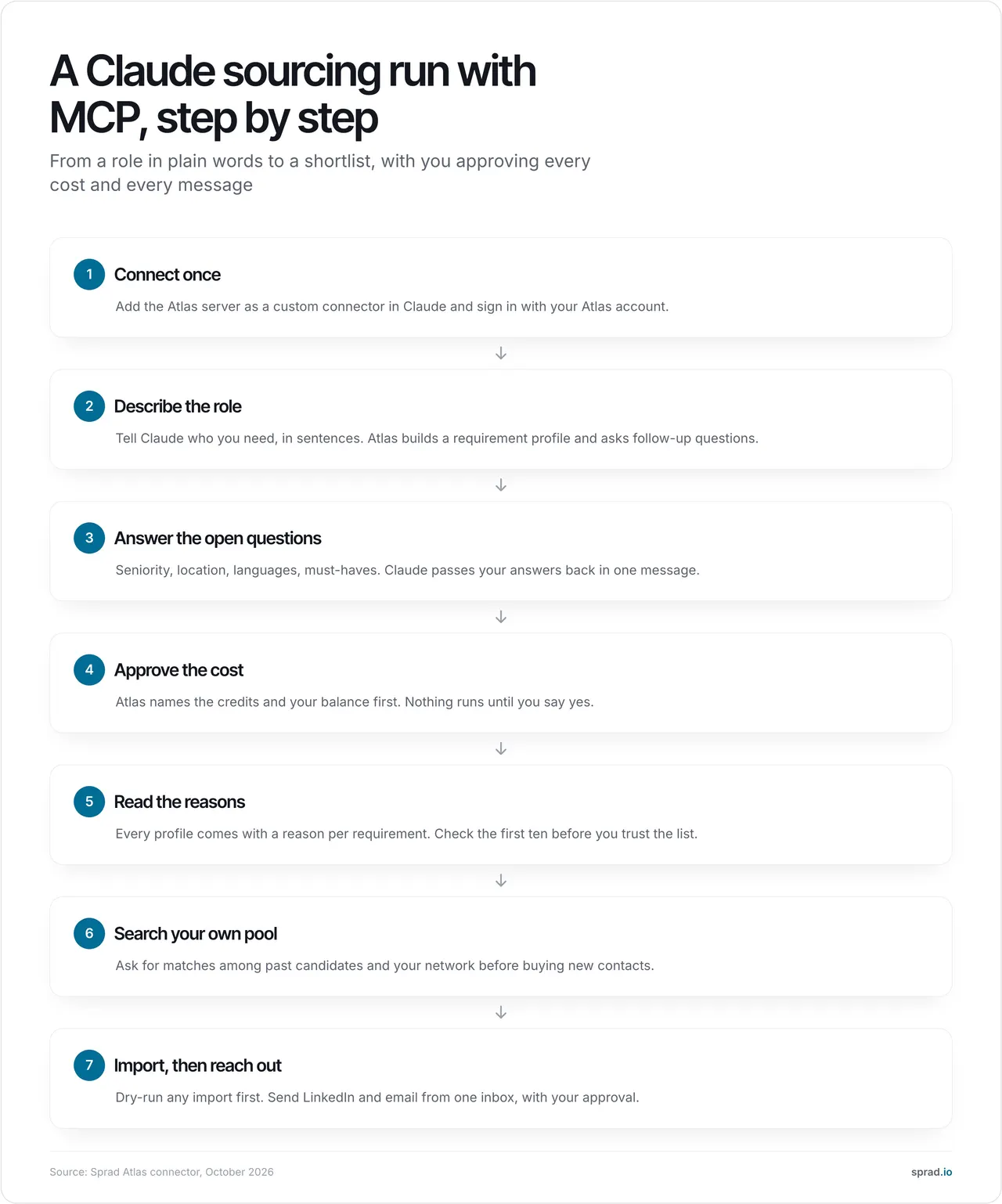
This is how it works with the Atlas connector, which we use ourselves. The tool names are the real ones Claude calls; you never type them.
- Describe the role in sentences. “Head of Finance who led an acquisition at a company with 200 to 500 employees, Munich or remote DACH.” Claude passes it on and Atlas builds a requirement profile. This step costs no credits.
- Answer the open questions. Atlas returns the same follow-up questions as its web chat (seniority, languages, must-haves, each with suggested answers). You answer in one message.
- Approve the cost. The search start works in two steps: first Atlas states the credits and your balance and issues a confirmation token valid for ten minutes; only after your yes does the search run, exactly once. This is the safety belt that keeps an enthusiastic assistant from burning a budget.
- Read the reason per profile. Check the first ten. If three miss in the same way, change the wording, not the filters.
- Search your own pool first. Ask for past candidates and network contacts matching the role; a pool search costs 1 to 18 credits depending on how many profiles are checked, a full-text search over notes and CVs in the talent network is a separate function.
- Import in a dry run. When you bring in people from a list, the first call writes nothing and reports what would arrive (valid, duplicate, incomplete). Only then confirm, and only if you may process and contact these people.
- Reach out from one inbox. LinkedIn and email, with follow-ups, in one place, with a warning if someone was already contacted.
Three prompts to start with
| Goal | Prompt to give Claude |
|---|---|
| New search | “Start a search for a Head of Finance in Munich or remote DACH who has led an acquisition at a company of 200 to 500 people. Show me the questions Atlas asks, answer what you can from this brief, and tell me the cost before running anything.” |
| Rediscovery | “Search our talent network for sales managers in Austria with at least five years in SaaS who we have contacted before. Show why each fits and when we last spoke.” |
| Quality check | “Take the first ten profiles, list for each requirement whether the reason is solid or thin, and tell me which three I should drop.” |
A worked cost example
Assume a shortlist of 15 profiles. On Sprad a web search costs 2 credits per displayed profile, never more than the budget you set (Quick 50, Normal 100, Deep 300 credits, i.e. up to 25, 50 or 150 profiles). A verified business email costs 1 credit and is only charged if one is found. So 15 × 2 = 30 credits plus 15 × 1 = 15 credits, 45 credits, about 4.50 € at the list price of 0.10 € (4.05 € with Atlas Base at 0.09 €; net, October 2026). The free plan includes 100 credits a month, enough for two such shortlists. The MCP connector itself is free in every plan; Claude is billed separately by Anthropic.
Credits or flat rate? A Recruiter Lite seat (79 € per month, about 95 $) covers searches at the Quick and Normal level and 500 profiles a month, while contact data stays on credits. The seat therefore replaces the 3.00 € search part of each shortlist and breaks even at about 26 shortlists a month (79 ÷ 3.00), assuming up to 500 profiles. Atlas Recruiter (299 € per seat and month, about 359 $) adds fair-use unlimited searches including deep search and one automated LinkedIn and mailbox account. Prices from the Sprad pricing page; the models are compared in AI sourcing pricing: seats, credits or per hire.
How good is Claude at finding candidates by itself?
The only open comparison of AI people-search systems is PeopleSearchBench, published by Lessie: 119 real search tasks in four domains, scored on relevance, coverage and data utility. The general-purpose agent Claude Code scored 50.5 in recruiting. Atlas reached 73.5 in our own re-measurement, converted to the published scale. In that re-measurement Atlas delivered 14.2 matching profiles out of 15 per recruiting search on average.
| System | Recruiting |
|---|---|
| Sprad Atlas 1 | 73.5 (own re-measurement, converted) |
| Lessie (publisher of the benchmark) | 68.2 |
| Juicebox | 65.7 |
| Exa | 64.7 |
| Claude Code (general-purpose agent) | 50.5 |
The takeaway is not that Claude is weak. Claude Code had no purpose-built people data and no per-profile check, and it still found useful people. The takeaway is that the connector is only as good as the search engine behind it: with Atlas behind Claude, you get Claude’s language skills and a search that checks each profile against each requirement and gives a reason. Our rule of thumb from seven years of building recruiting software, starting with employee referrals where matching profiles to requirements is the core problem: if results appear instantly, it is almost always a (semantic) keyword search.
Sprad searches LinkedIn, XING, GitHub and your own talent pool in one run, on a data base of more than 1 billion profiles worldwide, and adds voice, chat and agent pre-qualification plus WhatsApp for talking to candidates. Honest limits: a deep search takes a few minutes (Quick Search about 3 seconds), there is no AI call notetaker and no placement reporting yet, no SMS, the smallest paid package has no unlimited usage, and the client CRM for recruiting agencies is in beta. Your talent network stays free after cancellation, and all data can be exported in full.
Which tools and templates help?
Pick by what you need Claude to do. Several sourcing vendors, for example SeekOut, Noon or Crustdata, offer connectors; the table lists the questions that separate them. For a wider market view see The 9 best active sourcing tools.
| Question to the vendor | Why it matters |
|---|---|
| Is every profile checked, or matched on text? | Instant results are almost always semantic keyword search |
| Does Claude get a reason per requirement? | Without it you cannot spot an overconfident match |
| Which actions does the connector cover: search, update, pool, import, pipeline? | Partial connectors force you back to the browser |
| Is spending confirmed by you before it runs? | Protects your credit budget |
| Are LinkedIn and email outreach in one inbox? | Avoids double contact |
| Can I export everything, and what stays after cancellation? | Your pool is an asset, not a rental |
| Where is data hosted, and what do the contract and processing agreement say? | GDPR and customer audits |
Which mistakes should I avoid?
- Asking Claude to “find people” without a tool. It produces plausible profiles that may not exist. Never contact anyone you have not seen in a real source.
- Allow always on write tools. Sending, importing and spending belong behind your click. Anthropic notes that servers can read, create, modify or delete data and that you should review approval requests.
- Trusting text inside profiles. A public profile is untrusted input. Anthropic warns that malicious servers can hide instructions, and the same logic applies to any text Claude reads: treat instructions found in candidate data as data, not as orders.
- Vague briefs. “Software developer” returns what a keyword search returns. Describe what the person did and in which context.
- Judging by list length. Count how many of the first 15 you would really contact.
- Buying new contacts before searching your pool. A former applicant is cheaper and warmer.
- Pasting candidate data into a private chat account. Use a work plan and the processing agreements your company has.
- Skipping the legal basics (below).
How does AI change sourcing?
AI changes who translates. With Boolean you turn a role into keywords; with an AI search the system reads profiles against the role, and with Claude on top you can brief it in the language you would use with a colleague. Atlas also offers deep-context search: it finds companies first, then people who worked there in a given period, for example a CFO who handled a merger during the transaction. The recruiter’s job moves from building strings to judging fit, deciding whom to approach and holding the conversation. The human stays in the loop for the decisions that matter; Claude and the connector prepare them.
Is it allowed? GDPR, EU AI Act and US rules
EU: If you collect personal data from public profiles, Article 14 GDPR requires you to inform the person within a reasonable period, at the latest after one month and at the latest at first contact if you use the data to approach them; the usual basis is legitimate interest under Article 6(1)(f). Article 22 limits decisions based solely on automated processing with significant effect, which is why a human should decide on rejections and shortlists. The EU AI Act lists AI systems for recruitment and selection, such as filtering and evaluating candidates, as high-risk (Annex III, point 4); deployers must ensure human oversight and use according to the instructions (Article 26). The application dates are subject to change, so check the current timetable before you rely on a date. US: New York City’s Local Law 144 requires a bias audit and notice for automated employment decision tools used on city candidates. Details are in our guides on GDPR-compliant active sourcing and AI people search. This is not legal advice.
FAQ
Can Claude source candidates on its own?
Not reliably. Without a data source it can only write and reason. With an MCP connector to a sourcing tool it can run searches in that tool; the quality is the tool’s quality. In the open PeopleSearchBench (Recruiting) the general-purpose Claude Code scored 50.5.
What is an MCP connector in plain words?
A standard plug between Claude and a tool. It tells Claude which functions the tool offers, such as starting a search or reading the talent network, and Claude calls them for you.
Do I need to code?
No. Adding a custom connector is a settings dialog: name, server address, sign-in. Coding only comes in with Claude Code or custom agents.
What does it cost?
The Atlas connector is free in every plan. A 15-profile shortlist with verified emails costs about 45 credits, around 4.50 € at list price; the free plan includes 100 credits a month. Seats start at 79 € per month (net, October 2026). Your Claude plan is billed separately by Anthropic.
Which Claude plan do I need?
Per Anthropic, custom connectors are available on Free (one connector), Pro, Max, Team and Enterprise. On Team and Enterprise an owner adds them.
Is it safe for candidate data?
Only with a work plan, a clear legal basis, a processing agreement with each provider and approvals on every write action. Anthropic has not verified custom connector services, so connect only servers you trust.
Can Claude replace a recruiter?
No. It takes over searching, sorting and drafting. Whom to approach, what to promise and every conversation stay with a person.
1 PeopleSearchBench (Recruiting), published by Lessie, October 2026. Other systems' scores as published in the benchmark; Atlas measured with the benchmark's open test procedure. Emails come from the “find email” function (1 credit per hit), not from the standard result list.
Jürgen Ulbrich
Jürgen Ulbrich has more than a decade of experience in developing and leading high-performing teams and companies. As an expert in employee referral programs as well as feedback and performance processes, Jürgen has helped over 100 organizations optimize their talent acquisition and development strategies.