HR digitalization should not start with a software suite. Start with one frequent, clearly bounded process where delays, duplicate entry, or missing handoffs are visible. For most mid-sized companies, the practical order is reliable people data, employee self-service, recruiting and onboarding, integrations, analytics, and only then AI-led decisions or broad automation.
What does HR digitalization actually mean?
HR digitalization is more than converting a paper form into a PDF. A digital process moves structured information from a clear trigger to a clear outcome. Owners, approvals, deadlines, permissions, and exceptions are visible. Employees and managers do not need side emails to learn which version is current or who acts next.
Separate three levels that vendors often blend together:
- Digitize information: Make records structured, searchable, and accessible to the right roles.
- Standardize the process: Define the normal path, decision rights, handoffs, and known exceptions.
- Automate actions: Let the system route work, send reminders, validate fields, or exchange data with another application.
The sequence matters. Automating a process that nobody can explain simply makes confusion move faster. Digitizing HR processes is process design first and software configuration second.

Which HR processes should you digitize first?
The best first process is frequent, bounded, and easy to observe. It has visible friction but does not make an irreversible people decision. Its common path is stable, its exceptions can be named, and users gain something tangible. Employee data changes, simple leave requests, document acknowledgments, or the handoff of a new hire to IT are often stronger pilots than payroll or automated selection.
This decision matrix shows the typical dependency between impact, effort, and readiness. It is a starting point, not a universal ranking.
| HR process | Likely operational value | Implementation effort | What must exist first | Priority guidance |
|---|---|---|---|---|
| Core people data and documents | One reliable record and less re-entry | Medium because data needs cleanup | Data model, owners, access and retention rules | Start early; this is the foundation |
| Employee self-service and simple requests | Visible status and fewer routine follow-ups | Low to medium | Clear policies, routing, and backup approvers | Good adoption pilot |
| Recruiting pipeline | Fewer lost handoffs and a shared hiring view | Medium | Defined stages, scorecards, and owners | Early when hiring is a recurring bottleneck |
| Onboarding | Reliable tasks across HR, IT, and managers | Medium | Stable new-hire data and start-date workflow | Build after the data foundation |
| Payroll inputs and time data | Less manual transfer into payroll | High because errors have direct consequences | Tested rules, interfaces, and reconciliation | Do not use as an unsupported first pilot |
| Talent CRM and sourcing | Known prospects become findable and reusable | Medium | Purpose, data quality, consent and retention approach | After the recruiting foundation is stable |
| People analytics | Consistent metrics instead of manual exports | Medium to high | Shared definitions and complete source data | After operational data cleanup |
| AI matching or screening | Prioritization when candidate volume is high | High, including quality and risk controls | Job-related criteria, human review, and monitoring | Later, through a bounded use case |
This order is why a clean employee record usually comes before a dashboard. Analytics can only be as reliable as the definitions and source systems beneath it. The same applies to recruiting. Before adding AI, make sure the team understands what an ATS should own and which decisions remain with people.
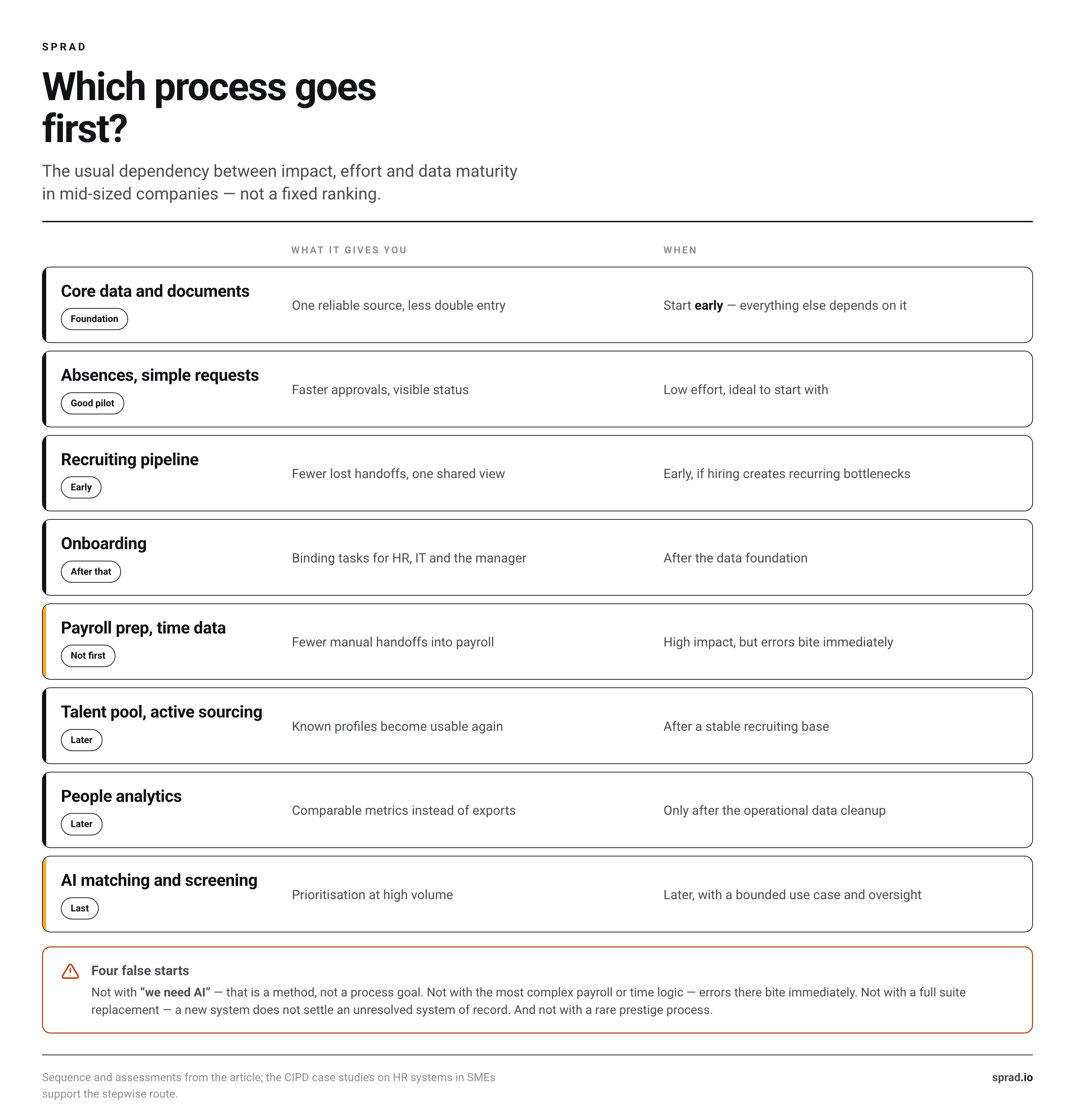
What is a practical sequence for a mid-sized company?
A useful roadmap follows dependencies, not the order of a product demo. A common sequence looks like this:
- Map the current process. Record its trigger, participants, source data, approvals, exceptions, and unambiguous finish.
- Establish the data foundation. Decide which system owns each important record. Remove duplicates. Define roles and access.
- Pilot one low-risk core workflow. Choose a frequent process with a clear definition of done. Simple requests or data changes often work well.
- Connect recruiting and onboarding. New hires should not re-enter data already captured during the application. HR, IT, payroll, and managers need explicit handoffs.
- Stabilize integrations. Connect ATS, HRIS, payroll, calendars, and communication tools only after system ownership is clear.
- Add analytics and AI. Start with one business question. Test output quality, exceptions, accessibility, and human intervention points.
This incremental approach is grounded in operating reality. European SME case studies reviewed by CIPD found paper, spreadsheets, and manual handoffs to be common starting points. The same cases show that modules can be launched in stages and refined after go-live. That model travels well to growing US companies because it limits simultaneous changes in data, policy, and behavior.
What should you not digitize first?
Do not start with “we need AI”
AI is a method, not a process outcome. Without job-related criteria, representative inputs, and feedback, teams cannot tell whether a model is helping. Start with a bounded task such as summarizing applications, structuring evidence against a scorecard, or searching an existing talent pool. Then define human review and escalation. The distinction between AI-first and bolt-on AI in an ATS matters less than whether the use case can be tested.
Do not start with your most complex payroll configuration
Payroll-adjacent workflows can have high value, but errors are immediately consequential. Multiple states, union rules, shift patterns, or worker types can multiply exceptions. Put payroll integration on the roadmap, but use it as a first pilot only when rules are documented, reconciliation is designed, and accountable experts are available.
Do not replace the entire stack before deciding data ownership
A new suite cannot resolve unclear ownership on its own. If HRIS, ATS, payroll, and local spreadsheets maintain the same fields differently, first decide which system is authoritative. Then evaluate a suite, specialist tools, or a hybrid stack. For recruiting, the comparison of what a recruiting CRM should own beyond the ATS makes that boundary concrete.
Do not choose a rare prestige workflow
An annual process produces slow feedback. Teams discover late whether permissions, notifications, and exceptions work. A frequent, contained workflow creates more useful learning and gives users a visible reason to change their habits.
How should you rank your own processes by effort and impact?
Do not score the loudness of a complaint. Score the whole workflow. Ask the same questions about each candidate process. A simple qualitative scorecard is more honest than an overly precise business case built before anyone maps the work.
| Criterion | Question to ask | Signal to prioritize | Warning signal |
|---|---|---|---|
| Frequency | How often does the workflow really run? | Recurring and predictable | Rare or highly seasonal |
| Friction | Where do people wait, search, or re-enter data? | Several visible handoffs | The problem is only assumed |
| Standardization | Is there a shared normal path? | Few, nameable exceptions | Every case follows different rules |
| Error consequence | What happens when the output is wrong? | An error is visible and recoverable | A people or financial decision is hard to reverse |
| Data readiness | Are the source, format, and owner clear? | One authoritative record | Duplicates and conflicting sources |
| Adoption value | What becomes easier for the user? | Less chasing or duplicate entry | Extra maintenance with no direct benefit |
Do not automatically select the process with the greatest theoretical impact. Choose one whose impact is meaningful and whose implementation risk is manageable. A high-value workflow with undefined policies is a design project first.
Before evaluating software, document a baseline case. List the steps, waiting points, repeated entries, common corrections, and current user experience. Run the same case after the pilot. This creates evidence that belongs to your organization instead of relying on broad productivity claims.
Which software category fits each stage?
HR software categories overlap. What matters is which system owns a record and whether it completes the intended process.
- HRIS or core HR: Employee records, documents, time off, permissions, and employee self-service.
- ATS: Requisitions, applications, pipeline stages, messages, interview feedback, and hiring decisions.
- Recruiting CRM or talent pool: Relationships with known and potential candidates beyond one open role.
- Specialist recruiting tools: Sourcing, screening, interviews, or candidate portals when the ATS does not serve the use case well.
- Integration or workflow layer: Events and data handoffs between authoritative systems.
A specialist tool may fit better than another suite module. It must still return structured results to the team’s working system. Do not test only the attractive front-end action. Test the full return path, permissions, failure messages, and corrections. For candidate evaluation, that includes how screening results get back into the ATS.
Sprad is one option for bounded recruiting use cases such as people search, screening, voice interviews, and a candidate portal. Other vendors focus on core HR, payroll, or a broad ATS suite. The right category depends on whether you need to fill one process gap or replace an authoritative system.
What governance belongs in a US rollout?
Governance should start with process design, not a final legal review. Decide what data is necessary, who can access it, how long it remains useful, and how a person can correct it. Document the purpose of each automated step. Keep a manual route for exceptions and system failures.
Risk increases when software influences employment decisions. The EEOC’s resources on AI and the ADA explain that algorithmic tools can screen out applicants or employees with disabilities and connect that risk to reasonable accommodation. A practical requirement follows: tell users how to request an alternative, and ensure the process can actually provide one.
For broader AI governance, the NIST AI Risk Management Framework organizes work around Govern, Map, Measure, and Manage. It is voluntary, but the structure is useful for HR teams. Assign ownership, map affected people and failure modes, measure performance in the real use case, and manage issues over time. A vendor’s accuracy statement does not replace your own testing.
State and local requirements can differ, so legal counsel should review the specific location and use case. Operationally, every pilot should answer these questions:
- What is the documented purpose of the data and decision support?
- Which system is authoritative for each important field?
- Who can view, edit, export, and delete information?
- How can an applicant or employee request an accommodation or correction?
- Who reviews exceptions and adverse outcomes?
- How are model, rule, and workflow changes recorded?
How do you roll out a digital HR process without overwhelming the business?
Choose a complete but narrow workflow. “Digitize recruiting” is too broad. “Move applications for one job family from intake through the interview decision in one shared pipeline” is testable.
Name a process owner. This person does not make every policy decision. They keep definitions coherent, resolve ownership questions, and prioritize improvements after launch. Set an end date for the old channel as well. If email, forms, and spreadsheets remain permanent parallel routes, the team never gains one dependable source.
Test cases beyond the happy path:
- a standard case with complete information,
- missing or incorrect data,
- an absent approver or manager change,
- a withdrawal or cancellation,
- an accommodation or alternative route,
- a failed integration, export, correction, or deletion.
Go-live is not completion. Capture actual deviations and decide whether the process, configuration, integration, or training needs to change. A sound system makes exceptions visible. It does not pretend they have disappeared.
How do you know the next HR process is ready?
Expand when the first workflow uses a reliable source, owners can see status without side lists, and common exceptions have a route. Users should know where to act. The process owner should be able to trace changes. Integration failures should generate visible work rather than silent data loss.
Then choose the next process with a real dependency or reusable pattern. Self-service can build on clean core data. Onboarding can build on a stable recruiting pipeline. Meaningful analytics can build on consistent operations. This is how HR digitalization becomes a connected operating model rather than a collection of subscriptions.
Frequently asked questions about HR digitalization
What is the best first HR process to digitize?
A frequent, bounded, low-risk workflow with visible handoffs. Employee data changes, simple requests, or one defined part of the recruiting pipeline often make better pilots than payroll or AI selection.
Do we need an HRIS or an ATS first?
Follow the bottleneck. An HRIS usually anchors employee records and administration. An ATS is more urgent when applications, feedback, and hiring handoffs are getting lost. In either case, define system ownership.
Can a mid-sized company combine several HR tools?
Yes. A hybrid stack works when each tool owns a clear process and exchanges structured data. Avoid overlapping record maintenance and integrations that nobody monitors.
When is AI worth adding to an HR process?
When the workflow is defined, suitable data exists, outputs can be tested, and people can intervene. AI is usually safer as assistance for a bounded task than as an undefined end-to-end decision-maker.
How should we measure HR digitalization success?
Compare the same workflow before and after the pilot. Track handoffs, duplicate entry, unresolved work, corrections, and user experience. Use your own baseline instead of generic savings claims.
Jürgen Ulbrich
Jürgen Ulbrich has more than a decade of experience in developing and leading high-performing teams and companies. As an expert in employee referral programs as well as feedback and performance processes, Jürgen has helped over 100 organizations optimize their talent acquisition and development strategies.