The best job search app depends on what you need: Indeed for the widest search, LinkedIn for networking, StepStone or the official Bundesagentur app in Germany, the AMS “alle jobs” app in Austria, and Atlas Career if you want an AI agent that scores every job for you, for free and without a limit. Almost every job app is free for job seekers; the cost is mostly your data and your attention. Install two, not ten, and switch on alerts for one saved search each.
At Sprad we have built recruiting software for seven years, so we see the other side of every app: the same vacancy usually enters from the employer's applicant tracking system and then shows up in three or four apps, with different delay and different quality. That is why “the best app” is the wrong question. The useful question is which two apps cover your market with the least duplicate scrolling. Everything below is as of October 2026; where we could not verify a number on the provider's own page, we left it out.
Job search apps compared: what each one is good for
This table answers the first two questions: which app fits which situation, and whether you pay. “Free” means free for you as a job seeker.
| App | Type | Free for you? | Best for | Region |
|---|---|---|---|---|
| Atlas Career | Agent (email matches) | Yes, no limit | Match score and tailored CV per application | DACH + worldwide |
| Indeed | Search app | Yes | Widest single search, alerts | US, Europe |
| Network + board | Basic yes, Premium paid | Networking, white-collar roles | Worldwide | |
| StepStone | Board app | Yes | Professional roles in Germany | Germany |
| Bundesagentur Jobsuche | Public board app | Yes, no account to search | Trades, care, apprenticeships | Germany |
| AMS “alle jobs” | Public search app | Yes, no registration | Austria, plus German listings | Austria, Germany |
| Glassdoor | Reviews + jobs | Yes, with account | Pay and reviews before interviews | US, Europe |
The “Type” column matters more than the logo. A board app shows postings that employers pay for. A search app collects postings from many places. An agent searches for you, explains the fit and keeps searching after you close the app. Mixing one of each gives the best coverage.
Why a phone changes how you search
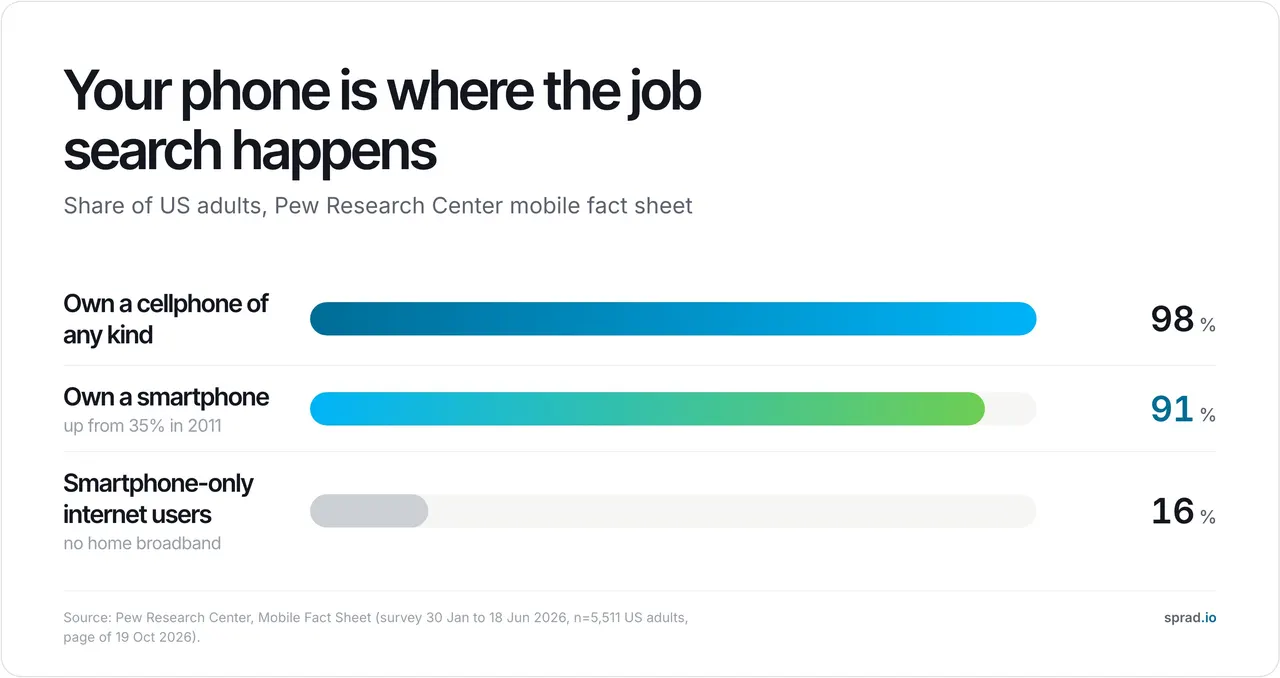
The phone is where job alerts reach you. In the United States, 91% of adults own a smartphone and 16% reach the internet only through one, with no home broadband (Pew Research Center, survey January to June 2026). For many people a job app is therefore not a convenience but the only practical way to apply.
An alert for a precise saved search beats a daily manual scroll, because you see a new posting while it is still new. But writing a CV on a 6-inch screen is where applications go wrong, so use the phone for finding and shortlisting, and a laptop for the application itself.
1. Atlas Career: the AI agent, free and without a limit
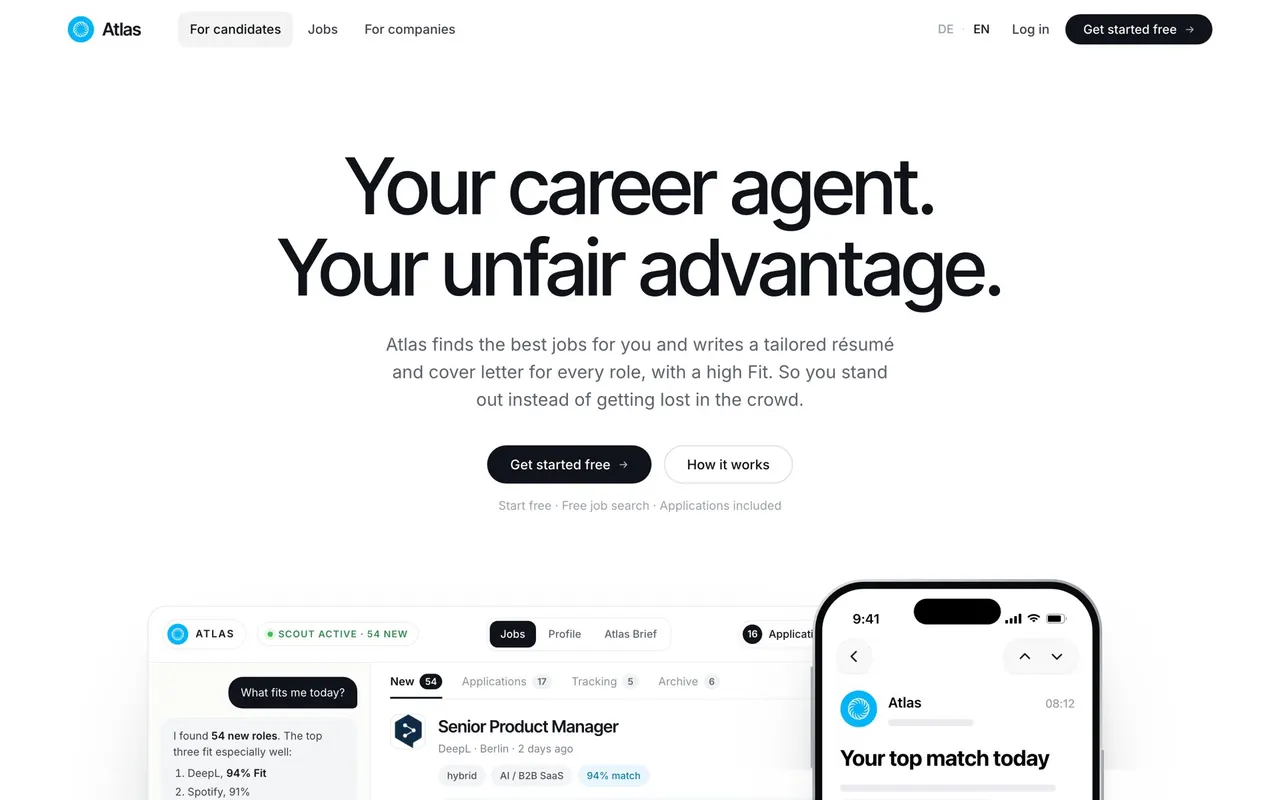
Atlas (built by Sprad in Vienna) is an AI career agent rather than a classic board app. In a short voice conversation, the “Atlas Brief”, you state role, level, salary, location and no-gos. Atlas then keeps searching across 1.5M+ active jobs, more than 100,000 of them in the DACH region, taken straight from employers' career sites and application systems.
Every job gets a match score from 0 to 100 with reasons (“Atlas Take”). For each application Atlas writes a tailored CV and, on request, a cover letter, without inventing facts. New matches arrive by email, so they land on your phone like an alert, and a reply to that email changes the search (“part-time only”). Atlas sends nothing for you: you review, download the PDF and apply to the employer yourself.
Honest limits: Atlas is a young product with few independent reviews, and it is not an app-store download, so there is no native push notification; email is the channel. For networking LinkedIn stays better, for pay data Glassdoor. There are also industry portals for healthcare, trades, sales and tech.
2. Indeed: the widest search in your pocket
Indeed collects postings from company sites, agencies and other boards and is the first stop in the US and most of Europe. The price of reach is noise: the same job twice, sponsored results on top, uneven quality. Save one precise search per target role with an alert instead of browsing the feed.
3. LinkedIn: strong for people, crowded for quick apply
On LinkedIn recruiters find you, so a complete profile often does more than one application. Roles with one-click apply attract very many applicants, and fake recruiter messages are common. Message someone on the hiring team instead of only tapping “Apply”.
4. StepStone: German white-collar roles
StepStone is a large private board in Germany with saved searches and alerts. Expect overlap with Indeed; use it if your field is professional or technical roles and you want a second German source.
5. Bundesagentur “Jobsuche” and the AMS “alle jobs” app: the official ones
The Jobsuche of the Bundesagentur für Arbeit has its own app (“Jobsuche – Jobportal der BA” on iOS). It is strong for trades, care, apprenticeships and public employers. Austria's AMS app works anonymously without registration, offers radius search, map view and daily job alerts, and also searches German Bundesagentur listings, according to the AMS page (updated 30 October 2026).
6. Glassdoor: check pay and reviews, then apply elsewhere
Use the Glassdoor app before an interview, not as your main search: pay ranges and reviews help you judge an offer. Treat single reviews with care, because they are self-selected.
Which job apps are really free?
For job seekers, the big apps are free to search and apply. The common catches are: optional Premium subscriptions (LinkedIn), sponsored results mixed into the list, and niche apps that charge a membership (FlexJobs). The less visible price is data: many free apps live from advertising and profile data. A free app is not automatically a cheap one for you.
Atlas is free without a limit, with no plans or quotas for search, match score, CV and cover letter. The public apps of the Bundesagentur and AMS are free as well. Before you install anything, check the “Free” label and the in-app purchases line on the store page.
What can AI job apps do better than job boards?
Three things, and only three. First, they explain the fit: a board shows keyword matches, an agent says why a job matches and what is missing. Second, they keep searching and filter out what you already rejected. Third, they tailor the application to each posting instead of one generic CV.
What they do not do better: reach, networking, and the employer's original posting. And “auto-apply” that sends hundreds of applications is a different thing, and it is not what Atlas does. A simple, labelled example (assumptions, not a measurement): you check four apps for three minutes a day, which is 12 minutes, about four hours in a month of working days. One agent email with five scored jobs takes about two minutes a day, roughly 45 minutes a month. The saving is not the minutes; it is that you read fewer irrelevant jobs.
More on this in our guides best AI job search tools and what is an AI career agent.
Privacy: what to check before you install a job app
A job app collects a lot: CV, contact details, salary wishes, sometimes location. In the EU, the GDPR (Regulation (EU) 2016/679) gives you rights that you can use against any app: access to your data (Art. 15), deletion (Art. 17) and withdrawal of consent at any time (Art. 7(3)). Use them.
- Read the store label. Google Play shows a “Data safety” summary with what the developer says it collects and shares, and whether you can request deletion; Google notes it does not verify these statements (Google Play Help). Apple has a similar privacy label. Both are self-reported.
- Deny what you do not need. A job search needs no access to your contacts.
- Find the deletion path first. Can you delete the account in the app, or only by email?
- Ask where the data lives and who gets it. Atlas states EU hosting, GDPR and EU AI Act alignment, no sale of data, no training of third-party AI models and deletion at any time.
- Know your AI rules. Recruiting AI is high-risk under Annex III of the EU AI Act, with obligations from 2 December 2027 after the Digital Omnibus (Regulation (EU) 2026/1744); those mainly bind employers and tool providers, but they tell you what to ask.
Set-up in ten minutes: the mistakes we see most
- Too many alerts. Ten alerts a day teach you to ignore all of them. One precise alert per target role.
- Vague saved searches. “Manager” returns everything. Add title, location and a no-go.
- Applying from the notification. Tap, shortlist, apply later on a laptop with a tailored CV.
- Trusting the app's posting date. Reposted jobs look fresh. Open the employer's own career page.
- Skipping the scam check. In the US, reported losses to job and employment agency scams rose from $90 million in 2020 to $501 million in 2024 (FTC, March 2025). A real employer never asks you to pay or buy equipment.
For the website side of the search, see best job search websites 2026; for Europe versus the US, AI for job applications in Europe.
FAQ: job search apps
Which job app is the best?
There is no single best one. Combine a wide search app (Indeed), a regional source (Bundesagentur, AMS or StepStone) and, if you want AI matching, Atlas Career.
Which job apps are free?
Indeed, LinkedIn (basic), StepStone, the Bundesagentur and AMS apps and Atlas are free for job seekers. Optional Premium or membership offers exist at LinkedIn and FlexJobs.
What can AI job apps do better than job boards?
They explain the fit of each job, keep searching for you and tailor your CV and cover letter per posting. They do not replace networking or the employer's original posting.
Is my data safe in job apps?
It depends on the provider. Check the store privacy label, deny unneeded permissions, find the deletion option and use your GDPR rights to access and deletion.
Does Atlas have a native app?
No. Atlas runs on atlas.now; new matches come by email, which you read on your phone.
How many job apps should I use?
Two or three. More apps mean more duplicates, not more jobs.
Can I apply from my phone?
Yes for simple forms, but write and tailor your CV on a laptop. Mistakes in a cramped form are the most common reason a good application goes unread.
Want one free list that searches employers' career sites and scores each job? Try Atlas Career.
Jürgen Ulbrich
Jürgen Ulbrich has more than a decade of experience in developing and leading high-performing teams and companies. As an expert in employee referral programs as well as feedback and performance processes, Jürgen has helped over 100 organizations optimize their talent acquisition and development strategies.