Boolean search is a way to write a candidate search as logic: AND narrows, OR widens, NOT excludes, quotation marks keep phrases together and parentheses decide what is evaluated first. A working recruiter string groups the synonyms of each criterion with OR, joins the groups with AND, and adds NOT only for exclusions you have tested. The most common mistake is missing parentheses: on LinkedIn, AND is evaluated before OR, so Java AND Spring OR Kotlin returns every Kotlin profile. ChatGPT can draft such a string in seconds if your prompt names the role, must-haves, locations, exclusions and the platform's rules, but treat the output as a draft: check the parentheses, operators and hit count before you use it. Below you get the operator rules, a five-step method, a ChatGPT prompt template with a checklist, copy-paste strings by role, the typical errors and an honest view of where Boolean stops and AI search starts.
What does Boolean search mean in practice?
The name comes from the mathematician George Boole. In recruiting it means: instead of typing a few words and hoping, you tell the search engine exactly how the words relate. That makes the result transparent and repeatable: the same string returns the same kind of profiles tomorrow, a colleague can read it, and a hiring manager can see why someone is on the shortlist.
It also has a built-in limit. A Boolean string finds people who used your vocabulary. Someone who writes “Pflegefachkraft” will not match a string that only contains “registered nurse”. That is why good strings are mostly synonym lists, and why we come back to this limit in the AI section below. For the full comparison with plain-language search, see our guides on Boolean vs. requirement search and Boolean vs. natural language.
The operators you need (and the order they run in)
Five building blocks cover almost every recruiter search. LinkedIn documents them in its help page on Boolean search: operators must be typed in uppercase, and the order of evaluation is quotes, then parentheses, then NOT, then AND, then OR (checked October 2026).
| Operator | What it does | Example | Effect |
|---|---|---|---|
| AND | Both terms must appear (narrows) | accountant AND CPA | Only profiles with both words |
| OR | Either term may appear (widens) | "sales manager" OR "account executive" | Both title variants |
| NOT | Excludes a term | programmer NOT manager | Drops profiles containing “manager” |
| " " | Keeps a phrase together | "product manager" | Exact phrase instead of two loose words |
| ( ) | Groups terms, evaluated first | VP NOT (assistant OR SVP) | Excludes both titles |
Two details trip people up. First, LinkedIn does not support wildcards (*) or curly, square and angle brackets, and the + and - symbols are not official operators: use AND and NOT instead. Second, other platforms differ in syntax and limits, and free search, Sales Navigator and Recruiter treat long strings differently. Check the help of each tool before you paste a string you built elsewhere, and test it on the first results.
How do I build a string, step by step?
This is the method we use when we test searches against real roles. The point is to start wide and tighten one step at a time, so you always know which part of the string removed which people.
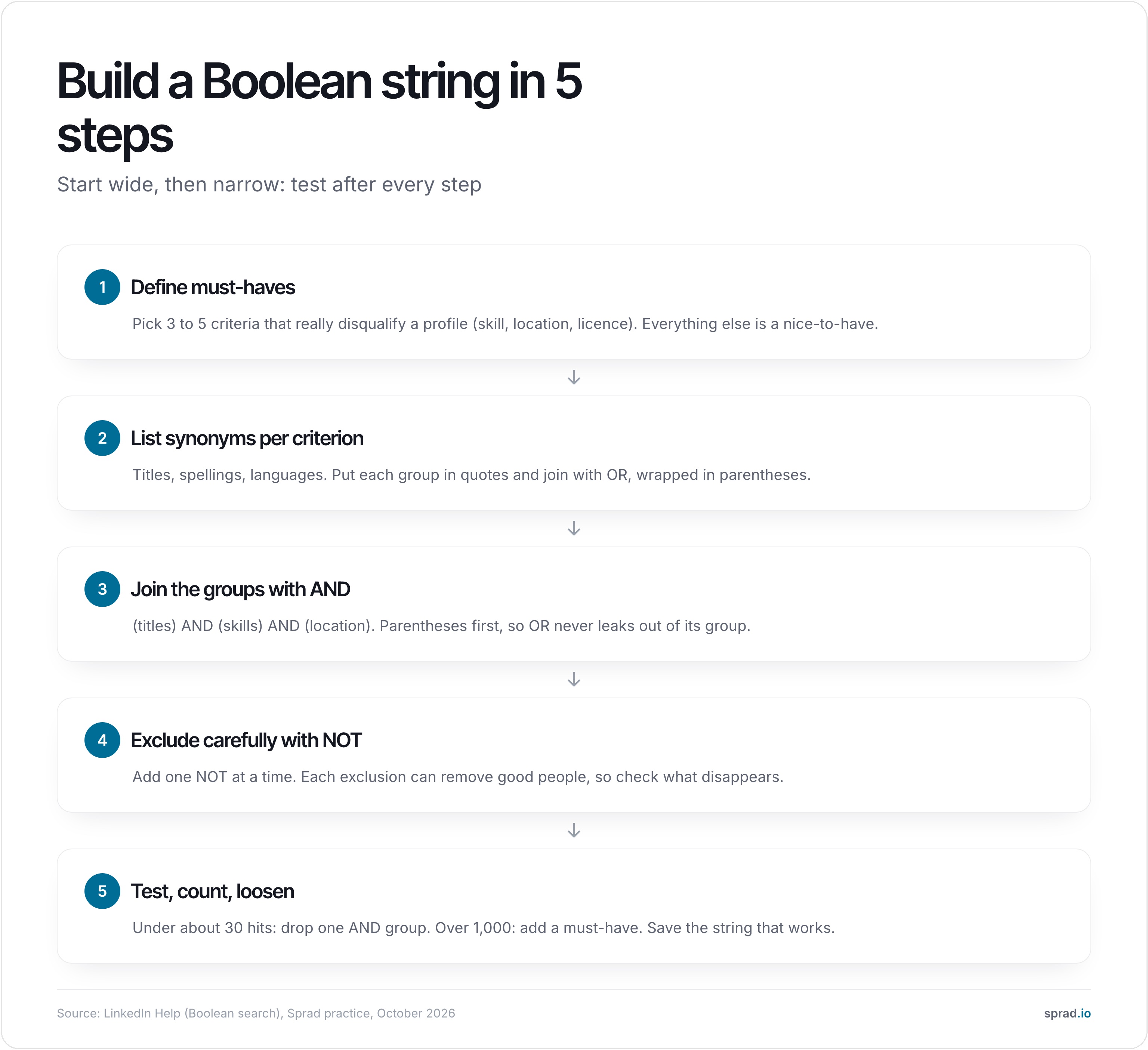
A worked example with numbers
Take a backend role: four title variants (software engineer, software developer, backend developer, Softwareentwickler), two skills (Java, Kotlin) and four cities (Berlin, Hamburg, Munich, München). Without Boolean you would run 4 × 2 × 4 = 32 separate searches. At an assumed two minutes each, that is more than an hour, and you would still have to merge the lists. As one string it is a single query:
("software engineer" OR "software developer" OR "backend developer" OR Softwareentwickler) AND (Java OR Kotlin) AND (Berlin OR Hamburg OR Munich OR München)
Now the classic mistake. Write Java AND Spring OR Kotlin and, because AND binds before OR, you get “(Java AND Spring) OR Kotlin”: every Kotlin profile in the index, whether or not it has anything to do with Spring. Add parentheses, Java AND (Spring OR Kotlin), and the logic matches what you meant. Our rule of thumb from reviewing strings: if the hit count is far higher than you expected, look for a missing parenthesis first.
Copy-paste Boolean strings by role
These strings follow the LinkedIn rules above (uppercase operators, quotes, parentheses, no wildcards). Treat them as templates: swap titles, skills and places for your market, and check the first 20 results before you widen or narrow.
| Role | String |
|---|---|
| Backend engineer, DACH | ("software engineer" OR "backend developer" OR Softwareentwickler) AND (Java OR Kotlin) AND ("Spring Boot" OR Spring) AND (Berlin OR Hamburg OR München OR Wien OR Zürich) |
| Frontend developer | ("frontend developer" OR "front-end developer" OR "UI developer" OR "Frontend-Entwickler") AND (React OR Vue OR Angular) AND (TypeScript OR JavaScript) |
| Data engineer | ("data engineer" OR "analytics engineer" OR "big data engineer") AND (Python OR Scala OR SQL) AND (Spark OR dbt OR Airflow OR Snowflake) |
| DevOps / SRE | ("devops engineer" OR "site reliability engineer" OR "platform engineer" OR SRE) AND (Kubernetes OR Terraform) AND (AWS OR Azure OR GCP) |
| Product manager, B2B SaaS | ("product manager" OR "product owner" OR Produktmanager) AND (B2B OR SaaS) AND (roadmap OR discovery OR Produktstrategie) |
| ICU nurse | ("registered nurse" OR Pflegefachkraft OR "Gesundheits- und Krankenpfleger") AND (ICU OR "intensive care" OR Intensivstation) |
| Electrician, industry (DACH) | (Elektriker OR Elektroniker OR "Elektroniker für Betriebstechnik" OR electrician) AND (Industrie OR Gebäudetechnik OR "Mess- und Regeltechnik") AND (Meister OR Techniker) |
| Warehouse / logistics lead | (Lagerleiter OR "warehouse manager" OR "Leiter Logistik" OR "logistics manager") AND (SAP OR WMS OR Lagerverwaltung) |
| SaaS sales, HR tech | ("account executive" OR "sales manager" OR "key account manager") AND (SaaS OR software) AND ("HR tech" OR HRIS OR "talent management") NOT (intern OR trainee) |
| Performance marketing | ("performance marketing manager" OR "growth marketer" OR "SEA Manager") AND ("Google Ads" OR "Meta Ads" OR "LinkedIn Ads") NOT (intern OR Werkstudent OR Praktikant) |
| HR business partner | ("HR business partner" OR HRBP OR Personalreferent) AND (Transformation OR Restrukturierung OR "change management") |
| Finance lead with M&A | ("head of finance" OR "financial controller" OR CFO) AND ("M&A" OR merger OR acquisition) |
| Exclude agency recruiters | [your search] NOT (recruiter OR staffing OR "talent acquisition") |
Each row follows the same pattern: a group of title variants, a group of skills, optionally a place or an exclusion. German and English titles sit side by side because DACH profiles use both. Hit counts depend on your market and licence, so we publish no counts; run the 20-result test from the method above on every row.
The finance example shows the limit well. The string finds people who mention M&A. It cannot tell whether someone was CFO during the merger or only joined afterwards. That kind of company-and-time context is what Boolean cannot express.
How do I create Boolean strings with ChatGPT?
ChatGPT and similar assistants are good at the tedious part of Boolean search: listing title variants, spellings and German-English pairs. They are weak at the strict part: platform syntax and precedence. So give the model the rules, and keep the checking for yourself. Most prompt guides from recruiting vendors follow the same pattern (role, skills, location, exclusions, title variants); what they rarely add is the platform's rules and a review step.
A prompt template that works
Copy this, replace the brackets, and paste it together with the job ad text (see the data-protection note below):
You are a sourcing specialist. Write ONE Boolean search string for LinkedIn. Role: [title]. Must-haves: [skills]. Locations: [cities, with German spellings]. Exclusions: [terms]. Rules: operators AND, OR, NOT in uppercase; phrases in quotation marks; parentheses around every OR group; no wildcards (*), no + or - signs; add English and German title variants; keep it under [500] characters. Return the string first, then a list of the synonym groups so I can check them.
The “under 500 characters” value is an assumption from common prompt guides, not a documented platform limit; check your own licence. Ask for the synonym list separately: it lets you spot a missing group in seconds.
Five checks before you run the string
- Count the parentheses. Every “(” needs a “)”, and every OR group sits inside its own pair. This is where generated strings fail most often in our reviews.
- Look for forbidden syntax. Wildcards (*), curly or square brackets, lowercase operators, + and - signs: LinkedIn does not support them (see the operator section above).
- Read the groups, not the string. Does each OR group contain real synonyms, or did the model invent a title nobody uses?
- Test on the first 20 results. Open profiles. If they do not fit, the string is wrong, not the market.
- Check the hit count. Under about 30: drop one AND group. Far more than expected: look for a missing parenthesis.
What a typical correction looks like
An illustrative example of the kind of draft we correct: asked for “Java developer with Spring or Kotlin, no interns”, an assistant may return Java* AND Spring OR Kotlin NOT intern. Three problems: the wildcard is not supported, precedence turns it into “(Java AND Spring) OR Kotlin”, and NOT intern is unbounded. The corrected string is Java AND (Spring OR Kotlin) NOT (intern OR trainee OR Praktikant). If Spring is mandatory for both languages, it becomes (Java OR Kotlin) AND Spring instead. Deciding which one you mean is your job; the model cannot know.
Limits of ChatGPT for candidate search
- It does not search anything. ChatGPT writes the query; it has no access to LinkedIn, XING or your talent pool. The string still runs on a platform and still finds only people who used your words.
- It guesses syntax. Platforms change their rules. The model reproduces what it has seen, which may include operators your tool no longer supports.
- Data protection. Paste the job ad and your criteria, not candidate profiles or CVs. Personal data of candidates in a public chat tool needs a legal basis and a data-processing set-up (GDPR, Art. 6 and 28); when in doubt, ask your data-protection officer. General information, not legal advice.
If you find yourself rebuilding the same synonym lists again and again, that is the sign to skip the string altogether: with Active Sourcing you describe the role in plain language and every profile is checked against your requirements, so no string and no syntax review is needed (more in the AI section below and in our guide on Boolean vs. requirement search).
From a string to your own words: the same role as a brief
A string is a translation: you turn a role into keywords and hope the people you want used them. The alternative is to skip the translation and write the requirement the way you would explain it to a colleague. Take the backend row from the table above. As a brief it reads:
Backend engineer in Vienna or Munich, at least five years, Kotlin or Java in production, has worked on payments or another regulated product, speaks German or English, not an agency recruiter.
The difference is what happens next. The string returns profiles that contain your words. With Sprad Active Sourcing each profile is checked individually against every requirement in the brief and shows a reason, so a person who writes “Zahlungsverkehr” instead of “payments” is not lost. Hard rules such as a licence or a city stay explicit filters; the brief covers the rest. We compare both ways on the same roles in Boolean vs. requirement search, and the practical side of switching is in Boolean or natural language. For the Google variant of the same idea, see Google X-ray search for recruiters.
Which tools and templates help?
- Cheat sheets and string libraries from HR publishers and ATS vendors are a good starting point for synonyms. Copy the structure, not the exact words.
- LLM chat assistants can draft a string from a job ad in seconds (template and checks above). Always read the result: they happily produce wildcards or operators your platform does not support.
- X-ray search on Google looks for profiles through the search engine, for example site:linkedin.com/in ("data engineer") (Python OR Scala) (Vienna OR Wien). Google documents quotes, the minus sign and site: in its help. Results depend on what Google has indexed, not on the platform's own database.
- Saved searches and string logs in your ATS or a shared sheet. A string you cannot find again is a string you will rebuild next month.
String generators save typing, but they do not remove the structural limit: a generated string is still a keyword filter.
Which mistakes should I avoid?
- No parentheses around OR groups. The precedence example above is the most frequent error.
- Lowercase operators. On LinkedIn they must be uppercase, otherwise the word is searched as plain text.
- Over-using NOT. NOT removes any profile that contains the word in the text the platform searches. NOT intern can drop a senior engineer who interned once. Add exclusions one at a time and look at what disappears.
- One language only. In DACH, a string without German title variants misses a large part of the market.
- Too many AND groups. Every AND removes people. When a string returns under about 30 hits (our rule of thumb, not a platform figure), drop one group.
- Treating the string as the shortlist. A hit means the words appear, not that the person fits. Read profiles before you write.
How does AI change Boolean search?
AI changes who does the translation. With Boolean, you convert a role into keywords. With requirement search, you describe the role in plain language and the system reads profiles against it. In our own coverage test (own measurement by Sprad, as of 15 August 2026, method on sprad.io/sourcing-benchmark), Atlas found 38 % of the candidates that four other systems found; the best of those four found 9 %. In the recruiting area of the open PeopleSearchBench, the published scores run from 50.5 to 68.2; our own re-measurement puts Atlas at about 73.5 on that scale, converted and not an entry in the benchmark’s table.1
The reason is mechanical. Atlas checks every profile individually against your requirements, with context, and shows a reason for each. That also finds people whose profile is poorly maintained or lacks the “right” keywords, and it supports deep-context search: first find companies, then the people who worked there in a given period, for example a CFO during an acquisition or someone who took a start-up through Series A/B. Sprad has built recruiting software for seven years, starting with employee referrals, where matching profiles to requirements is the core problem. Our rule of thumb: if results appear instantly, it is almost always a (semantic) keyword search. A per-profile check takes longer: Quick Search about 3 seconds, a deep search a few minutes. That is a real trade-off.
Boolean does not disappear. Use it where a criterion is a hard rule (licence, location, a technology needed from day one) and use requirement search for the people your vocabulary misses. Sprad searches LinkedIn, XING, GitHub and your own talent pool in one go, and sends LinkedIn and email outreach from one inbox, so nobody is contacted twice.
| Boolean string | Sprad requirement search | |
|---|---|---|
| How you search | Keywords and operators | Plain-language requirements |
| What gets checked | Whether your words appear | Every profile individually, with a reason per requirement |
| Sources | One platform per string (X-ray via Google) | LinkedIn, XING, GitHub and your own pool in one search |
| Strength | Transparent, repeatable, exact hard filters | Finds profiles without your keywords; deep-context search |
| Limit | Misses other vocabulary; precedence errors | Deep search takes minutes; Atlas Recruiter costs more per seat than some seat tools |
| Price (net, Oct 2026) | Part of your LinkedIn or ATS licence | Free start, 100 credits a month; Recruiter Lite 79 € per seat and month |
Prices are net, excluding VAT, as of 29 October 2026; EUR and USD are selectable. Deep web search runs on credits: 300 credits per run for up to 150 qualified profiles, 2 credits per profile shown. Current figures are on sprad.io/pricing; you can try the search on Active Sourcing with the free plan.
Is it legal? GDPR and the EU AI Act in short
A Boolean search is only a query; what follows from it is regulated. Under Article 14 of the GDPR, if you collect personal data from public profiles, you must inform the person within a reasonable period and at the latest within one month, and at the latest at first contact if you use the data to reach out. The EU AI Act lists AI systems for recruitment and selection, such as filtering and evaluating candidates, as high-risk in Annex III. The high-risk obligations apply from 2 December 2027 under the Digital Omnibus (Regulation (EU) 2026/1744, in force since 27 July 2026; status 30 October 2026). Note that this concerns AI that filters or ranks people, not a plain Boolean query. In practice: AI prepares the shortlist, a person decides. This is general information, not legal advice.
FAQ
What is Boolean search for recruiters?
A search technique that uses AND, OR, NOT, quotation marks and parentheses to build precise candidate queries on LinkedIn, Google or an ATS.
Does LinkedIn support wildcards?
No. LinkedIn's help page says it does not support wildcards such as the asterisk, or curly, square and angle brackets. Use OR for variants instead (checked October 2026).
What is the order of operations in LinkedIn Boolean search?
Quotes first, then parentheses, then NOT, then AND, then OR. When in doubt, add parentheses.
Is there a Boolean string generator?
Yes, several tools and chat assistants generate strings from a job ad. They save time but still produce keyword filters, so review the string and test the first results.
Can ChatGPT write a Boolean search string?
Yes, as a draft. Give it the role, must-haves, locations, exclusions and the platform rules (uppercase operators, parentheses, no wildcards), then run the five checks above. It writes the query but cannot search profiles itself.
Is it safe to paste candidate data into ChatGPT?
Paste the job ad and your criteria, not CVs or profiles. Candidate data in a public chat tool needs a legal basis and a processing agreement under the GDPR; ask your data-protection officer.
Can AI replace Boolean search?
For finding people beyond your vocabulary, yes. For hard rules such as a licence or a location, an explicit filter is still the cleanest tool. Most teams combine both.
What is X-ray search?
Searching a platform's public profiles through Google with the site: operator, for example site:linkedin.com/in plus your keywords.
1 PeopleSearchBench (Recruiting), published by Lessie, October 2026. Other systems’ scores as published in the benchmark; the Atlas value is Sprad’s own re-measurement, converted to the published scale, not a table entry. Coverage test: own measurement by Sprad, 15 August 2026. Sprad is itself a vendor in this field.
Jürgen Ulbrich
Jürgen Ulbrich has more than a decade of experience in developing and leading high-performing teams and companies. As an expert in employee referral programs as well as feedback and performance processes, Jürgen has helped over 100 organizations optimize their talent acquisition and development strategies.