LinkedIn Sales Navigator is worth it for recruiters who use it for what it was built for: researching employers, finding hiring managers and doing business development. It is not worth it as the main tool for sourcing candidates, because it has no candidate pipeline, no email channel and only 50 InMail credits per month per seat. At $89.99 per month on annual billing (Core, status 30 October 2026) it pays back after a single placement; as a daily sourcing system it caps your reach.
Is Sales Navigator worth it for recruiters? The short verdict
The answer depends on what the seat is used for, not on the price. Sales Navigator is a sales product: its objects are accounts and leads, and its filters are built to find buyers. Recruiters borrow it because it is cheaper than a Recruiter licence and offers filters that matter for sourcing, such as years in current role and company type, according to several vendor comparisons.
Our verdict after seven years of building recruiting software: yes for business development and employer research, conditionally yes for occasional sourcing, no as the backbone of a sourcing process. Details and the numbers behind that follow below.
What do users say about Sales Navigator for recruiting?
Most written reviews come from vendors that sell a competing or complementary tool, so treat star ratings and verdicts with care. We did not find independent recruiter reviews with verifiable figures, and we do not quote review-site scores because they change monthly. Across the comparisons we read on 30 October 2026, the same themes recur:
- Praised: precise filters, saved searches and alerts, a lower price than Recruiter, and good research on companies and decision makers.
- Criticised: the monthly InMail allowance runs out quickly for serious outreach; there is no recruiting pipeline or ATS link; no email or phone data; no export of leads; lists and notes stay tied to one login; the search stops after 2,500 results (according to third-party tests).
In our experience the praise comes from people who use it to find companies and contacts, and the criticism from people who try to run a candidate funnel in it.
What are the strengths of Sales Navigator?
- Filters. Years in role, seniority and company size make it good for finding hiring managers and decision makers.
- Account research. You see where a company is growing and who leads which team. That is exactly what agencies need to win clients.
- Price. Core is $119.99 per month ($89.99 on annual billing). In euros LinkedIn lists €120.99 per month or €1,088.88 per year. Our Sales Navigator pricing guide has the full table for Core, Advanced and Advanced Plus.
- Familiar interface. No training needed for anyone who already uses LinkedIn.
What are the limits?
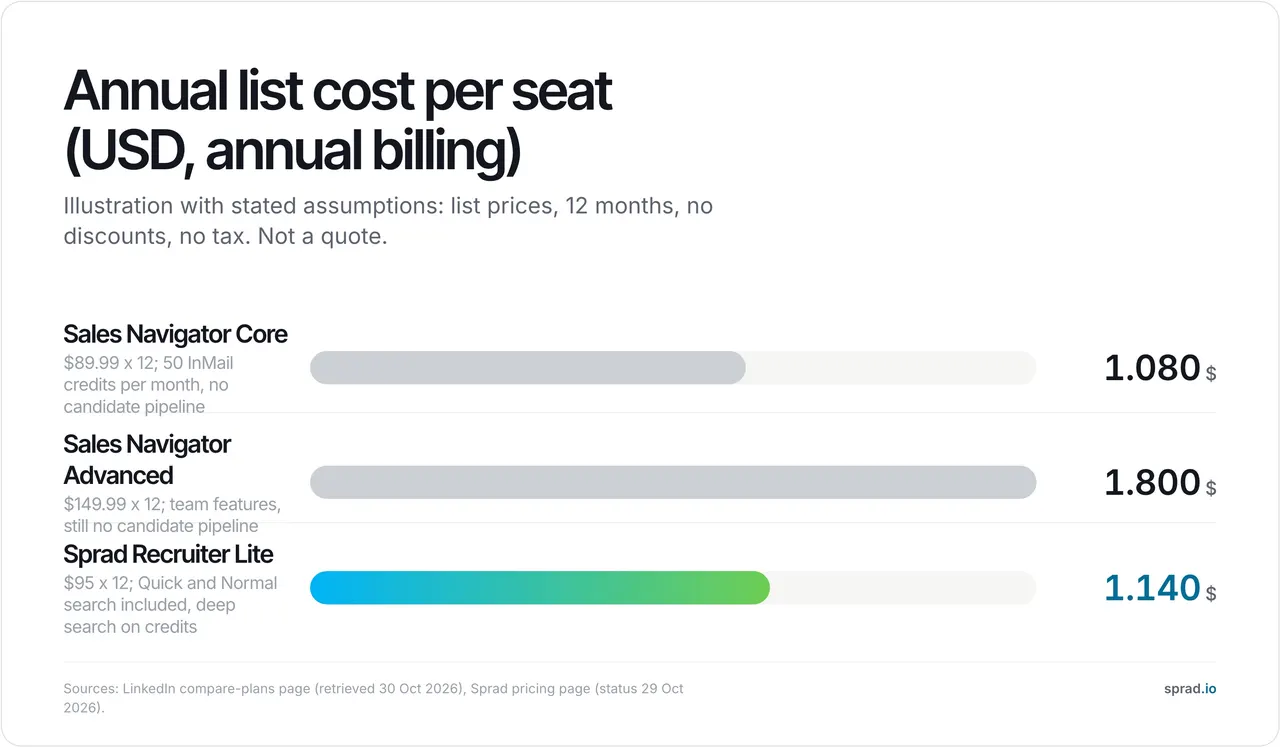
- InMail credits. LinkedIn's Help Center gives 50 per month. On Core billed annually that is $1,079.88 for 600 credits a year, or $1.80 per credit before a single reply. A recruiter with eight open roles who contacts 80 people per role needs 640 messages a year, which already exceeds the allowance.
- No candidate pipeline. There are no stages, no interview scheduling and no link to your ATS. Names end up in spreadsheets.
- No second channel. Follow-ups and email sit outside the tool. If a colleague writes to the same person, nothing warns you.
- Search cap. Around 2,500 results per search according to third-party tests, so broad searches have to be split.
- Keyword logic. Results appear instantly because the tool filters profile fields. Candidates with a thin profile or different wording never show up.
- Automation rules. LinkedIn's terms restrict automation tools. Read the rules before you connect one; our guide to LinkedIn automation for recruiters covers what is risky.
Which teams is it right for, and which not?
| Team | Worth it? | Why |
|---|---|---|
| Recruitment agency, business development | Yes | Finds hiring managers and growing employers; $89.99 per month is small against one placement fee |
| In-house recruiter, a few roles a year | Maybe | Fine if your sales team already has a seat; otherwise a free trial or a pay-per-use tool is cheaper |
| In-house team, 10+ open roles | No, as main tool | InMail cap, no pipeline, no email; the work moves back to spreadsheets |
| Sourcers who contact candidates daily | No | You need search, outreach and follow-ups in one place |
| Headhunters with a narrow executive niche | Maybe | Filters help; outreach volume is small enough for 50 InMails |
Does it pay off? A worked example
Assumptions, not LinkedIn figures: an agency fee of 20% on a €60,000 salary is €12,000. A Core seat on annual billing costs €1,088.88, or 9% of one placement. If the seat helps you win one client or fill one role you would otherwise have missed, it has paid for itself. For a five-person team the arithmetic is $5,399 per year on Core (annual billing, list prices) and $8,999 on Advanced.
The picture changes for pure sourcing. Take a team that wants to contact 3,000 candidates a year. Five Core seats give you 3,000 InMail credits, so the allowance is just enough, but you still have no email, no follow-ups and no shared candidate view, and you pay for five seats for a job that one tool could handle with automation.
Sales Navigator or Recruiter Lite?
If the goal is candidates, LinkedIn's own answer is a Recruiter licence. Recruiter Lite costs more per month than Core according to the comparisons we saw, and it offers fewer filters but recruiting-specific features such as pipeline management. Pricing for these licences changes often; our guides on LinkedIn Recruiter vs Sales Navigator and LinkedIn Recruiter pricing keep the current numbers. A common mistake is paying for both. Decide first whether the seat searches for companies or for people to hire.
Which alternatives fit better?
If candidates are your main goal, compare tools by what happens after the search. Sprad has built recruiting software for seven years, from employee referrals to matching profiles with requirements, and the sourcing tool Atlas is now in daily use at teams from start-ups to large enterprises.
- Every profile checked by AI. Atlas checks each profile against your requirements and gives a reason per requirement, so it also finds people with a poorly kept profile. The rule of thumb: if results appear instantly, it is a keyword search. Our quick search returns first results in about three seconds; the deep search takes a few minutes because far more AI runs per profile.
- LinkedIn and email in one inbox. Automated with follow-ups, trainable AI templates and a pitch format. You can send InMails from Sprad with your own quota, and the system warns you when someone has already been contacted, even for another role or by a colleague.
- One search across sources. LinkedIn, XING, GitHub and your own talent pool, from a database of more than 1 billion profiles, including your uploaded LinkedIn network and the networks of colleagues.
- Your data stays yours. If you cancel, the talent network stays free and every view can be exported.
- Price. Start free (100 credits per month), Recruiter Lite at €79 per seat and month, Atlas Recruiter at €299 with unlimited search (fair use) and one outreach account included, flexible credits. Compared with separate recruiter licences at LinkedIn and XING, costs are 30 to 80% lower, depending on your current setup.
In the Recruiting area of the open PeopleSearchBench, Atlas reaches 73.5 out of 100 in our own re-measurement, converted to the published scale; see the note below. Honest limits: no AI notetaker for calls, no placement reporting, no SMS (WhatsApp instead), the deep search takes a few minutes, and Atlas Recruiter costs more per seat than some seat-based tools. See also our LinkedIn Recruiter alternatives, Sales Navigator alternatives, the active sourcing tools comparison, people search and Sprad pricing.
Legal checks before you buy (EU, UK and US)
Sourcing from public profiles still triggers duties. Under Article 14 GDPR you must inform people whose data you did not collect from them, in general within one month. The EU AI Act lists AI systems used to filter or evaluate candidates as high-risk (Annex III), so ask every vendor how it supports your obligations. In New York City, Local Law 144 requires a bias audit and candidate notice for automated employment decision tools. The Irish regulator's €310 million fine against LinkedIn in October 2024 concerned advertising, not recruiting, but it shows how closely regulators read the lawful basis for profile data; see the Data Protection Commission's decision. Ask any vendor, including us, for hosting location and a data processing agreement.
FAQ
Is LinkedIn Sales Navigator worth it for recruiters?
For business development and employer research, yes. As the main tool for daily candidate sourcing, no, because of the 50 monthly InMail credits, the missing candidate pipeline and the lack of email.
How much does Sales Navigator cost?
Core is $119.99 per month, $89.99 on annual billing; Advanced is $159.99, or $149.99 annually. Advanced Plus is quote-only. Status 30 October 2026, per licence, excluding VAT.
Can Sales Navigator replace LinkedIn Recruiter?
Only for light, search-driven work. It lacks project pipelines and ATS integration. See the full comparison.
Is there a free trial?
Yes, for Core and Advanced, if you have no paid LinkedIn subscription and no trial in the past 365 days. A card is required, so cancel in time.
What is a better alternative for sourcing?
A tool that checks every profile, reaches people by LinkedIn and email from one inbox, and keeps your data after you cancel. Sprad starts free; Recruiter Lite is €79 per seat and month.
Note on the benchmark: PeopleSearchBench (Recruiting), published by Lessie, October 2026. Other systems' scores as published in the benchmark; Atlas measured with the benchmark's open test procedure. Price sources: LinkedIn's compare-plans page and Help Center (retrieved 30 October 2026), search-cap figures from third-party tests, Sprad pricing page (status 29 October 2026).
Jürgen Ulbrich
Jürgen Ulbrich has more than a decade of experience in developing and leading high-performing teams and companies. As an expert in employee referral programs as well as feedback and performance processes, Jürgen has helped over 100 organizations optimize their talent acquisition and development strategies.