Most LinkedIn automation for recruiting is not allowed. LinkedIn's help page on prohibited software excludes third-party crawlers, bots, browser plug-ins and extensions that act on your account, and says members who use them risk having the account restricted or shut down. What is safe is automation around LinkedIn: finding and checking profiles, drafting messages, timing follow-ups by email, stopping on a reply and keeping one shared record. The sections below show where the line runs, what the tools do, and how to build a sequence that survives a restricted account.
What does "LinkedIn automation for recruiting" mean in practice?
The phrase covers three very different things, and only one of them is a real risk for your account.
- Acting as you on LinkedIn: a tool sends connection requests, messages or profile visits through your logged-in session. Browser extensions, desktop apps and cloud tools that log in with your credentials all belong here. This is what the help page prohibits.
- Using LinkedIn's own features: Recruiter, InMail, saved searches and LinkedIn's AI-assisted messages. These are sold by LinkedIn and run under its rules, with limits of their own.
- Automating around LinkedIn: a system that searches other sources, checks profiles against requirements, drafts the message, sends the email touch, stops on a reply and logs everything. Nothing here acts on your LinkedIn session.
Most "is it safe?" arguments mix these up. Ask one question instead: does the tool perform actions inside LinkedIn as me? If yes, you are in the area the User Agreement covers. If no, your account is not at stake, although data protection and anti-spam law still apply (see below).
Is LinkedIn automation banned? What the rules and the courts say
Three primary points are worth knowing.
- The rule: LinkedIn's help page says it does not permit third-party software, including crawlers, bots, browser plug-ins or extensions, and that users risk restriction or closure (LinkedIn Help, "Prohibited software and extensions", checked October 2026).
- Scraping is a separate fight: In hiQ Labs v. LinkedIn the Ninth Circuit held in 2022 that accessing public profiles likely does not violate the US computer-fraud law. The case still ended in December 2022 with a consent judgment: hiQ agreed to stop scraping, delete its data and code, and pay $500,000 (Proskauer, December 2022). So "public data" is not a safe harbour against LinkedIn's contract claims.
- LinkedIn itself is not above the law: the Irish Data Protection Commission fined LinkedIn Ireland €310 million in October 2024 over behavioural analysis and targeted advertising (DPC press release). Platform rules do not replace your own GDPR duties as a recruiter.
What happens in practice is a graduated response: warnings, temporary restrictions on invitations, then closure. The exact thresholds are not published by LinkedIn. Numbers you will see online, such as "100 requests a week" or "5 to 7 spam reports trigger a block", come from tool vendors and community experience, not from LinkedIn. Treat them as folklore, not limits.
Which tools exist, and how risky are they?
Four groups cover the market. The risk column describes the account risk under LinkedIn's rules, not product quality.
| Type | Examples | Acts inside your LinkedIn session? | Account risk | Good for |
|---|---|---|---|---|
| LinkedIn's own products | Recruiter, InMail, AI-assisted messages | No (it is LinkedIn) | Low; InMail quality rules apply | Search and one-to-one messages inside LinkedIn |
| Browser extensions and desktop apps | Dux-Soup, Linked Helper and similar | Yes | High; named in the prohibited-software list | Nothing you cannot do by hand |
| Cloud outreach tools | HeyReach, Expandi and similar | Yes, via your login | High; vendors rely on pacing and warm-up | Agencies with dedicated accounts that accept the risk |
| Recruiting platforms that automate around LinkedIn | Sprad | Search, drafting and email do not touch LinkedIn; LinkedIn requests and messages go out from the account you connect, so the same rules apply | Depends on how you use the LinkedIn steps; email and the shared record carry the sequence, so the account is not the only channel. We make no claim about LinkedIn's thresholds | Teams that want one process, one inbox and no single point of failure |
Source: LinkedIn Help (prohibited software), vendor product pages, Sprad analysis, October 2026. Risk ratings are our assessment, not LinkedIn statements. A full list of tools of the second and third type is in our guide to HeyReach alternatives.
One honest caveat about ourselves: no tool, ours included, can make an action on your LinkedIn account compliant with LinkedIn's terms. What a platform can do is reduce your dependence on that one account.
How do I automate recruiting outreach step by step?
This is the sequence we recommend, in the order the work happens.
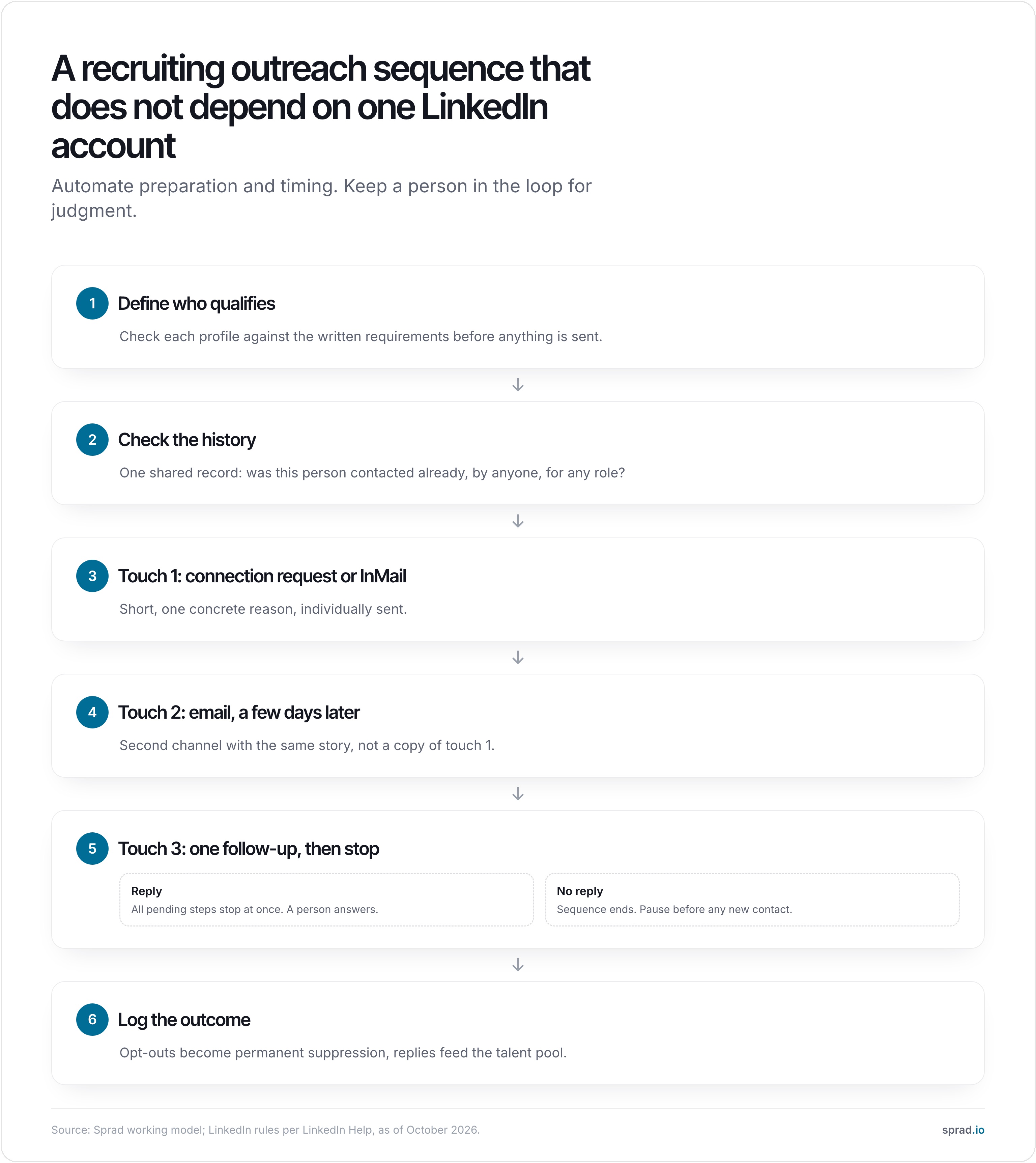
1. Qualify before you write
Write down the requirements and check each profile against them. A message is only as good as the reason to send it. If results appear in a second, the tool is almost always running a keyword or semantic filter and not reading the profile.
2. Check the history
Before touching a profile, check whether anyone on the team already contacted this person, for this or another role. Double outreach is the most common avoidable mistake we see in teams that use two or three separate tools, and it damages the employer's name faster than a low reply rate does.
3. Send the first touch individually
Keep it short and name one concrete reason. LinkedIn's own data shows that InMails sent one by one get response rates about 15 percent higher than bulk sends (LinkedIn Talent Solutions, 2021). Recruiter also applies a quality rule: LinkedIn announced that a seat sending 100 or more InMails in 14 days with a response rate under 13 percent loses bulk InMail for two weeks (LinkedIn Talent Blog, 2014; the current help page is the authority on today's values).
4. Add email as the second channel
Email is where automation does not endanger a LinkedIn account. A follow-up a few days later reaches people who ignore connection requests. In our experience, the combination of LinkedIn and email is the biggest single lever on reply rates, because each channel reaches people the other misses.
5. One follow-up, then stop
Three touches in total is a sensible ceiling for cold outreach. The rule that matters most: any personal reply stops every pending step at once. An out-of-office message pauses the sequence and creates a task, it is not a reply and not a refusal.
6. Log and suppress
Record the outcome on the person's profile. A refusal or an opt-out becomes a permanent suppression, so nobody on the team writes again by accident.
A worked example: what email adds
These numbers are assumptions for illustration, not measurements. Take 100 connection requests per week, a 30 percent acceptance rate and a 15 percent reply rate on the follow-up message to those who accept.
- LinkedIn alone: 100 × 30 % = 30 accepted, 30 × 15 % = about 4.5 replies a week.
- Add an email touch for the 70 who did not accept, at an assumed 5 % reply rate: 70 × 5 % = 3.5 more replies.
- Together: about 8 replies a week, roughly 78 percent more, with the same LinkedIn activity and no extra pressure on the account.
Replace the three rates with your own and the picture holds as long as email reaches people LinkedIn does not. The point is not the exact figure but that the second channel multiplies results without raising LinkedIn volume.
Which mistakes should I avoid?
- Running several automation accounts or tools at once. Different tools acting on one account create unusual patterns and double contacts.
- Generic AI text with fake familiarity. A message that implies knowledge of a project the sender has not read is worse than a plain, honest one.
- Treating a stalled reply as consent. A friendly answer from a year ago does not authorise new automated contact.
- Ignoring the one-month information duty. If you store a sourced candidate in your system, Article 14 GDPR requires that you inform them within a reasonable period and at the latest within one month (GDPR, Art. 14(3)).
- Assuming email is free of rules. In Germany, advertising by email without prior consent can be unlawful (§ 7 UWG). Whether a job approach counts as advertising is disputed, so get legal advice for your campaign. Other EU states and the US differ again.
- Letting AI decide. Under the EU AI Act, systems used to filter or evaluate candidates are classed as high-risk (Regulation (EU) 2024/1689, Annex III). Keep a person responsible for every decision about a candidate and check the current application dates.
How does AI change LinkedIn automation?
AI changes two things: who gets the message and what it says. Used well, it reads each profile against the requirements, so the list is smaller and better, and it drafts the message from facts. Used badly, it multiplies volume and generic text, which is exactly what both LinkedIn's rules and candidates punish. Agents that send messages on their own add a third question: who approves? Our rule is that automation can prepare and time, and that a person approves anything that makes a claim about the candidate or the role.
How Sprad handles outreach
Sprad (Atlas) checks every profile individually against your written requirements, searches LinkedIn, XING, GitHub and your own talent pool in one run, and then handles outreach over LinkedIn and email, including follow-ups, InMails from your own quota and trainable AI templates. Each person has one inbox with the whole conversation, and the system warns when someone was already contacted, even by a colleague or for another role. Agents can run fully automatically or with your approval. If a LinkedIn account is ever restricted, the email channel, the talent network and the data stay available, and you export your data at any time.
In the independent PeopleSearchBench (Recruiting), Atlas ranks first with 73.5 out of 100, 5.3 points ahead of Lessie, which published the benchmark (published October 2026; other systems' scores as published in the benchmark; Atlas measured with the benchmark's open test procedure). Pricing: you can start free (100 credits a month); Recruiter Lite costs 79 € per seat and month, and Atlas Recruiter, which includes the first LinkedIn and inbox account per seat, costs 299 € (sprad.io/pricing, October 2026, net). For teams that currently pay for separate LinkedIn and XING licences, the cost is 30 to 80 percent lower. Limits: there is no AI call notetaker, no placement reporting and no SMS channel yet, and the deepest search takes a few minutes because every profile is read. See Active Sourcing for details.
Which tools or templates help?
- A first-touch template: "Hi [first name], your work on [specific project or stack] at [company] caught my eye. We are hiring a [role] in [city] where [one concrete reason]. Open to a short call this week or next?"
- A follow-up by email, three to five days later: one new fact (a salary range, a team detail), no "just checking in".
- A stop rule written down: reply, refusal and out-of-office each get a defined next step.
For the wider process, see our guides on automating recruiting outreach and GDPR-compliant active sourcing, and on why LinkedIn Recruiter alone costs you good candidates.
Related: connection request or InMail, contacting candidates by email, recruiter outreach templates.
FAQ
Can LinkedIn ban my account for automation?
Yes. LinkedIn says users of prohibited third-party tools risk having the account restricted or shut down. The actual response is usually graduated, but it is at LinkedIn's discretion.
Is it legal to automate LinkedIn messages in the EU?
Breaking LinkedIn's terms is a contract matter, not a crime. The legal questions sit elsewhere: GDPR information duties for sourced candidates, anti-spam law for email, and the AI Act for tools that rank people.
Is email outreach safer than LinkedIn automation?
For your LinkedIn account, yes: an email never touches it. For the law, it needs care. Use a lawful basis, identify yourself, and honour opt-outs immediately.
How many follow-ups are right?
Two to three touches in total across channels. More mostly raises opt-outs and complaints.
Can I use LinkedIn Recruiter and an outreach platform together?
Yes. Many teams keep Recruiter for search and one-to-one InMails and let a platform handle the sequence, the shared record and email.
Jürgen Ulbrich
Jürgen Ulbrich has more than a decade of experience in developing and leading high-performing teams and companies. As an expert in employee referral programs as well as feedback and performance processes, Jürgen has helped over 100 organizations optimize their talent acquisition and development strategies.