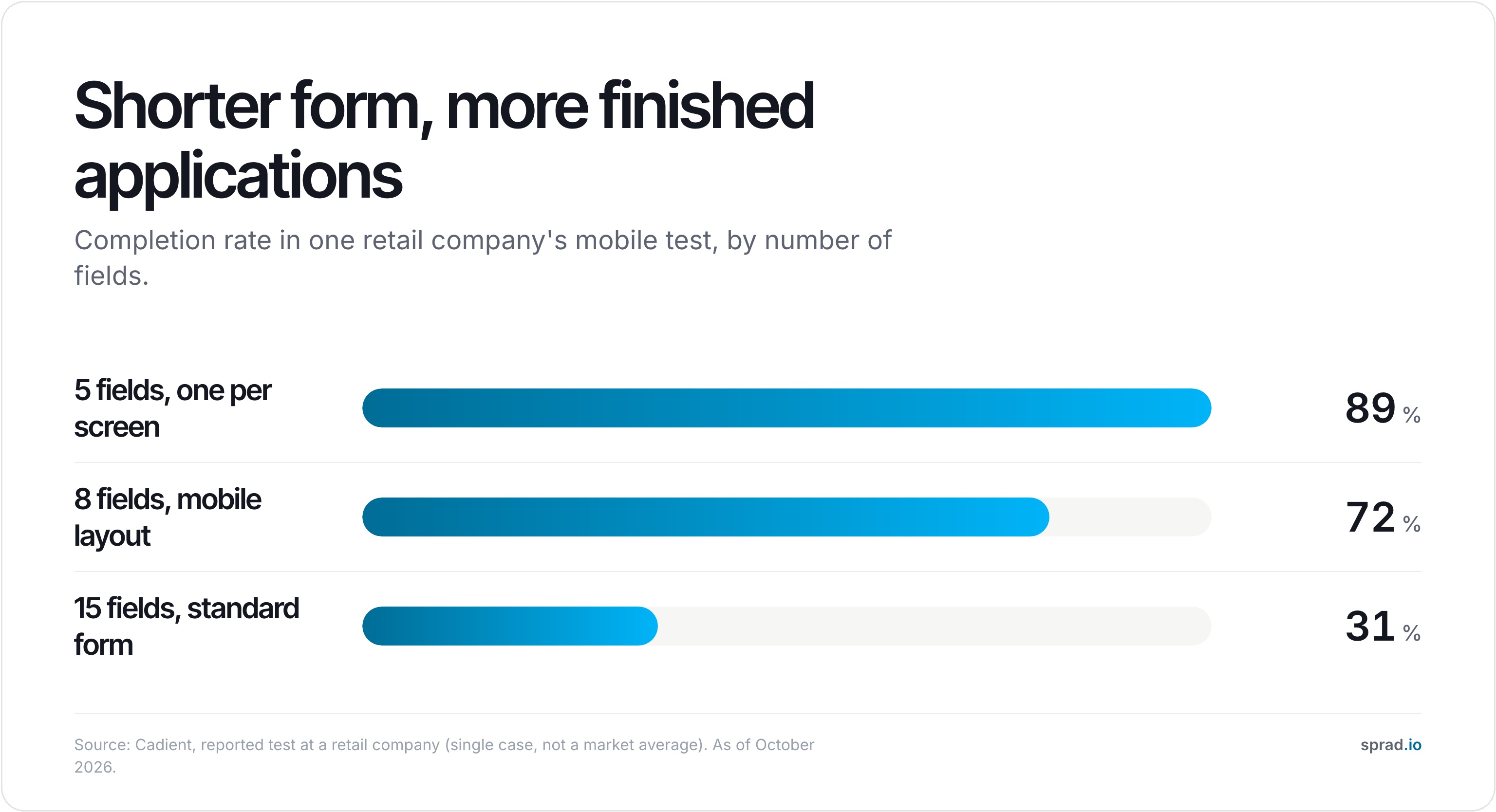
A mobile job application should take under two minutes, need no CV and ask only what decides the first conversation. Hourly applicants search and apply on their phones, often between shifts, and every extra field or upload costs you applications. In one retail test, a 15-field form was completed by 31 % of mobile applicants and a five-field form by 89 %.
Why a CV kills hourly hiring
A CV is a tool for office roles. A forklift driver, a care assistant or a kitchen helper often has none, or has an old one on a laptop they do not use. Asking for it on a phone means asking them to find a file, upload it and retype the same details into a form. Many give up halfway.
The numbers show how large the leak is. According to Hirevire's 2026 compilation of industry data, hourly and frontline applicants skew heavily to mobile flows, and the iCIMS 2025 frontline report found 72 % mobile apply rates in hospitality with 68 % abandonment. Cadient reports 2024 data in which 68 % of applications were started on mobile but only 32 % were completed there, a completion rate of 44 % against 78 % on desktop. A LinkedIn study of 2.3 million applications, cited by the same source, found completion falling by about 2.3 percentage points for every additional minute required.
Treat these as directional. They come from vendors and aggregators, they mix countries and role types, and the retail test below is a single case. The direction is consistent, though: shorter and more mobile means more finished applications.
What a mobile-friendly application looks like
Cut everything that is not needed to decide whether to talk. A workable standard for frontline roles:
- No account, no password. A login wall ends most applications before they start.
- No CV upload as a requirement. Offer it as optional, or skip it for roles where it adds nothing.
- Two or three must-have questions. Licence or qualification, availability, start date. Everything else can wait for the conversation.
- One question per screen, with large tap targets and numeric or yes/no answers where possible.
- Click-to-chat instead of a form. A WhatsApp or text button lets people answer in an app they use all day.
- An instant answer. The applicant sees a confirmation right away, and a person follows up fast on fits. The rapid reply is part of the application experience, as in our piece on frontline recruiting by phone and WhatsApp.

One-click apply: when it helps and when it does not
"One-click apply" can mean two different things. In white-collar hiring it usually means applying with a LinkedIn or XING profile. That fits professionals with an updated profile and does little for a warehouse worker who has none. For frontline roles, the equivalent is a one-tap start into a short chat or form, with no profile and no documents.
The trade-off is real. Fewer data points mean more unqualified applicants. That is why short does not mean empty: the two or three questions you keep must be the ones that screen. A form that asks nothing gets many applications and little signal, so you simply move the work to your recruiters. Pre-screening in the same chat solves this: the applicant answers while they are still engaged, and you only spend time on the fits.
A checklist to test your own application
Do this on your own phone, on mobile data, with a stopwatch:
- Open your job ad in the feed and tap through. Is the first screen the application, or a career-site homepage?
- Count the taps and fields. More than eight fields or three screens of typing is too much for hourly roles.
- Try it without a CV. Can you finish?
- Submit it. How long until you get a reply, and through which channel?
- Check the next day: did a person follow up, or did the application disappear into a mailbox?
If the test takes more than two minutes, you have found where applicants drop out.
Make mobile applications part of the pool, not a pile
A short application has a second benefit: it gives you a contact you can reach again. If those contacts sit in an inbox, they are lost after the role is filled. In your own talent pool, they stay available for the next opening and the next shift. This is where most of the long-term value of frontline hiring comes from, and it works well in hospitality and other high-volume areas. Also see how to screen blue-collar applicants without white-collar tools.
How Sprad handles mobile applications
Sprad Social Recruiting runs job ads on Instagram and Facebook, where nurses, tradespeople, drivers and other frontline workers spend time every day. An AI talent agent pre-screens every applicant via WhatsApp, phone or web, so the application happens in a chat on the phone, not in a CV upload. Every applicant lands in the employer's own talent pool, so the relationships stay with the employer instead of a platform. Pricing is ad spend plus 10 %, from a €1,000 budget that can be split across roles. Learn more on the Social Recruiting page and in pricing. Sprad does not promise a number of applicants; it shortens the path so fewer of them drop out.
FAQ
What is a mobile job application?
A job application designed to be completed on a smartphone: short, no login, no required CV, with large tap targets and ideally a chat option.
Why do hourly workers need a mobile-first application?
Industry data suggest hourly and frontline applicants skew heavily to mobile, and a long desktop-style form is where they drop out.
How long should a mobile application take?
Under two minutes. A LinkedIn study of 2.3 million applications, cited by Hirevire, found completion falls for every extra minute.
Do I still need a CV?
Not to start the conversation for most frontline roles. Ask for proof of licence or qualification later, once there is a mutual fit.
Does a shorter form bring worse candidates?
Not if the questions that remain screen the must-haves. A form with no questions does bring more noise, so keep two or three that matter.
Can applicants apply by WhatsApp?
Yes, with a business channel and consent. Sprad's talent agent pre-screens applicants via WhatsApp, phone or web.
What does Sprad cost?
Ad spend plus 10 %, from a €1,000 budget that can be split across several roles.
Jürgen Ulbrich
Jürgen Ulbrich has more than a decade of experience in developing and leading high-performing teams and companies. As an expert in employee referral programs as well as feedback and performance processes, Jürgen has helped over 100 organizations optimize their talent acquisition and development strategies.