To post jobs on social media, start with free posts on your Facebook Page, Instagram and LinkedIn, then add a paid Facebook and Instagram campaign when you need applicants fast. Free posts reach mostly your own followers. Paid ads reach people who never search for jobs: in a 2026 US benchmark of 891 campaigns, the median cost was $13.88 per applicant. Job ads on Meta run in the special ad category "Employment", which limits targeting.
Free or paid: what each way gets you
The question is not "free or paid" but "how fast do I need people, and who is my audience". A nurse, driver or warehouse worker rarely follows a company Page. That is why free posts alone work for an employee network and not for an urgent hire.
| Free (organic) | Paid (ads) | |
|---|---|---|
| Cost | your time | ad spend, from a few hundred euros per role |
| Reach | followers and their shares | everyone within your chosen radius |
| Speed | slow, unpredictable | applicants within days |
| Targeting | none | by location, with limits (see below) |
| Best for | employer brand, referrals, a first test | shift, trade and frontline roles with real urgency |
One outdated tip circulates in many guides: the free "Jobs" tab on Facebook Pages. Facebook closed it outside the US and Canada in February 2022 and shut it down entirely in February 2023. A new "Local Jobs" tab in Marketplace has been in limited testing in the US since October 2025. Do not plan around it.
How to post jobs on social media, step by step

1. Define the role, the must-haves and the pay
Write down shift, location, pay, and the one or two criteria that really decide (licence, degree, shift availability). State pay in the ad: it is the line candidates look for first.
2. Start free
Post the job on your Facebook Page, as an Instagram post or story, and on LinkedIn. On Instagram, regular posts cannot carry clickable links, so use the link in your bio or a link sticker in stories. Ask your employees to share. It costs nothing and tells you whether your wording works before you spend.
3. Set up Page, ad account and Instagram
For paid ads you need a Facebook Page, an ad account in Meta Business Suite and your Instagram account connected to it. Do this once; every later campaign reuses it.
4. Create the campaign and declare the category
Pick the objective Leads and use an instant form. That lets candidates apply with name, phone and two or three questions without leaving the app. Sending people to a career page loses most of them at page load. Then declare the special ad category Employment. If you skip it, Meta may pause the ad, because it detects job ads automatically.
5. Set the audience by location
Under the Employment category, per Meta, age and gender cannot be set, and where the rules apply (the US, Canada and parts of Europe) there is no postcode targeting and a minimum location radius of 15 miles. Check the current scope for your country in Ads Manager. In practice the audience is built by copy, image and location: if the ad says "CDL driver, night shift, Dallas area", it filters for you.
6. Set budget per role and duration
Set the budget per role, not per company, and plan several weeks of testing. To estimate it, work backwards: applicants needed ÷ qualified share × cost per applicant. Example with illustrative numbers: you want 10 qualified candidates, assume 30 % of applicants qualify, so you need about 33 applicants. At the $13.88 median that is roughly $460.
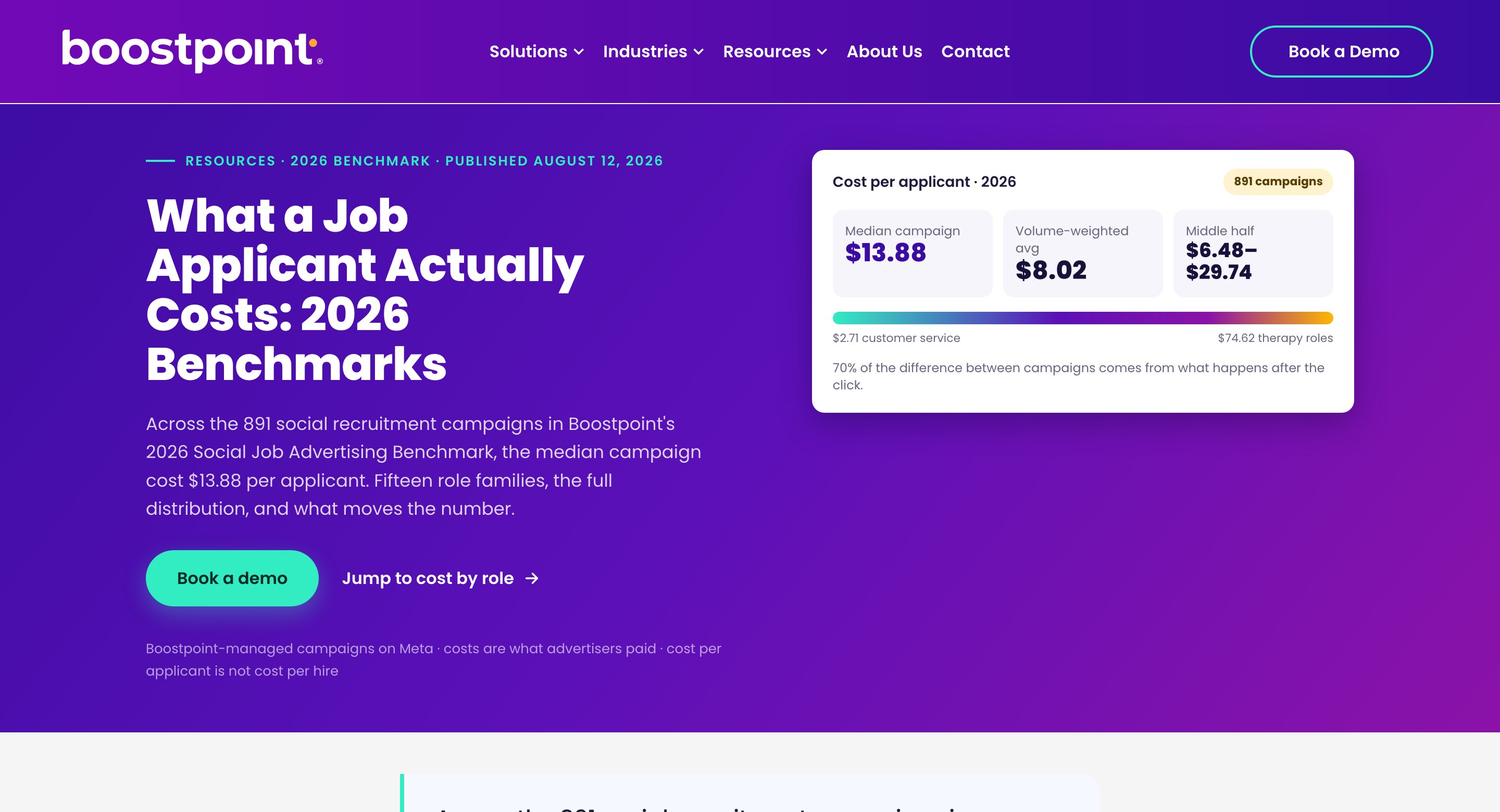
The benchmark shows how much roles differ. Per Boostpoint's 2026 data, the median cost per applicant was $9.83 for warehouse and production, $13.41 for technicians and mechanics, $14.14 for skilled trades and $26.86 for CDL truck drivers. These are US figures and cost per applicant, not per hire. In the same data, what happens after the click explained 70 % of the cost difference between campaigns, and the ad auction only 18 %. A short form beats a clever audience.
7. Build the ad
Use one real photo or a short video, put the pay in the first line, name the location and shift, and end with one clear button. Do not boost a post; build a proper ad. Here is a template:
Warehouse operative, Leeds, early shift, £14 per hour (example text). Free transport, overtime available, start next week. Apply in two minutes, no CV needed. Tap "Apply now".
8. Follow up within minutes and measure
Speed decides. Reply to every applicant by text or WhatsApp within minutes and ask a few knock-out questions. Then track two numbers: cost per applicant and the share that is qualified. Cost per applicant alone is misleading when most applicants do not fit.
Five questions to ask every applicant
- Can you work the shifts (early, late, nights, weekends)?
- Do you live within reach of the workplace, or have transport?
- Do you hold the licence or certificate this role requires?
- When can you start?
- Is the pay and hours as advertised acceptable to you?
Common mistakes
- Skipping the Employment category. The ad can be paused or rejected.
- Using a long form. Every extra question loses applicants.
- No pay in the ad. Candidates scroll past.
- Judging by cost per applicant only. Qualified share matters more.
- Replying the next day. Candidates have moved on.
- Stopping after one campaign. The applicants you paid for are lost if nobody keeps them in a pool. See talent pool.
For roles that work by phone rather than email, read why frontline hiring runs on phone and WhatsApp. For screening many applicants fast, see blue-collar screening.
FAQ
Can I post jobs on social media for free?
Yes. Post on your Facebook Page, Instagram and LinkedIn and ask staff to share. Reach is limited to followers and their networks, so it suits employer branding and a first test better than an urgent hire.
How much does it cost to advertise a job on social media?
It depends on the role. A 2026 US benchmark of 891 Meta campaigns found a median of $13.88 per applicant, from $2.71 for customer service to $74.62 for therapy roles. Plan the budget per role, not per company.
Do I need the "Employment" special ad category?
Yes, whenever an ad promotes a job. It restricts targeting by age, gender and postcode where it applies, which is why copy and location carry the targeting.
Instant form or career page?
For frontline roles, an instant form with two or three questions usually works better, because candidates apply without leaving the app.
Which social network is best for job ads?
For frontline and shift roles, Facebook and Instagram. LinkedIn suits professional roles. TikTok is an option for younger audiences.
Where Sprad fits
Posting jobs on social media is easy; keeping the people you reach is not. Sprad Social Recruiting runs your ads on Instagram and Facebook, an AI talent agent pre-qualifies every applicant by WhatsApp, phone or web, and everyone lands in your own talent pool instead of on a platform. Pricing is ad spend plus 10 %, from a €1,000 budget that can be split across roles. See how Sprad Social Recruiting works or check pricing.
Jürgen Ulbrich
Jürgen Ulbrich has more than a decade of experience in developing and leading high-performing teams and companies. As an expert in employee referral programs as well as feedback and performance processes, Jürgen has helped over 100 organizations optimize their talent acquisition and development strategies.