Resume keywords are the skills, tools, certificates and job titles that a job ad names, written into your resume in the ad's own words wherever they are true. Take them from the ad itself: copy it, mark the skill terms, count which ones repeat, check each against your real work history, and use the matching ones in your skills list and in your experience bullets. Aim for 8 to 12 honest matches per application, not a pasted wall of words.
What do "resume keywords" mean in practice?
A keyword is any word or short phrase that a recruiter might type into a search box to find someone like you: "Salesforce", "stakeholder management", "registered nurse", "Scrum". They come in four kinds: tools and systems (SAP, Excel, Figma), methods and certificates (Scrum, CPA, forklift licence), the job title itself ("Customer Success Manager") and domain words ("churn", "onboarding", "wound care"). Soft skills such as "team player" are the weakest kind: they are easy to claim and rarely searched.
Two readers see your resume. First a system that stores the text and makes it searchable. Then a person who skims for six or seven things the ad asked for. Keywords serve both: they make you findable and they make the match obvious. That is why this guide is about true keywords. A term you cannot back with a job or a result helps with the search and hurts in the interview.
Do keywords decide whether an ATS rejects you?
The documented role of keywords is search, not rejection. Greenhouse's help page on searching candidates with Boolean queries shows recruiters typing terms with AND, OR and NOT, putting phrases in quotation marks for exact word order, and using a wildcard such as Java*. The page describes no automatic synonym matching, so a recruiter looking for "customer onboarding" does not automatically find "client intake". Lever's help article on searching the database describes the same logic: search covers parsed resume content, and a Resume filter limits matches to resume text.
Newer features add AI on top. Greenhouse's page "Greenhouse AI features" (updated 3 September 2026) lists keyword suggestions, which filter application review by criteria taken from the job post, and Talent Matching, which compares resumes against a calibration the employer defines. Neither description says that a candidate is rejected automatically. We found no vendor page that promises rejection by keyword count. Employers can still set screening questions in the application form, so answer those truthfully.
The step before search can fail too. If the system cannot parse your file, your skills are not in the searchable fields at all. Greenhouse's page "Unsuccessful resume parse" lists graphics, photos, columns and image files among the causes. Perfect keywords in a broken layout find nobody. Our guide to an ATS-friendly resume template has the 5-minute file test.
For applicants in the EU there is one more fact: the AI Act lists AI systems used to recruit or select people, for example to filter applications and evaluate candidates, as high-risk in Annex III, point 4(a) of Regulation (EU) 2024/1689. Employers using such systems face obligations. It does not change what you should write: truthful, readable, matched to the ad.
How do I find resume keywords in a job description, step by step?
The method is the same one career services teach, with one addition: counting. The US Department of Labor's CareerOneStop advises, in its resume guidance, to review about 10 to 15 postings for a job title and note the requirements that come up most, then use the posting's own terms, because variations may be missed.
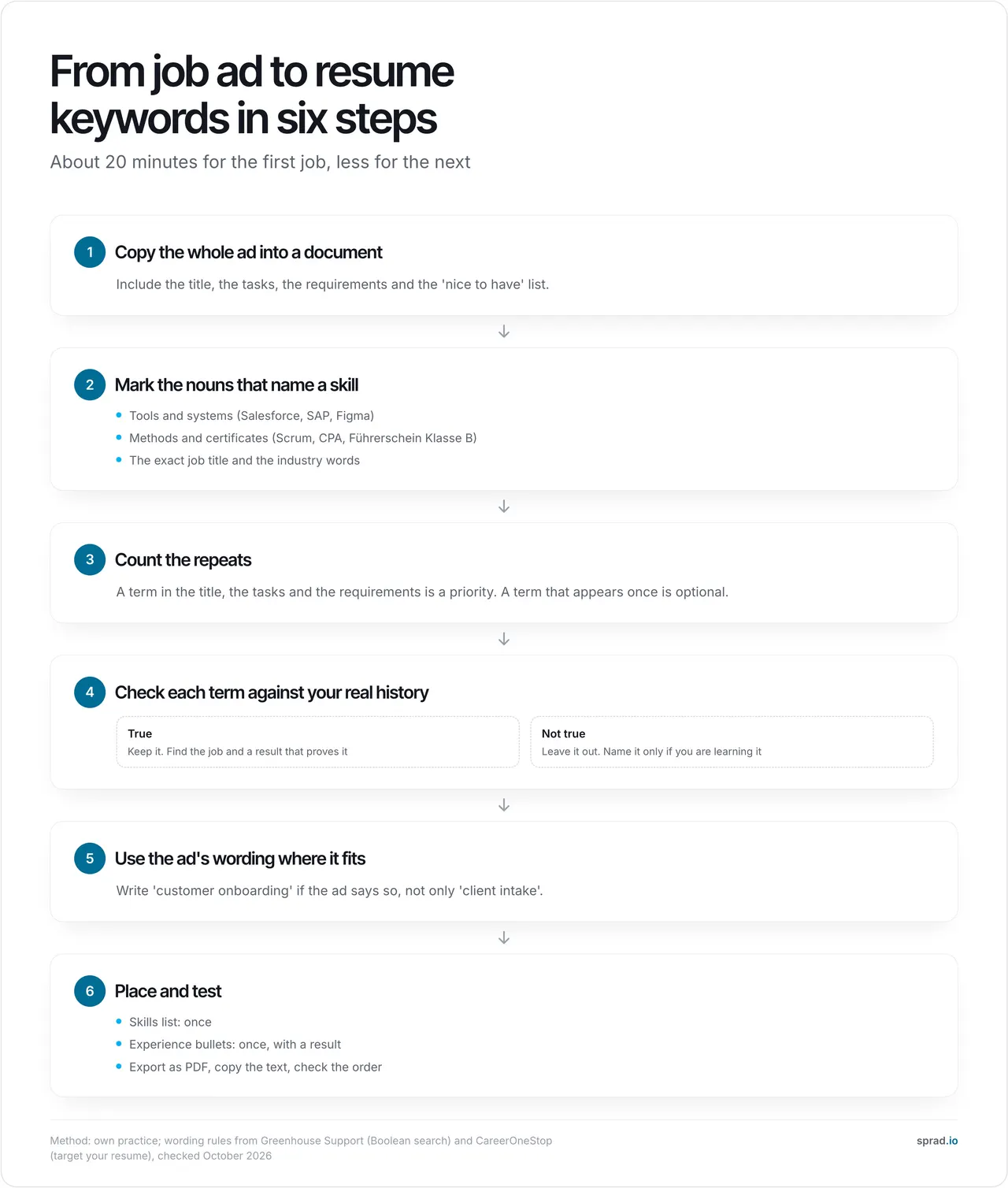
- Copy the ad into a document. Include title, tasks, requirements and the "nice to have" list.
- Mark skill nouns. Tools, methods, certificates, the exact title, industry words.
- Count. A term in the title, the tasks and the requirements is a priority. One mention is optional.
- Check each against your real history. Keep what is true, drop the rest.
- Use the ad's wording. If the ad says "customer onboarding", do not hide it behind "client intake".
- Place and test. Skills list once, a bullet once, export, copy the text, check the order.
If the ad gives you few terms, open two or three similar ads for the same title and use the terms they share. That is CareerOneStop's 10-to-15-postings idea in a small version.
A worked example (constructed)
Take an invented ad for a "Customer Success Manager (SaaS)". After steps 1 to 3 you get this list. The right-hand column shows an honest result for an applicant who has worked in account support.
| Term in the ad | Times in ad | Type | In resume today? | Action |
|---|---|---|---|---|
| Customer onboarding | 4 | Domain | As "client intake" | Rename to the ad's wording |
| Churn / renewals | 3 | Domain | No | Add: "owned 40 renewals" (true here) |
| Salesforce | 3 | Tool | Yes, in one job only | Add to Skills |
| QBR (quarterly business review) | 2 | Method | No, never done | Leave out |
| SaaS | 3 | Industry | Yes | Keep |
| Zendesk | 1 | Tool | No | Optional, skip |
Count it like this: 6 terms. Before the edit, 2 of 6 were readable in the ad's words (33%). After it, 4 of 6 (67%), and the two missing ones are things you did not do. That is the honest ceiling: you close the wording gap, not the experience gap. The numbers are an illustration, not a measurement.
Where should the keywords go?
| Place | What to put there | Why |
|---|---|---|
| Headline or summary | The exact job title and 2 to 3 top terms | First thing a person reads, and a searchable field |
| Skills section | Tools and methods, once each | Easy to scan and to search |
| Experience bullets | Term plus what you did and the result | Proof. This is what an interviewer asks about |
| Education / certificates | Full name and the usual abbreviation | A recruiter may type either |
| Anywhere hidden | Nothing | White-text blocks are easy to spot and do not help |
CareerOneStop's guidance says it plainly: use each keyword about twice, and more does not help. Treat that as a rule of thumb, not a quota. Skills list once, a bullet once, and you are done.
Which tools help: generators, scanners and checkers?
You will find many "resume keyword generators", "scanners" and "checkers". They all do the same thing: compare the words of the ad with the words of your resume and show the gap. You can do the core of it for free:
- A plain document and a highlighter for steps 1 to 3. A word counter or Ctrl+F on each term does the counting.
- A master resume with every job, tool and result you have. Per application you cut down and reword, you never invent. CareerOneStop recommends this approach.
- A two-column list: terms from the ad on the left, your proof (job and result) on the right. Empty right side means leave it out.
Be careful with any tool that returns a single "ATS score". We found no vendor documentation of such a score being used to reject applicants, so a number like "73" mostly measures how many words overlap. Use scanner output as a to-do list for wording, not as a grade.
How does AI change resume keywords?
AI is good at the tedious part: reading a long ad, pulling out the requirements, and rewriting your bullets in the ad's vocabulary. It is bad at knowing what is true. CareerOneStop warns that AI can write descriptions that exaggerate or falsify your experience. So the rule stays: AI may reword, it may not add. Read every line and delete anything you could not explain in an interview. Our guide on how to tailor your CV with AI covers the prompts, and the comparison of free AI resume builders shows which tools are really free.
Atlas Career (atlas.now) does the whole loop for free. It is an AI career agent that searches 1.5M+ active jobs straight from employers' career sites, shows each role a match score from 0 to 100 with reasons (the "Atlas Take"), and writes a tailored resume for every application and a cover letter on request, with no limits. The language and format follow the ad: a photo is common in German applications, not in US ones. Atlas does not send anything for you. You review the text, download the PDF and apply directly to the employer. Atlas does not invent facts: it phrases your real experience more strongly.
Try Atlas Career for free. It is EU-hosted, GDPR-compliant and built by Sprad in Vienna. Sprad builds recruiting software, and recruiter search works the way described above.
Which mistakes should I avoid?
- Pasting the whole ad. A wall of words reads badly and does not make you findable for a real search.
- Listing tools you have never used. The first technical question in the interview ends it.
- Only synonyms. Search matches typed words. Write the ad's term at least once.
- Keywords without proof. "Salesforce" in Skills is fine, "Salesforce" in a bullet with a result is better.
- One resume for all ads. Two ads with the same title can name different tools. Tailor each time.
- Breaking the layout. Tables and columns can stop the parser from reading the words you worked on.
- Ignoring the cover letter. The Federal Employment Agency tells applicants to refer to the ad and explain why they fit the job; see "Bewerbung schreiben".
DACH, UK and US: what differs?
The method is the same in every country. What changes is the language of the keywords: use the language of the ad. A German ad for a "Vertriebsmitarbeiter im Außendienst" needs those words, not only "field sales", and a Vienna ad may name "Lehrabschluss" where a UK ad says "apprenticeship". Keep both when you honestly hold both. Photo and personal details follow local convention: usual in many German applications, not in the US or UK. The Federal Employment Agency also tells German applicants to focus on what matters for the specific ad and to send the documents the employer asks for.
Sources checked October 2026: Greenhouse Support, Lever Help Center, CareerOneStop (US Department of Labor, via search excerpts, page not directly retrievable), Federal Employment Agency, EUR-Lex.
FAQ
How many keywords should a resume have?
There is no magic number. A practical target is 8 to 12 terms from the ad that you can honestly back, each once in the skills list and once in a bullet.
Where do I find keywords for a resume?
In the job ad first. Then in two or three similar ads for the same title. Count the repeats and keep the true ones.
Is there a resume keyword generator or checker that works?
They all compare ad words with resume words. Useful as a to-do list, not as a grade. You can do the same by hand with a highlighter and a word count, and Atlas Career reads the ad for you and shows a match score with reasons.
Should I copy the exact words from the ad?
Where it is true, yes. Search tools match typed words, and the Greenhouse help page describes exact phrase matching in quotation marks. Do not copy sentences, only terms.
Do soft skills count as keywords?
Less than tools, methods and titles. Show them through results instead: "led a team of 4" says more than "leadership".
Can I hide keywords in white text?
No. It is easy to spot, CareerOneStop says it will not fool the software, and it can damage your credibility if a human sees it.
Do keywords matter for a German Lebenslauf?
Yes, for companies that use applicant tracking systems, and always for the reader. Use the German terms of the ad.
Jürgen Ulbrich
Jürgen Ulbrich has more than a decade of experience in developing and leading high-performing teams and companies. As an expert in employee referral programs as well as feedback and performance processes, Jürgen has helped over 100 organizations optimize their talent acquisition and development strategies.