An ATS-friendly resume template is a plain, one-column layout in a standard font, with normal text for your name, contact details and jobs, exported as a text-based PDF or DOCX. Its only job is to let an applicant tracking system read your resume correctly, so that name, employers, titles and dates land in the right fields. Greenhouse, one of the common systems, lists on its own help page what breaks that: graphics and photos, tables, headers and footers, columns, and files saved as images. Keep those out, run the 5-minute test below, and you have an ATS-friendly resume.
What does "ATS friendly" mean in practice?
An applicant tracking system (ATS) does not "read" your resume the way a person does. It first runs a parser that cuts the file into fields: name, contact data, employers, job titles, dates, education, skills. Recruiters then search and filter those fields. If the parser cannot read your layout, the system keeps only the attached file and the recruiter has to fill in the profile by hand.
Greenhouse describes exactly this on its support page "Unsuccessful resume parse" (updated March 2026): when a resume cannot be parsed, it is only attached to the candidate and the details must be entered manually. The page names the causes: files larger than 2.5 MB, resumes with graphics, photos or word art, uploads as an image, complex tables, headers and footers, name and contact data in a header, footer or text box, a columned layout, no clear sections, company names without words such as Inc. or Ltd., and incomplete job titles such as "Sr. Account Exec".
So "ATS friendly" means machine-readable first, pretty second. It does not mean boring. You can have clear hierarchy, bold job titles and good spacing in a one-column Word document.
Is the ATS really the gatekeeper? What the evidence says
Two things are true at once. Automated screening is widespread: a Harvard Business School and Accenture study of employers in the US, UK and Germany found that more than 90 % use their recruitment software to filter or rank middle-skills and high-skills candidates, and estimates that around 27 million "hidden workers" in the US are filtered out although they are qualified (Harvard Business School Working Knowledge, 2021).
But the failure you can control is the technical one, not a secret score. We found no vendor documentation that promises an "ATS score" or that rejects resumes for a missing keyword. What vendors do document is what the parser cannot read. Keywords from the job ad still matter, because recruiters search for them, but they only help if the parser captured them. Resume-score checkers estimate this; see our guide to resume ATS checkers and what a resume score really means.
One legal note for Europe: the EU AI Act lists AI systems "to analyse and filter job applications, and to evaluate candidates" as high-risk in Annex III, point 4(a) of Regulation (EU) 2024/1689. Employers in the EU therefore have to deal with documentation and human oversight for such tools. For you as an applicant: GDPR Article 22 also limits decisions based solely on automated processing, so a machine should not be the only one deciding about your application.
As builders of recruiting software (Sprad, Vienna, seven years), we look at it from both sides: a parser is a tool for filling a database, while a recruiter opens the attached file as soon as your name makes a shortlist. So build for both. Structured enough that the parser captures every field, and convincing enough that a person keeps reading.
How to build an ATS-friendly resume, step by step
- Start in Word or Google Docs, not in a design tool. Use a blank document or a simple template with one column. Fancy design tools often place text in boxes, which is on Greenhouse's list of parser problems.
- Put name and contact details in the body, not in the header. Greenhouse names contact data in the header, footer or a text box as a cause of failed parsing. First line: your name. Second line: city, phone, email, optional profile link.
- Use standard section names: Summary (optional), Experience, Education, Skills. "My journey" is charming to a person and meaningless to a parser.
- Order every job the same way: job title in full, employer with legal form if you have one (for example "Northwind Logistics GmbH"), city, dates as 07/2021 – 03/2024, then 3–5 bullets.
- Write bullets with a result. Not "responsible for customer service", but "Handled around 40 customer cases a day, cut average response time from 6 h to 3 h" (use your own real numbers).
- Use a standard font at 10–12 pt (Arial, Calibri, Times New Roman, Georgia) and headings of 14–16 pt. Skills as plain words, not bars or stars.
- Export as text-based PDF, or DOCX if the portal asks for it. Workday's own documentation for its candidate profiles lists DOC, DOCX, PDF, RTF and TXT as supported resume attachments, so follow whatever the specific employer states.
- Run the 5-minute parse test (below) and keep the file under 2.5 MB.
The 5-minute parse test
This is the check we recommend on every export. It costs nothing and catches most layout problems: copy the whole text out of your PDF and paste it into a plain-text editor. If the text reads top to bottom in a sensible order, a parser will most likely cope.
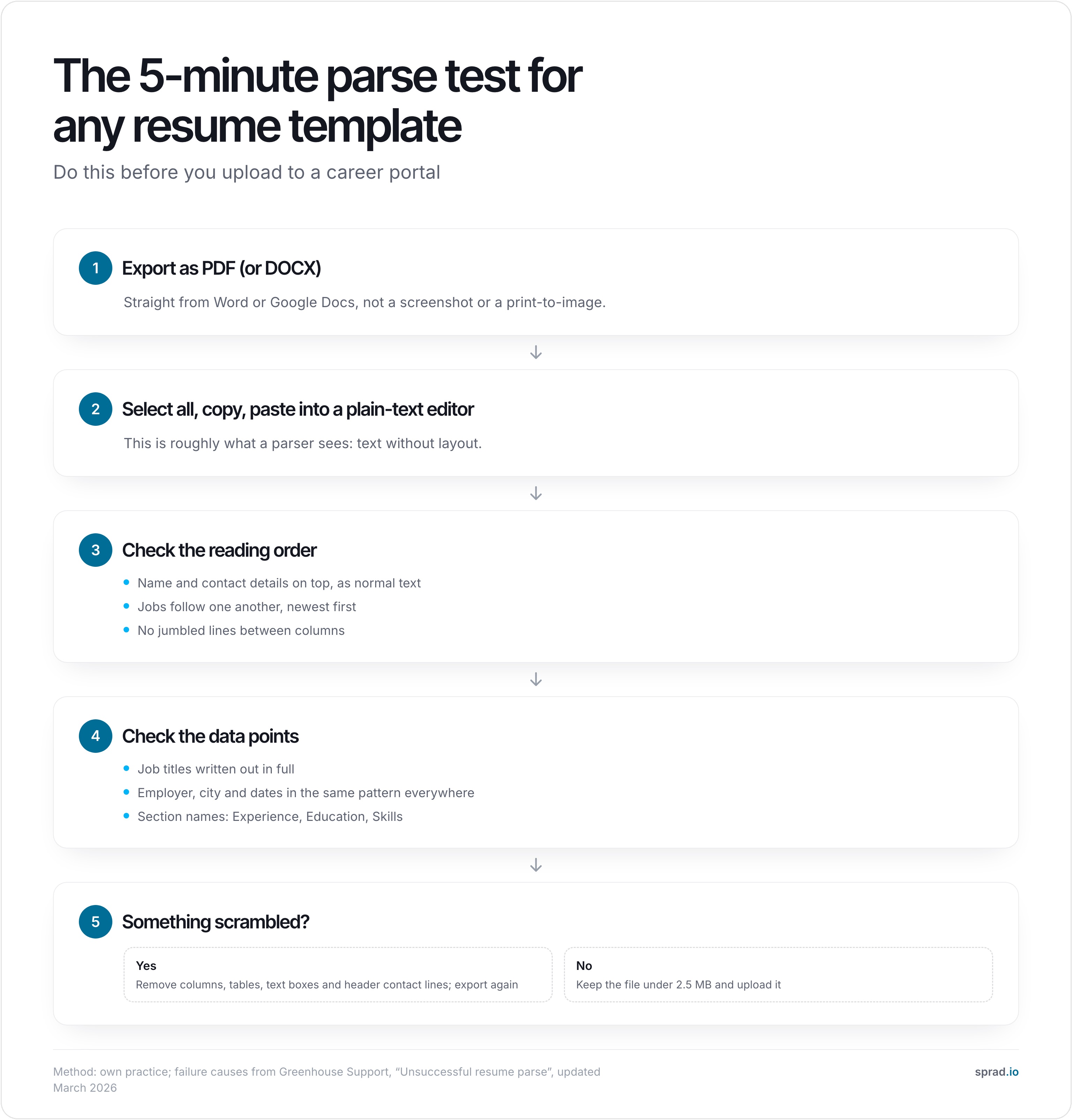
Worked example (constructed to show the effect, not a measurement): a popular two-column template puts "Skills" and "Languages" in a left sidebar and the jobs on the right. Pasted as text it often comes out like this: "Skills Languages Experience Excel English Account Manager 2021–2024 SQL German Northwind Logistics". Skills, languages and a job title now sit in one line. A human sees a clean sidebar; a parser sees noise. The same content in one column pastes as three clean blocks, and that is the version to upload.
Which layout elements help and which hurt?
| Element | Risk | Do instead |
|---|---|---|
| Two columns / sidebar | High: listed as a parse problem by Greenhouse | One column; use bold and spacing for hierarchy |
| Tables and text boxes | High | Plain paragraphs and bullet lists |
| Contact data in header or footer | High | Name and contact in the first lines of the body |
| Photo, icons, skill bars | High for parsing; photo is a regional convention | Icons: none. Skills as words. Photo: see the country section |
| Creative section titles | Medium | Experience, Education, Skills |
| Abbreviated titles ("Sr. Acct Exec") | Medium: named by Greenhouse | Write out the full title |
| Scan or image-PDF | High: unreadable | Export from Word or Docs so the text is selectable |
| Files over 2.5 MB | High at Greenhouse (limit) | Compress images or drop them |
| Bold, italics, normal bullets | Low | Fine, use sparingly |
Which templates and tools help?
You do not need a special "ATS template". You need a simple one and the discipline above. In practice:
- Word or Google Docs, blank or basic template: the safest start; free; full control over the text.
- Europass: the EU's free CV tool at europass.europa.eu is widely recognised in Europe. Export it and run the parse test, as with any template.
- Design tools and builders: fine for people-to-people applications (email, networking), but check the export with the parse test before uploading to a portal.
- AI: see the next section.
If you want to compare AI builders on what is really free, see free AI resume builders in 2026.
How does AI change this?
AI helps with the part templates cannot: the content. A template makes your layout readable; it does not make your resume fit the job. Germany's Federal Employment Agency tells applicants in its "1x1 der Bewerbungsunterlagen" (2025) to send application documents as one PDF, not DOCX or JPEG, with a plain file name and up to 5 MB. That covers format. Fit still means tailoring the text to each ad, which is slow to do by hand. How to do it with AI, step by step, is in how to tailor your CV with AI.
Atlas Career (atlas.now) is built for this part. It is a free AI career agent that searches 1.5M+ active jobs from employers' career sites, shows a match score with reasons for each role, and writes a tailored CV for each application and a cover letter on request, with no limits. The language and format follow the ad (a photo is common in German applications, not in US ones). You review everything, download the PDF and apply directly to the employer. Atlas does not send anything for you. It is not a template gallery, so treat the PDF like any other export: run the 5-minute test on it.

Try Atlas Career for free. It is EU-hosted, GDPR-compliant and built by Sprad in Vienna.
Which mistakes should I avoid?
- Trusting a pretty template. Many marketplace templates are made to look good in a preview, not to paste cleanly.
- Keyword stuffing. Pasting the whole ad into a hidden white-text block is easy to spot and reads as gaming the system. List real skills in the Skills section and in your bullets.
- One resume for every job. The ad's wording for titles and tools should appear in your text where it is true.
- Different date formats and abbreviations in each job. Consistency is what lets the parser fill the right fields.
- Exporting from a design tool as an image-PDF. Select a word in your PDF. If you cannot, a parser cannot either.
- Forgetting the file name. "Maria-Keller-Resume.pdf" instead of "final_v7.pdf".
DACH, UK and US: what differs?
The parser rules are the same everywhere. What differs is convention. In the US and UK, a photo, date of birth and marital status are not included. In Germany, Austria and Switzerland a photo is still common, though optional, and the tabular CV with the newest entry first is the norm. Keep the photo out if the employer's portal does not ask for it, and keep the two-column look out in every country. The employer's own upload instructions beat any general rule.
Sources checked October 2026: Greenhouse Support, Workday documentation, Federal Employment Agency, EU AI Act, Europass.
FAQ
Which resume format is best for ATS: PDF or Word?
A text-based PDF and DOCX both work with the major systems. Choose DOCX if the employer asks for it, otherwise a PDF exported from Word or Google Docs. Never use a scan or an image. In Germany the Federal Employment Agency recommends PDF for application documents.
Are two-column resumes bad for ATS?
They are a known risk: Greenhouse lists a columned layout among causes of a failed parse. A single column costs you nothing and removes the risk.
Should I use a resume template from Word or Canva?
A basic Word or Google Docs template is the safest. Design-tool templates can work, but export them and run the 5-minute parse test before uploading.
Does an ATS automatically reject resumes?
We found no vendor documentation promising an automatic rejection based on resume text. Parsing failures hurt in a different way: your data does not land in the right fields, so recruiters may not find you. Employers can also set screening questions in the application form, so answer those honestly.
How long should an ATS-friendly resume be?
One to two pages. The Federal Employment Agency's regional guidance for Germany also advises a maximum of two pages with the newest entry first. Longer files are not a parsing problem, but a file size above 2.5 MB can be.
Can I use AI to write an ATS-friendly resume?
Yes, for the content: tailoring wording and bullets to each ad. Check the facts yourself, then export and test the file. Atlas Career writes a tailored CV per job for free; the layout test stays your job.
Jürgen Ulbrich
Jürgen Ulbrich has more than a decade of experience in developing and leading high-performing teams and companies. As an expert in employee referral programs as well as feedback and performance processes, Jürgen has helped over 100 organizations optimize their talent acquisition and development strategies.