Ashby ATS is usually the better fit for a lean recruiting team that wants native analytics, sourcing, scheduling, and automation in one system. Greenhouse is safer for a larger organization that values standardized interview processes, mature integrations, and enterprise governance. Neither wins by default: compare the complete operating cost and run the same hiring workflow in both demos.
Ashby vs Greenhouse: which should you shortlist?
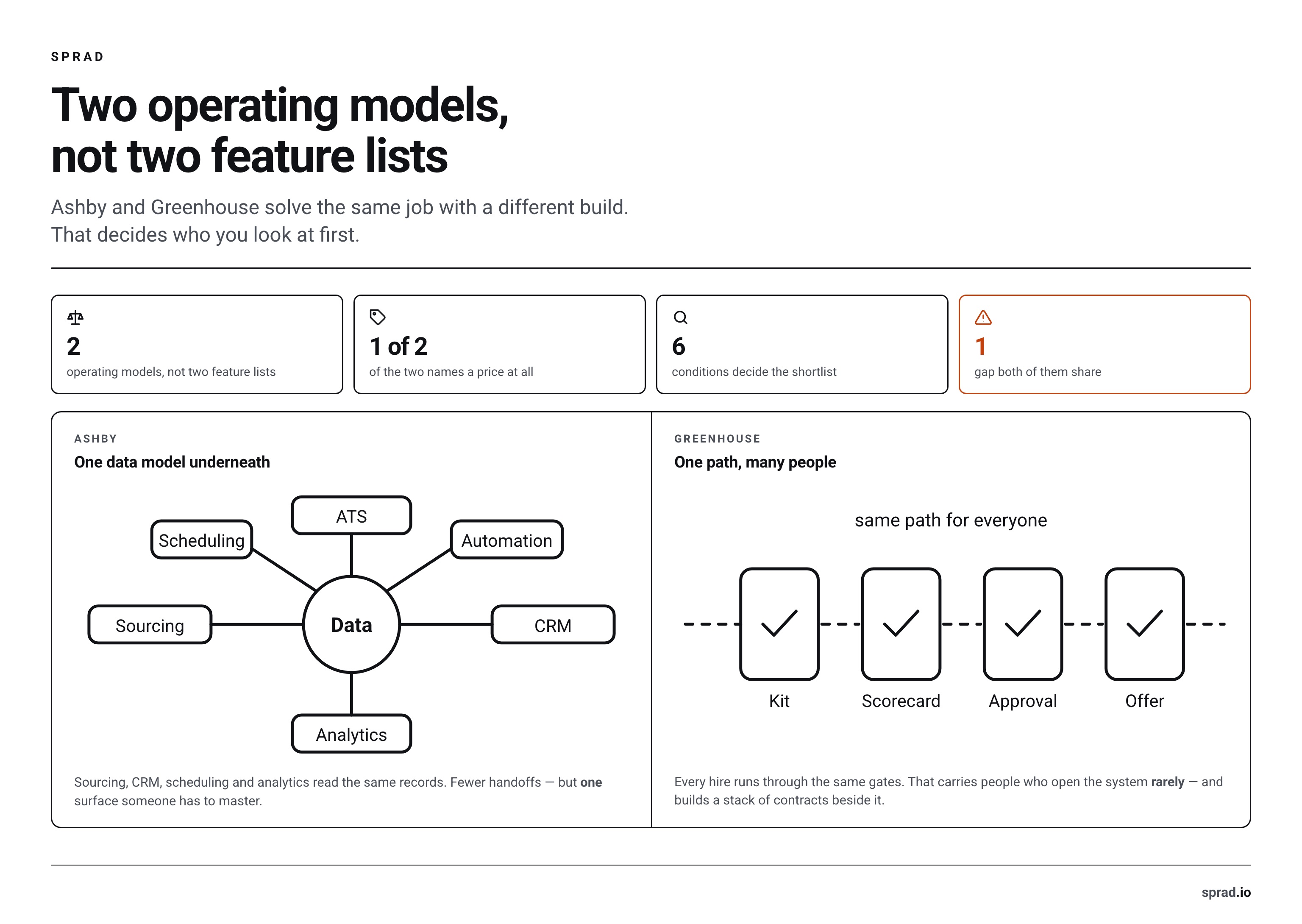
The shortest useful answer is about operating model, not feature count. Choose Ashby when recruiters work in the system all day and want to configure workflows, analyze funnels, source candidates, and schedule interviews without stitching together several products. Choose Greenhouse when many occasional users need a controlled, repeatable process across departments, regions, or business units.
That distinction matters more than whether one vendor has a particular checkbox. Both platforms cover the core ATS jobs: requisitions, applications, interview plans, feedback, offers, reporting, and integrations. The purchasing risk lies in the work around those features. One team may need deep recruiting analytics. Another may need strict approvals, familiar scorecards, and an integration that has already survived enterprise procurement.
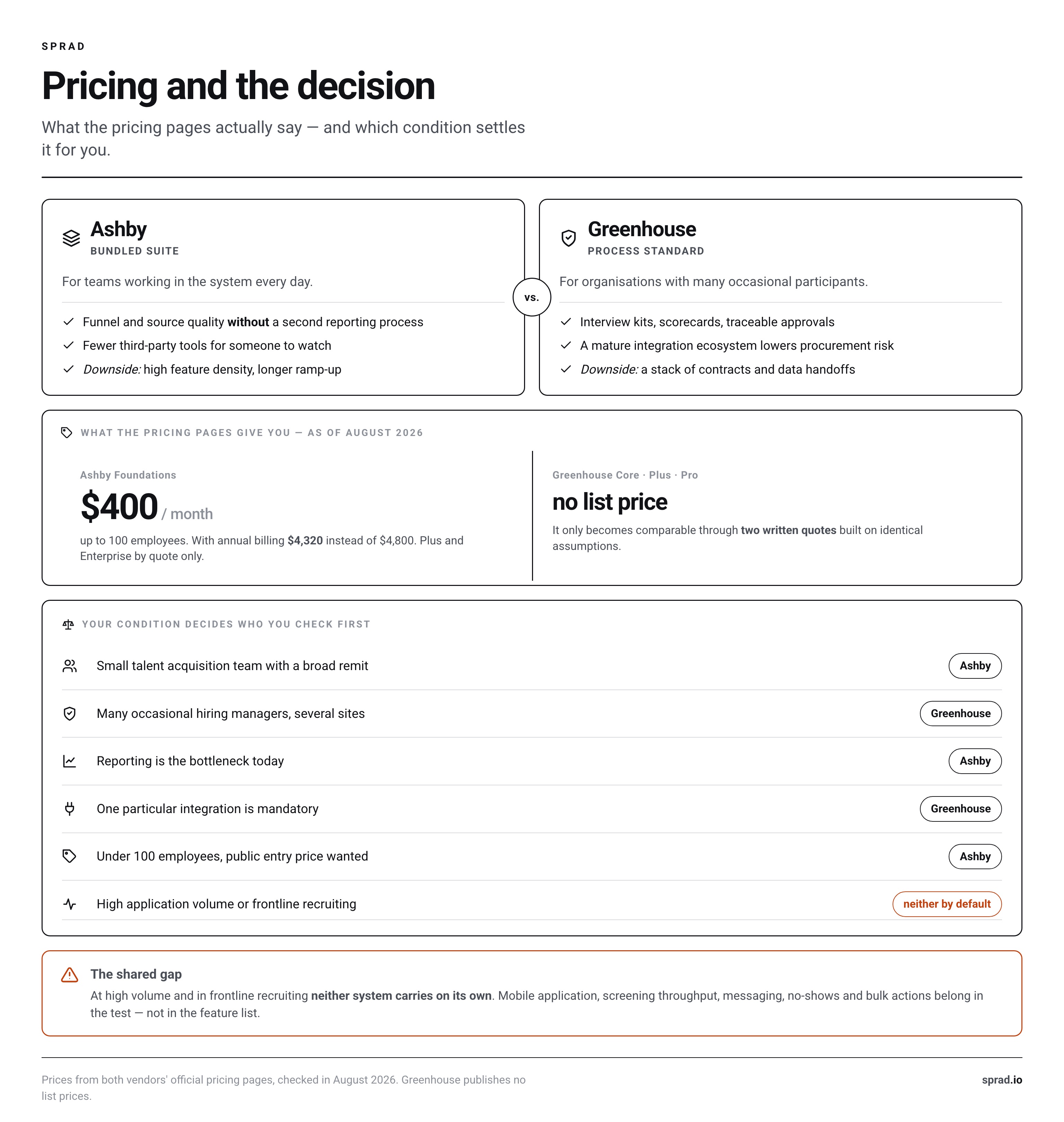
| Your deciding condition | Shortlist first | What to prove in the demo |
|---|---|---|
| Lean Talent Acquisition team, broad responsibilities | Ashby | How much of sourcing, scheduling, CRM, and reporting can replace existing tools |
| Complex company with many occasional Hiring Managers | Greenhouse | How permissions, approvals, scorecards, and reminders work for infrequent users |
| Reporting is the current bottleneck | Ashby | Build one real funnel and one source-quality report from your own sample data |
| Integration coverage is non-negotiable | Greenhouse | Verify each critical connector, field mapping, sync direction, and support owner |
| Under 100 employees and wants a public entry price | Ashby | Confirm plan limits, add-ons, implementation, and renewal terms |
| High-volume or frontline hiring is the main use case | Neither automatically | Test mobile application, screening throughput, messaging, no-show handling, and bulk actions |
If your team has not yet agreed on what an ATS should own, start with an applicant tracking system comparison. A polished demo cannot resolve an unclear system boundary.
How does Ashby pricing compare with Greenhouse pricing?
Pricing status: August 2026. Ashby is transparent only at the smallest tier. Its official pricing page lists Foundations at $400 per month for companies with up to 100 employees and offers a 10% discount for annual commitments. That equals $4,800 on monthly billing or $4,320 after the stated annual discount, before taxes and any paid extras.
Ashby Plus, aimed at companies with 101 to 1,000 employees, has no public amount. Ashby says the quote depends on company size, usage, and commitment. Enterprise, for organizations above 1,000 employees, is also quote-based. Advanced Scheduling, AI Notetaker, extra sourcing email lookups, and some other capabilities appear as add-ons or plan-dependent features. Confirm them line by line instead of treating “all-in-one” as “everything included.”
Greenhouse publishes Core, Plus, and Pro plans but no list prices. It says pricing depends on the plan, hiring volume, organizational complexity, and required capabilities. Core focuses on structured hiring. Plus adds more automation, configuration, and reporting. Pro adds enterprise governance, security, analytics, and extensibility. Therefore, a credible Greenhouse vs Ashby price comparison requires two written quotes based on the same assumptions.
| Cost item to normalize | Ashby | Greenhouse | Question for both vendors |
|---|---|---|---|
| Platform subscription | $400/month for Foundations up to 100 employees; larger plans custom | Custom for Core, Plus, and Pro | What changes the price at renewal? |
| Implementation and migration | Confirm scope in quote | Confirm scope in quote | Which historical records, attachments, and audit data are included? |
| Recruiter and admin access | Confirm paid-seat logic for your plan | Confirm licensed-user logic | Which occasional users are free or limited? |
| Sourcing and CRM | Broadly integrated into the suite; limits and lookups vary | Available by plan and configuration | Are contact data, sequences, and enrichment included? |
| Scheduling, texting, and AI | Some advanced capabilities may be add-ons | Availability varies by tier | Which usage caps or credits apply? |
| External tools retained | Potentially fewer, but prove replacement | Potentially more, depending on stack | Which current contracts can actually be cancelled? |
Calculate three numbers: first-year cash cost, steady-state annual cost, and cost at the headcount you expect in two years. Add implementation, data cleanup, internal project time, integrations, job distribution, e-signature, sourcing data, texting, BI, and specialist screening. Subtract only tools you have verified can be retired. This avoids the most common Ashby pricing error: comparing one platform fee with an entire Greenhouse-based stack, or comparing Greenhouse alone with an Ashby bundle that still needs outside services.
Where is Ashby ATS stronger in daily recruiting work?
Ashby’s strongest case is consolidation around the recruiter. ATS, CRM and sourcing workflows, scheduling, automation, and analytics share one data model. That can remove exports and handoffs. A lean team can answer questions about source quality, conversion, interviewer load, or pipeline health without maintaining a separate reporting process.
The advantage becomes meaningful when the team will use it. Ask a recruiter to build an automation, change an interview plan, create a sourcing project, and diagnose a stalled funnel during the demo. Do not let the vendor operator perform every task. The buyer needs to see whether an internal administrator can maintain the system after launch.
Ashby tends to fit these conditions:
- Recruiters need detailed funnel analysis and custom reporting frequently.
- Sourcing and nurture activity should live close to applicant records.
- A small operations team wants fewer integrations to monitor.
- Scheduling complexity consumes meaningful coordinator time.
- The company is willing to redesign workflows instead of copying its old ATS exactly.
The trade-off is density. Powerful configuration can create a learning curve. A sophisticated report builder is not valuable if only one person understands the underlying definitions. Establish metric ownership, naming conventions, and change control before administrators start building. The distinction between an AI-first ATS and traditional ATS with added AI also deserves a workflow test, not a branding judgment.
Where does Greenhouse beat Ashby?
Greenhouse’s strongest case is process institutionalization. It is built around structured interview plans, interview kits, scorecards, approvals, and repeatable collaboration. This is useful when a company must get hundreds of Hiring Managers and interviewers to follow one operating standard, even though many of them enter the ATS only occasionally.
Its mature integration ecosystem can also lower procurement risk. That does not mean every connector is complete. “Integrated” may mean a one-way status update, a partner-maintained app, or a custom implementation. For every critical system, document the objects, fields, trigger timing, error handling, and party responsible for support.
Greenhouse tends to fit these conditions:
- Interview consistency and auditable approvals matter more than maximum recruiter flexibility.
- The company already has trusted sourcing, scheduling, or analytics tools.
- Hiring spans multiple brands, regions, or tightly governed business units.
- Many users know Greenhouse and adoption risk matters.
- A specific integration is mandatory and demonstrably deeper in its ecosystem.
The trade-off is that a mature ecosystem can become a stack of contracts and data handoffs. Reporting that looks adequate in a standard demo may still require exports for your exact operating questions. Build two reports live: time in stage by department, and source quality through an agreed downstream milestone. If either needs offline repair, include that work in the purchase decision.
Where are both systems weak?
Neither platform should be assumed to solve every recruiting motion simply because it is an ATS. Core systems are good at recording candidates and coordinating process. They may not be the best interface for every acquisition or assessment channel.
- High-volume screening: A flood of similar applications needs fast triage, transparent criteria, and quality controls. Test actual reviewer throughput, not only AI labels.
- Frontline conversion: Candidates may respond by phone or messaging rather than email. Application and scheduling flows must work on a small screen with little friction.
- Talent rediscovery: Search quality depends on clean, current historical data. A large database is not automatically a usable Talent Pool.
- Interview evidence: Notes, transcripts, scorecards, consent, and retention need one coherent policy. A notetaker alone does not create better decisions.
- Candidate experience: Internal workflow power does not guarantee a fast application, clear status communication, or a useful candidate portal.
Specialist products can complement either ATS. For example, Sprad can be considered alongside other options for CV screening, People Search, voice interviews, or a candidate portal. The buying principle is simple: keep the ATS as system of record, then add a specialist layer only where it improves a measured bottleneck. Verify how screening results integrate with the ATS before creating another isolated data store.
What is the best Ashby alternative for your reason to switch?
“Ashby alternative” is not one category. The right shortlist depends on what made Ashby unsuitable.
- You want stronger enterprise process control: Start with Greenhouse. Also assess SmartRecruiters or iCIMS when global governance and a broad enterprise ecosystem dominate.
- You want a simpler ATS for a small team: Review Workable, Recruitee, Teamtailor, or Breezy HR. Compare limits and total annual cost rather than starting price alone.
- You want a DACH-centered HR suite: Review Personio or softgarden where local workflows, German-language support, and adjacent HR processes matter.
- You mainly want recruiting CRM and outbound sourcing: Compare Lever and dedicated CRM or sourcing tools. You may not need to replace the whole ATS.
- You mainly want better screening or rediscovery: Keep the current ATS and test a specialist layer first. Replacement has much higher migration and adoption risk.
Do not put ten products into a feature matrix. Select three based on your dominant failure mode. Then use the same scorecard, data sample, users, and tasks. Our broader ATS selection checklist for 2026 helps turn requirements into testable scenarios.
What should DACH buyers verify before signing?
Candidate data is employment-related personal data. In Germany, Section 26 of the Federal Data Protection Act governs processing for employment-related purposes. Your legal basis, transparency information, access controls, deletion concept, and processor agreements therefore belong in the evaluation before a pilot imports real profiles.
Ashby states that it stores and processes data in the United States and offers a data processing agreement with standard contractual clauses as well as support for a transfer impact assessment. Greenhouse also provides contractual privacy documentation. For either vendor, your privacy team should verify the current contracting entity, storage and support locations, subprocessors, transfer mechanism, deletion behavior, backups, and response to data-subject requests. A “GDPR compliant” badge is not a substitute for this review.
Include the works council early when configuration affects monitoring, automated recommendations, interview recording, or employee behavior. Define who may see diversity data, interview notes, compensation, and source history. Test deletion and export with a sample candidate. Ask what remains in analytics after anonymization. These practical checks reveal more than a security slide.
How do you compare both systems in a 60-minute demo?
Send both vendors the same script and sample data in advance. Allocate no more than ten minutes to the standard presentation. Use the rest for buyer-operated tasks.
- Create one requisition with an approval, two departments, and a structured interview plan.
- Import a prospect, add consent information, and move the person into an active process.
- Review twenty sample applications and apply the same screening rule in bulk.
- Schedule a panel interview, handle one cancellation, and replace one interviewer.
- Collect a late scorecard, enforce feedback visibility, and run a debrief.
- Build a source-quality report and explain every metric definition.
- Export and delete the sample candidate, including attachments and activity history.
Score task completion, clicks, administrator intervention, missing data, and follow-up promises. Record every “available through a partner” item separately. Before committing, plan the cutover with a guide to switching ATS without losing candidates. Migration quality often matters more than a marginal feature advantage.
Final recommendation: Ashby or Greenhouse?
Choose Ashby if your recruiting organization is lean, analytically demanding, and ready to consolidate ATS, CRM, sourcing, scheduling, and automation. Its public Foundations price also gives sub-100-person companies a clearer starting point. Demand a detailed quote once you move beyond that tier.
Choose Greenhouse if structured hiring, broad integration coverage, governance, and adoption among many occasional users are the larger risks. Demand a fully itemized proposal because no public list price anchors the comparison.
Choose neither if your main problem is low applicant volume, weak employer positioning, frontline response, or one narrow screening bottleneck. An ATS replacement cannot fix a funnel problem outside the ATS. Define the constraint first, test it with real work, and buy the smallest system change that resolves it.
Frequently asked questions
Is Ashby ATS cheaper than Greenhouse?
Not necessarily. As of August 2026, Ashby publishes $400 per month for Foundations up to 100 employees. Larger Ashby plans and all Greenhouse tiers require quotes. Compare like-for-like scope, add-ons, implementation, retained tools, and renewal assumptions.
Is Ashby a full ATS?
Yes. Ashby combines applicant tracking with CRM and sourcing workflows, scheduling, analytics, and automation. Some advanced capabilities, usage, or add-ons vary by plan, so validate the exact contracted package.
Is Greenhouse better for enterprise hiring?
It can be. Greenhouse is compelling where structured interviews, governance, a mature integration ecosystem, and many occasional users matter. Ashby also sells an Enterprise plan, so test your specific controls instead of deciding by company size alone.
What is the strongest Ashby alternative?
Greenhouse is the closest direct shortlist for many structured hiring teams. Personio or softgarden may suit DACH-centered requirements. Workable, Recruitee, or Teamtailor may suit simpler teams. A specialist tool may be better when only screening, sourcing, or rediscovery is broken.
Can we use Ashby or Greenhouse under GDPR?
Both vendors offer privacy and contractual mechanisms, but the customer remains responsible for its processing. Review the DPA, transfers, subprocessors, retention, access, deletion, and actual configuration with privacy counsel and, where relevant, the works council.
Jürgen Ulbrich
Jürgen Ulbrich has more than a decade of experience in developing and leading high-performing teams and companies. As an expert in employee referral programs as well as feedback and performance processes, Jürgen has helped over 100 organizations optimize their talent acquisition and development strategies.