The best Facebook job ads for hourly roles lead with the pay, use the Leads objective with a short instant form, and run under Meta's "Employment" special ad category, which locks age, gender and ZIP code. Because you cannot filter by demographics, your copy, location radius and application route do the targeting. Budget per role, reply to applicants within minutes and judge results by cost per applicant, then cost per interview. As of October 2026.
What changed: why the old Facebook hiring advice no longer works
Many guides still tell you to target by age, gender or interests. For job ads that has not worked since Meta introduced the Employment special ad category (December 2021 for advertisers targeting Europe; earlier in the US and Canada). Anyone who promotes a job has to declare the category, and Meta detects job ads automatically if you do not.
Inside the category, you get this:
- Age 18 to 65+ and all genders, fixed.
- Location only as a radius of at least 15 miles (about 25 km), no ZIP or postcode targeting, no excluded areas.
- No lookalike audiences, detailed demographic and behavior targeting removed, a limited list of interests.
- Still available: the location radius, Meta's broader Advantage+ audience expansion, and custom audiences from your own data if Meta treats them as eligible for employment ads.
This is a real limit and no setting works around it. The consequence is useful, though: an ad that names the role, the hourly rate, the shift and the town filters its own audience. The people who answer are those who would take that job. Check the scope for your country in Ads Manager when you build the campaign; Meta's rules differ by region and change.
The 2026 playbook in eight steps
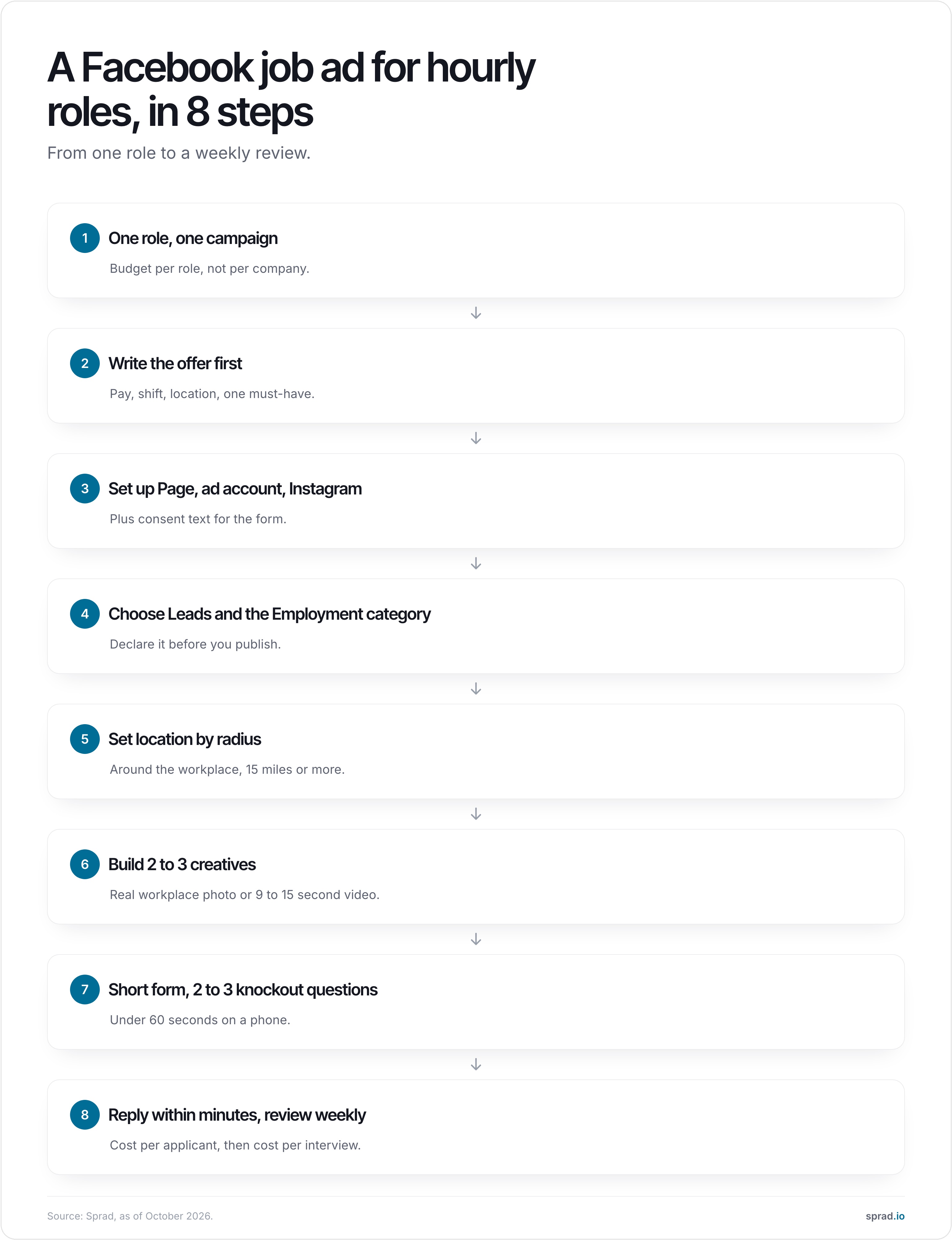
1. One role, one campaign
Set the budget per role, not per company. A campaign for "all positions" gives Meta no signal and gives candidates no reason to click. If you hire for warehouse pickers and forklift drivers, run two campaigns.
2. Write the offer before the ad
Write down the hourly rate, the shift pattern, the location and one must-have (a licence, a certificate, a minimum age). These four facts are the ad. "Competitive pay" loses to "$19 an hour, Monday to Friday, 6 am start".
3. Set up Page, ad account and Instagram
You need a Facebook Page, an ad account in Meta Business Suite and ideally a linked Instagram account, so the same ad reaches both feeds. If you collect applications in a form, add a consent text; for EU candidates this falls under GDPR (this is not legal advice).
4. Choose the Leads objective and the Employment category
For hourly roles, the Leads objective with an instant form is the usual starting point. Declare the Employment category before you publish. Boosting a post is not a substitute: boosted posts skip the category and the form, and tend to produce poor hiring results.
5. Set the location as a radius around the workplace
Use 15 to 25 miles for most hourly roles and go wider for drivers or travelling crews. Keep placements on automatic so the ad runs in the Facebook feed, Instagram feed, Reels and Stories.
6. Build two or three creatives
Use a real photo of the workplace or team, not stock images, or a vertical video of 9 to 15 seconds with captions. Put the pay in the headline and as text on the image. Use a clear button such as "Apply now" instead of "Learn more".
7. Keep the form short
| Form element | Recommendation |
|---|---|
| Length | under 60 seconds on a phone |
| Fields | name, mobile number, 2 to 3 knockout questions |
| Questions | legal requirements first (licence, right to work, shift availability), not preferences |
| Not in the form | resume upload, cover letter, long free-text answers |
Each extra question costs completions. For frontline roles the phone is the better channel than email; see frontline recruiting by phone and WhatsApp, not email.
8. Reply within minutes and review weekly
An automatic text within minutes keeps the applicant, because hourly candidates apply to several employers at once. Review weekly and refresh the creative every two to three weeks, once frequency and cost per applicant climb.
What it costs: benchmarks by role
A US benchmark gives the size of the numbers. Boostpoint's 2026 analysis of 891 campaigns found a median of $13.88 per applicant, with a volume-weighted average of $8.02. The spread by role is large.
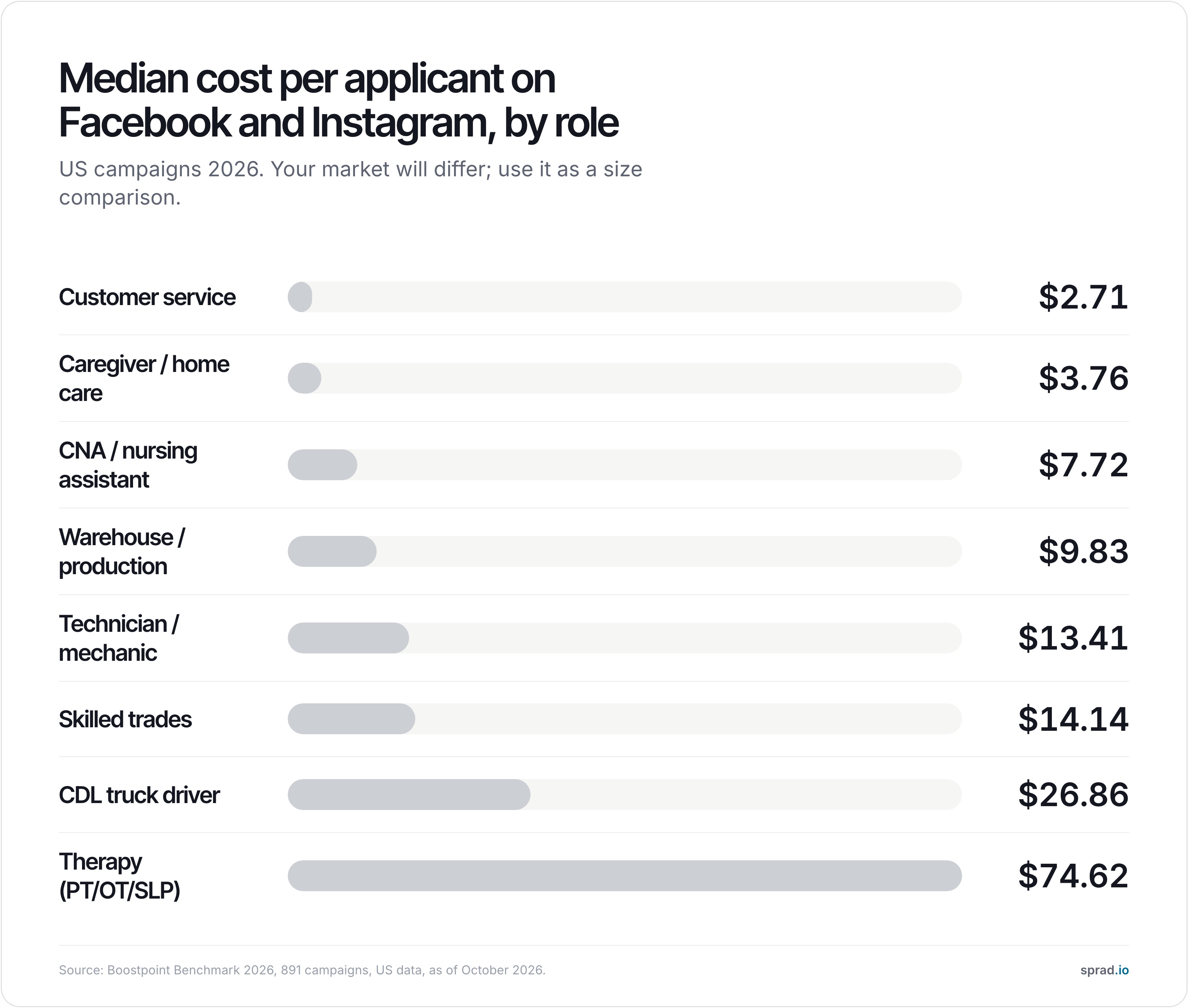
Worked example: with a $1,000 budget a warehouse role at $9.83 yields roughly 100 applicants, a CDL driver role at $26.86 roughly 37. Five roles at $1,000 each cost $5,000 in ad spend. With Sprad Social Recruiting a 10 % fee is added on the ad budget, so €1,100 for a €1,000 budget and €5,500 for five. These are US medians, not a promise for your market.
The number that moves the cost most: apply rate
The same study found that application completion explained about 70 % of the variation in cost per applicant, against 18 % for what the ad auction charged. In other words, a better ad and a shorter form beat a bigger budget.
| Apply rate | Cost per applicant | Share of budget | Share of applicants |
|---|---|---|---|
| under 5 % | $53.77 | 18 % | 3 % |
| 5 to 10 % | $23.13 | 24 % | 8 % |
| 10 to 20 % | $11.11 | 32 % | 23 % |
| 20 to 35 % | $4.41 | 21 % | 38 % |
| over 35 % | $1.61 | 6 % | 28 % |
Source: Boostpoint Benchmark 2026, US data. Campaigns with an apply rate under 5 % took 18 % of the budget and produced 3 % of the applicants.
Sample ad copy for an hourly role
Warehouse associate, Columbus: $19 an hour
Day shift, Monday to Friday, 6 am start, overtime paid. Forklift licence helpful, not required. Apply in under a minute from your phone.
This is an invented sample. Pay comes first, the shift is described as a weekly shape, and one clear must-have appears. Swap in your own numbers.
Five knockout questions for the form
- Are you legally allowed to work in this country?
- Can you work the shift shown (for example 6 am to 2:30 pm)?
- Do you live within reach of the site, or have a way to get there?
- Do you hold the required licence or certificate (if the role needs one)?
- When could you start?
Keep to legal and practical requirements. Questions about preferences cost completions and add little. For more on screening, see why blue-collar screening differs from white-collar screening.
Mistakes that make Facebook job ads expensive
- Trying to force age or ZIP targeting. It is blocked, and old advice that promises it is out of date.
- Boosting a post instead of building a campaign.
- Leaving out the pay figure, or writing "competitive pay".
- One campaign for every open role.
- A long form with a resume upload.
- Answering applicants after a day instead of after minutes.
- Stopping after two weeks, then starting again from zero.
For roles with fluctuating volume, such as logistics and production, also read recruiting in logistics and production at volume.
Where Facebook job ads stop: the applicant pile
A working campaign creates a new problem: dozens of applicants who each need a call. And when the campaign ends, most platforms keep the audience and you keep a spreadsheet. If every application lands in your own pool, the next ad starts with people you already reached.
The route with pre-screening: Sprad Social Recruiting
Sprad Social Recruiting runs job ads on Instagram and Facebook where frontline workers spend time every day. An AI talent agent pre-screens every applicant by WhatsApp, phone or web, and every applicant lands in your own talent pool, so the contacts stay with you rather than a platform. You pay the ad budget plus 10 %, from a €1,000 budget that can be split across roles; three months is the recommended run. There is no guarantee of applicants. Details: Sprad Social Recruiting.
FAQ
How much do Facebook job ads cost?
You set the budget; a few dollars a day is technically enough. A US benchmark puts the median at $13.88 per applicant, from $2.71 for customer service to $74.62 for therapy roles. Plan at least a few weeks of data before you judge a campaign.
Can I target by age or gender on Facebook job ads?
No. Under the Employment special ad category age is fixed at 18 to 65+ and all genders are included. Location works only as a radius of at least 15 miles, and ZIP codes cannot be used.
Is posting a job on my Facebook Page enough?
For an urgent hire, usually not. A Page post reaches mostly your followers. A paid campaign reaches people who are not searching for a job but would take yours.
Do Facebook job ads work for hourly and frontline roles?
Yes, they are one of the main channels for them, because the audience is on the platform daily and applies from the phone. The result depends mostly on the offer in the ad and how short the application is.
What is the best objective for Facebook job ads?
For hourly roles the Leads objective with an instant form is the usual starting point, because it removes a click to a website. If you need richer answers, send people to a short landing page and compare both against cost per interview.
How fast should I reply to applicants?
Within minutes. An automatic text right after submission, followed by a call or WhatsApp message the same day, keeps applicants from accepting another offer first.
More on social recruiting
Jürgen Ulbrich
Jürgen Ulbrich has more than a decade of experience in developing and leading high-performing teams and companies. As an expert in employee referral programs as well as feedback and performance processes, Jürgen has helped over 100 organizations optimize their talent acquisition and development strategies.