To recruit on Instagram, you run paid job ads in Feed, Stories and Reels that send people to a short application, and you back them with a few organic posts that show the workplace. Organic posts alone rarely reach beyond your followers, so paid placements do the work. Declare the Employment ad category where Meta requires it, keep applying under two minutes, and judge the campaign by qualified applicants per euro, not by clicks.
Why Instagram works for frontline and shift roles
Nurses, electricians, drivers and warehouse staff do not search job boards on a Tuesday morning. They scroll Instagram on the way home, between shifts and on the sofa. Instagram has more than two billion monthly users, so most of your future colleagues are already there. A job ad meets them while they are not looking, which is exactly the point: you reach the people who would switch for the right offer but would never type "jobs near me".
It works less well for roles where candidates search by keyword and expect a long job description, such as senior engineering or niche executive roles. For those, a search-based channel still wins. Our guide on frontline recruiting by phone and WhatsApp explains why the reply channel matters just as much as the ad.
Job ads, Stories or Reels: which format does what
| Format | Best for | What to show | Watch out for |
|---|---|---|---|
| Feed ad (image or carousel) | clear job facts, broad reach | role, location, pay or shift, one real photo of the team | stock photos, too much text on the image |
| Stories ad (9:16) | fast, mobile, one tap to apply | one sentence, one benefit, one button | important text hidden behind the top and bottom bars |
| Reels ad (video, 15 to 30 seconds) | showing the workplace and a real person | a day on the job, a colleague saying why they stay | polished corporate video that feels like an advert |
| Organic post or Reel | employer brand, trust, answers to "what is it like?" | behind the scenes, new hires, small wins | expecting applicants without any paid reach |
Run the same message in Feed and Stories first. Add Reels once you know which promise (pay, schedule, team) gets responses. Two or three variants are enough to learn something; ten variants split a small budget too thin.
How to run a job ad on Instagram, step by step
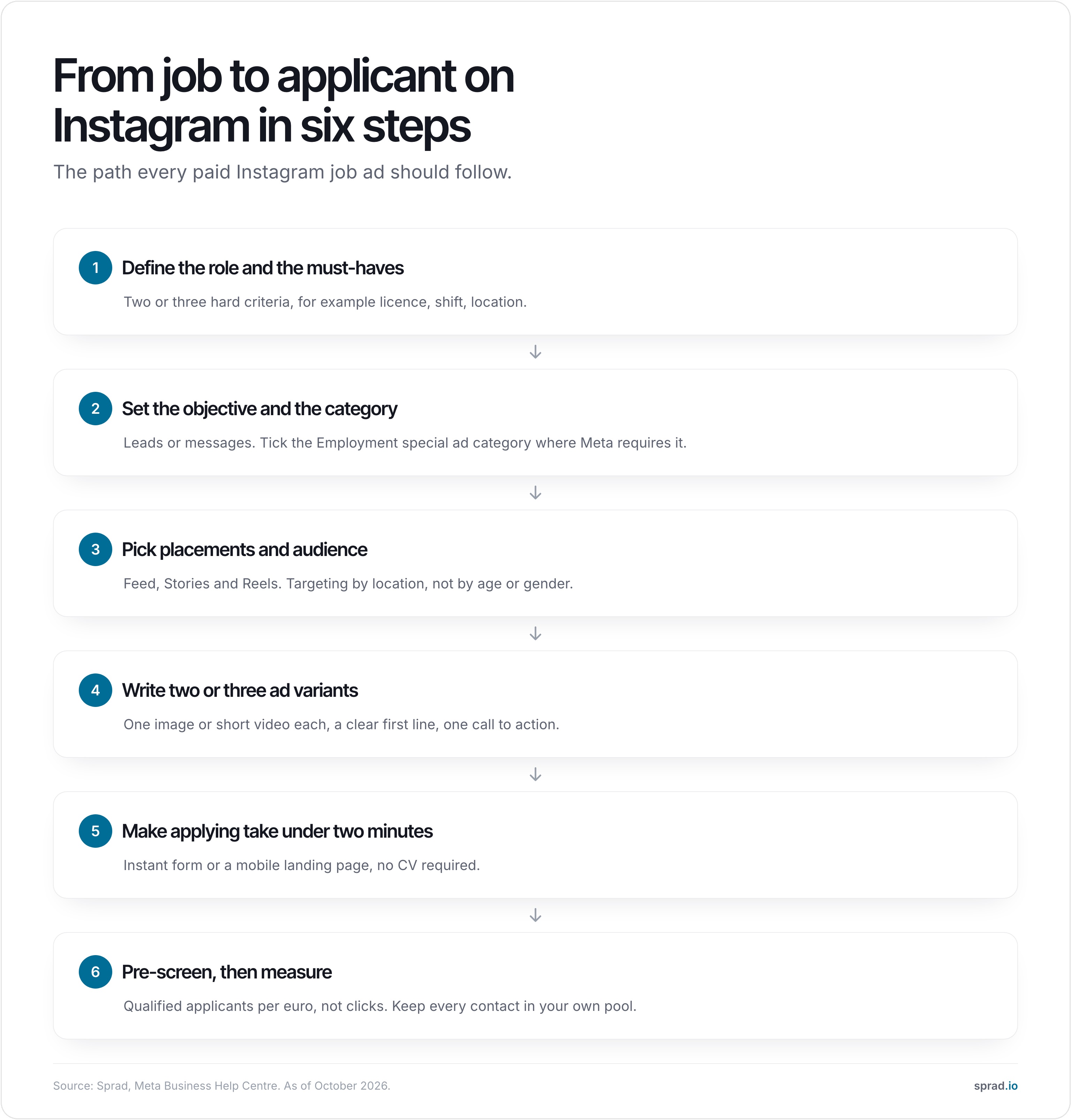
1. Define the role and the must-haves
Write down two or three criteria that decide whether someone can start: a licence, a shift model, a location, a start date. These become your ad promise and later your screening questions. If you cannot name them, the ad will attract everyone and fit no one.
2. Choose the objective and declare the category
In Meta Ads Manager, pick a lead or messages objective, not "traffic". Then check the special ad category. In the US, Canada and parts of Europe, ads for employment must be declared as the Employment special ad category, and Meta then restricts targeting: age and gender cannot be used to narrow the audience, lookalike audiences and detailed targeting that relates to protected groups are not available, and location targeting is limited. The exact rules depend on where you advertise and where the audience is, so read Meta's page on audiences for credit, employment and housing campaigns before you build the audience. Do not try to work around the category: ads that hide their purpose are rejected, and discrimination in job ads is illegal in the US and in the EU anyway.
3. Pick placements and the audience
Start with automatic placements limited to Instagram Feed, Stories and Reels, or run Instagram and Facebook together if your audience spans both. Target by region and radius around the workplace. Let the creative do the filtering: a Reel with a night shift in a care home speaks to the right people better than any interest setting.
4. Write the ad
The first line carries the ad. Put role, place and the one thing that matters to this audience in it. Short, plain, concrete.
- Headline: "Warehouse operator, early shift, Leeds, £14.20 per hour."
- Body: two lines on what the day looks like and what you offer; one line on how to apply.
- Call to action: "Apply now" or "Send message", never "Learn more".
Use real people from the team where possible. Do not promise things you cannot keep, and show pay when you can: it filters out mismatches before they cost you time.
5. Make applying take under two minutes
Most applicants drop out between the tap and the finished application. Use an Instagram or Facebook instant form with three to five fields, or a mobile landing page that works on a small screen and needs no CV and no account. Ask for name, phone number and the one or two must-haves. A CV can wait until the person has shown interest.
6. Pre-screen, then measure
A lead is not a candidate. Within minutes, ask the must-have questions by message or phone, ideally automatically, and separate people who fit from people who do not. Track three numbers: cost per lead, share of leads that pass pre-screening, and cost per qualified applicant. The last one is the only number that tells you whether the campaign works. For context, one US benchmark from Boostpoint puts the median cost per applicant at $13.88 (2026), but a cheap applicant who does not fit is still expensive.
Common mistakes
- Ads that look like ads. Real photos and plain language beat polished brand video for hourly and shift roles.
- Sending people to the career page. A desktop page with a long form loses most mobile applicants.
- No answer within a day. Candidates from social media apply on impulse and lose interest fast.
- Judging by likes and reach. Neither is an applicant.
- Rented reach only. If every applicant sits in an ad platform or job board, the next vacancy starts at zero again.
- Ignoring the category rules. Using restricted targeting or leaving out the declaration gets ads rejected.
An ad template you can copy
Care assistant (m/f/d), part-time, Manchester
Looking for a job with real colleagues and fixed shifts? We are a 40-bed care home and need two care assistants from November. Pay from £13.80 an hour, shift plan four weeks ahead, paid training. Tap "Apply now": three questions, two minutes, no CV.
Pair it with a vertical 15 second video of a real shift handover and one Stories variant with the same promise. Then compare which variant produces the most qualified applicants.
What does it cost?
You pay Meta for the ad budget, and you pay for whatever creates, runs and screens the campaign. With an agency, a common model is a flat fee per position; with a performance platform it is a package per job and month; with Sprad it is the ad budget plus 10 %. Compare the models on the pricing page and ask every provider who owns the applicant contacts afterwards. A small test needs less than most people expect: a budget of a few hundred euros or pounds over two weeks, split across two variants, is enough to see whether the promise and the form work.
Where Instagram stops and the work begins
An ad produces contacts. The expensive part comes after: calling back, asking the same four questions fifty times, chasing people who do not answer, and storing those who fit but whom you cannot hire today. This is where most campaigns lose their money, and where an own talent pool pays back over several vacancies.
How Sprad handles it
Sprad Social Recruiting runs job ads on Instagram and Facebook, where nurses, tradespeople, drivers and other frontline workers spend time every day. An AI talent agent pre-screens every applicant via WhatsApp, phone or web. Every applicant lands in your own talent pool, so the relationships stay with you instead of a platform. Pricing is ad spend plus 10 %, from a €1,000 budget that can be split across roles. Google and TikTok follow. See Sprad Social Recruiting for the details.
FAQ
Can you post a job ad on Instagram for free?
Yes, as a normal post, Reel or Story from your company account. It is free but reaches mainly your followers. To reach people who do not follow you, you need a paid ad.
Do I need a Facebook page to advertise on Instagram?
Meta Ads Manager runs both platforms, and you manage your account through a Meta business account. Connect your Instagram professional account to it so ads show your company name and profile.
What is the Employment special ad category?
It is a category you must select in Meta Ads Manager for job ads in the regions where Meta requires it. It limits targeting by age, gender and some interests to prevent discrimination. Check Meta's current rules for your country before you plan the audience.
How much does recruiting on Instagram cost?
The ad budget is yours to set. A test with two ad variants over two weeks can run on a few hundred euros or pounds. Total cost also includes creative work and the time spent screening applicants.
Are Reels better than Stories for recruiting?
Reels suit showing the workplace and a real colleague. Stories suit a quick promise with one button. Test both with the same message and let qualified applicants per euro decide.
How fast should I answer applicants from Instagram?
Within hours, not days. People who apply on impulse move on quickly, which is why automatic pre-screening by message or phone pays off.
More on social recruiting
Jürgen Ulbrich
Jürgen Ulbrich has more than a decade of experience in developing and leading high-performing teams and companies. As an expert in employee referral programs as well as feedback and performance processes, Jürgen has helped over 100 organizations optimize their talent acquisition and development strategies.