WhatsApp recruiting means letting candidates apply by message and pre-screening them in the same chat: they tap a button or scan a QR code, answer five to eight short questions, and only the people who meet your must-haves reach a recruiter. For more than a handful of applicants use the official WhatsApp Business Platform through a provider, not a private phone, ask for consent in the first message, and store the data in your ATS or talent pool under a clear retention period.
Why employers offer WhatsApp applications
People who work shifts, drive, nurse or build do not own a polished CV and rarely sit at a desk. They do have WhatsApp. A WhatsApp application removes the three barriers that cost the most candidates: finding the right page, uploading a document, and waiting for an answer. In an OMR guide, 93 % of users say they can imagine talking to companies on WhatsApp. The vendor Recruitee reports open rates of 90 to 98 % for WhatsApp against 20 to 25 % for email and a case study where a dropout rate fell from about 60 % to close to zero. Treat these as vendor figures, but the direction matches what recruiters see in volume hiring.
The same logic is why we recommend phone and messaging over email for frontline roles, as explained in frontline recruiting by phone and WhatsApp. If you only want to contact candidates you already know, read whether contacting candidates on WhatsApp is allowed first.
Three ways to set it up
| WhatsApp Business App | WhatsApp Business Platform (API) via provider | Integrated with ads and ATS | |
|---|---|---|---|
| Best for | a test with one team | many applicants, several recruiters | campaigns that bring applicants at scale |
| Who answers | a person on one phone | automation plus people, shared inbox | AI pre-screening, people take over qualified chats |
| Pre-screening | manual, copy and paste | automated question flow | automated, scored against your must-haves |
| Data | on a phone, personal contacts mixed in | central, can sit in your ATS | talent pool and ATS hand-over |
| Main risk | data on private devices, address book access | provider choice, contract, cost per message | depends on the provider, check before you sign |
The Business App is the free entry point and fine for a pilot. Once several recruiters need the same chats, or you want automatic questions, you need the Business Platform. Meta explains it on its WhatsApp Business Platform page; access runs through approved providers.
How a WhatsApp application works, step by step
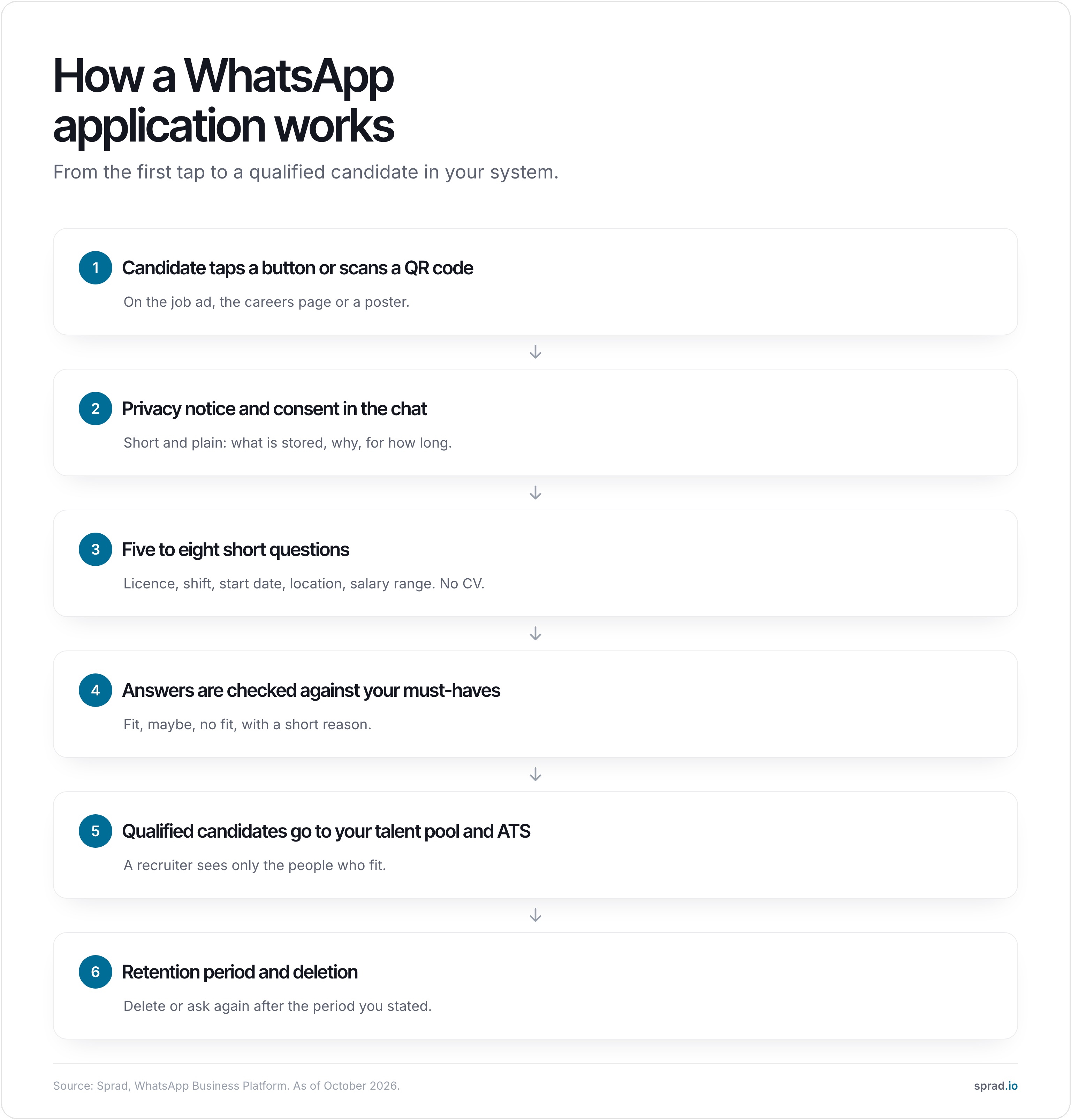
1. Give people a way in
Put an "Apply via WhatsApp" button on the job page, a QR code on vehicles, posters and canteen walls, and a click-to-WhatsApp button in your Instagram and Facebook job ads. The message that opens is pre-filled with the job title so you know what the person applies for.
2. Ask for consent and explain the data use
The first automatic message states who you are, what you will ask, what happens with the answers and how long you keep them. Add a yes button. A template that works:
Hello, thanks for your interest in the warehouse operator role at Example Ltd. I will ask you six short questions, it takes about three minutes. We use your answers only for this application and delete them after six months unless you agree to stay in our talent pool. Details: example.com/privacy. Reply YES to start.
3. Ask five to eight questions, not twenty
Every question should map to a must-have or help you plan the interview. For frontline roles these usually work:
- Do you have the licence or certificate the role needs (for example CDL, NVQ, forklift ticket)?
- Which shifts can you work: early, late, nights, weekends?
- Where do you live, and how do you get to the site?
- When could you start?
- Are you allowed to work in the country (yes or no, no documents in chat)?
- What pay range do you expect?
Do not ask for health data, religion, family plans or age. Keep sensitive documents out of the chat.
4. Check the answers and route the candidate
Sort into three groups: fit, maybe and no fit. A short reason helps the recruiter and makes a polite rejection possible. A person who does not fit today may fit the next vacancy, so ask whether you may keep the contact in your pool.
5. Hand over to your system
Qualified candidates should land in your ATS or talent pool with their answers, not stay in a chat window. Otherwise you have moved the inbox, not solved the problem.
Is it compliant? A checklist for employers
This is a practical overview, not legal advice. In the EU and UK, applicant data falls under the GDPR. In the US, rules on text messaging consent and state privacy laws apply, so check with counsel.
| Question | What to do |
|---|---|
| Legal basis | Processing for the application itself rests on taking steps before a contract; keeping a profile for future roles needs the candidate's consent. |
| Consent in the chat | Ask in the first message, log the yes with date and time, and let people withdraw at any time. |
| Information duty | Say who is responsible, what is stored and for how long, and link to the full privacy notice. |
| Business App or API | Avoid running applicant data through a personal phone. Use the Business Platform via a provider and keep data in a central system. |
| Provider contract | Sign a data processing agreement with the provider and check where data is stored and which sub-processors are used. |
| Messages outside 24 hours | WhatsApp allows free-form replies within 24 hours of the candidate's last message; later messages need an approved template and a valid opt-in. |
| Retention | Set a period (many employers choose about six months after a rejection) and delete or ask again afterwards. |
| Automation | Decisions about people stay with a human. Tell candidates when an AI assistant asks the questions. |
Common mistakes
- Using a private number. The chats, the contacts and the risk all sit on one phone.
- Twenty questions in a row. Completion falls with every extra question.
- No consent step. You cannot add it afterwards.
- Chat with no hand-over. Candidates who live only in WhatsApp are lost when the recruiter leaves.
- Silence after the answers. Reply the same day, even if it is a no.
What it costs
The Business App is free. The Business Platform charges per message category, and providers add platform fees; prices change, so ask for the current rate card. The larger cost is the time spent on chats, which is why automatic pre-screening matters more than the message price. If you also buy the ad traffic, add the ad budget on top. For comparison: Sprad charges ad budget plus 10 %, from a €1,000 budget, see the pricing page.
How Sprad combines ads and WhatsApp pre-screening
Sprad Social Recruiting runs job ads on Instagram and Facebook, where nurses, tradespeople, drivers and other frontline workers spend time every day. An AI talent agent pre-screens every applicant via WhatsApp, phone or web. Every applicant lands in the employer's own talent pool, so the relationships stay with the employer instead of a platform. Pricing is ad spend plus 10 %, from a €1,000 budget that can be split across roles. Google and TikTok follow. Learn more on the Sprad Social Recruiting page or see how the talent pool keeps candidates for the next role.
FAQ
Can candidates apply via WhatsApp?
Yes. They tap a button or scan a QR code, a chat opens, and they answer a few questions. No CV is needed at this stage.
Is WhatsApp recruiting GDPR compliant?
It can be, if you ask for consent, inform candidates, sign a processing agreement with your provider, avoid private phones and set a retention period. Without these steps it is not.
Do I need the WhatsApp Business API?
Not for a pilot. For automation, several recruiters on the same chats or a link to your ATS, yes, through an approved provider.
Can I message candidates first?
Only with a valid opt-in and an approved message template. Cold messaging to people who never agreed is not allowed under WhatsApp's policy and may breach privacy and marketing law.
Which roles suit WhatsApp applications?
Shift, driving, care, trades, retail and hospitality roles, where applicants use a phone all day and rarely own a polished CV.
How long can I keep candidate chats?
Only as long as you stated. Many employers delete about six months after a rejection and keep longer only with the candidate's consent.
More on social recruiting
Jürgen Ulbrich
Jürgen Ulbrich has more than a decade of experience in developing and leading high-performing teams and companies. As an expert in employee referral programs as well as feedback and performance processes, Jürgen has helped over 100 organizations optimize their talent acquisition and development strategies.